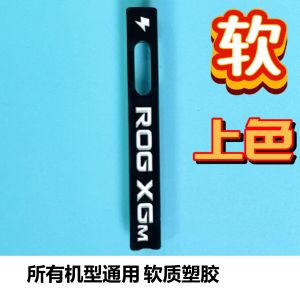
ROG XG Dedicated Dust Plug Anti-Dust Cover Soft Rubber Flip Version Graphics Card Dock Universal Soft Silicone for Gaming
ROG XG Dedicated Dust Plug Anti-Dust Cover Soft Rubber Flip Version Graphics Card Dock Universal Soft Silicone for Gaming
What is the ROG XG Dedicated Dust Plug Anti-Dust Cover?
The ROG XG Dedicated Dust Plug Anti-Dust Cover is a specially designed, universal dust cover for gaming graphics cards. Crafted from soft silicone rubber, this anti-dust cover is perfect for protecting your graphics card dock from dust and other debris, ensuring optimal performance and longevity.
Key Features of the ROG XG Dust Cover
- Soft Rubber Flip Version: The soft rubber flip version provides a snug fit for your graphics card, ensuring a secure and protective seal against dust and other contaminants.
- Universal Dock for Gaming: This dust cover is compatible with a wide range of graphics cards, making it a versatile solution for gamers looking to protect their investment.
- Dedicated Dust Cover for Gaming: Specifically designed for gaming, this dust cover provides peace of mind, knowing that your graphics card is protected from dust and other potential hazards.
Benefits of Using the ROG XG Dust Cover
Using the ROG XG Dedicated Dust Plug Anti-Dust Cover offers numerous benefits for gamers, including:
- Improved Performance: By keeping dust and debris away from your graphics card, this dust cover helps maintain optimal performance, ensuring your gaming experience remains smooth and uninterrupted.
- Longevity: Protecting your graphics card from dust and other contaminants extends its lifespan, saving you money in the long run.
- Peace of Mind: Knowing that your graphics card is protected from dust and other potential hazards provides peace of mind, allowing you to focus on what matters most – gaming!
How to Install the ROG XG Dedicated Dust Cover
Installing the ROG XG Dedicated Dust Plug Anti-Dust Cover is a simple process that can be completed in just a few steps.
Preparing for Installation
Before installing the dust cover, ensure that your graphics card is clean and free of any debris. This will help ensure a proper seal and prevent any potential issues during installation.
Step-by-Step Installation Guide
- Carefully remove the dust cover from its packaging.
- Align the dust cover with your graphics card dock.
- Press the dust cover firmly onto the graphics card dock, ensuring a secure fit.
Tips for Successful Installation
- Make sure your graphics card is clean and free of debris before installing the dust cover.
- Take your time during installation to ensure a proper fit.
- If the dust cover does not fit properly, consult the manufacturer's instructions for troubleshooting.
Maintaining the ROG XG Dedicated Dust Cover
To ensure the longevity and effectiveness of your ROG XG Dedicated Dust Plug Anti-Dust Cover, regular maintenance is essential.
Cleaning the ROG XG Dust Cover
Cleaning your dust cover is simple – simply remove it from your graphics card dock and wipe it down with a soft, lint-free cloth. If necessary, you can also use a mild cleaning solution to remove any stubborn debris.
Troubleshooting Common Issues
If you encounter any issues with your dust cover, consult the manufacturer's instructions for troubleshooting. Common issues may include a poor fit or difficulty removing the dust cover from your graphics card dock.
Extending the Lifespan of the ROG XG Dust Cover
To extend the lifespan of your ROG XG Dedicated Dust Plug Anti-Dust Cover, follow these tips:
- Regularly clean your dust cover to maintain its effectiveness.
- Store your dust cover in a cool, dry place when not in use.
- Avoid exposing your dust cover to extreme temperatures or harsh chemicals.
Frequently Asked Questions About the ROG XG Dedicated Dust Cover
Does the ROG XG Dust Cover Fit All Graphics Cards?
The ROG XG Dedicated Dust Plug Anti-Dust Cover is designed to be compatible with a wide range of graphics cards, but compatibility may vary depending on the specific model. Check the manufacturer's instructions for compatibility information.
Is the ROG XG Dust Cover Easy to Install?
Yes, the ROG XG Dedicated Dust Plug Anti-Dust Cover is designed for easy installation. Simply align the dust cover with your graphics card dock and press it firmly into place.
Can I Use the ROG XG Dust Cover With Other Components?
While the ROG XG Dedicated Dust Plug Anti-Dust Cover is specifically designed for graphics cards, it may be compatible with other components. Check the manufacturer's instructions for compatibility information.

TAO Children Fun
Review

You May Also Like

Computer Set Amd A6-7480 fm2+ 16gb ram 240gb ssd Onboard 19"wide led monitor led keyboard mouse headset
500GB Suitable for Desktop Computer 3.5\" Built-In Mechanical Hard Disk SATA 3Gb/s-6Gb/s HDD 5900-7200RPM 64MB/128MB Buffer
1080P PC Computer HDTV to VGA Video Converter VGA Male to HDTV Male Adapter for Laptop Top Box Monitor Projector
KUAIQU DC Power Supply 30V 10AAdjustable Switching Regulated DC Bench Power Supply12V 24V 48V 60V 120V Intelligent Battery Charging US Pug
YUWO 5Pcs Motherboard CPU Socket Protection Cover Pin Cover For LGA115X CPU
LCD Screen TTL LVDS Controller VGA 2AV 50PIN for AT070TN90 AT070TN92 AT070TN94 Driver Board Universal
Lenovo Gaming Laptop Intel Core i7 10510U Laptop RAM12/16GB SSD 256GB/512GB/1TB Play Valorant GTA V Support 180 Degree Folding 15.6inch Warranty 2 Year
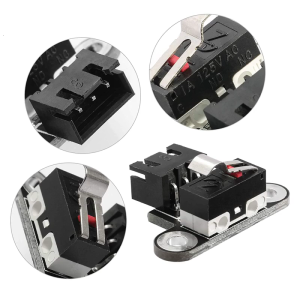
Mini Vertical Mechanical Limit Switch Endstop Touched Stroke Re-set Switch for 3D Printer DIY Motherboards Accessory
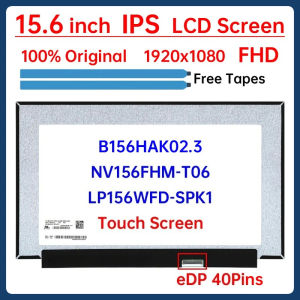
15.6" IPS Laptop LCD Touch Screen B156HAK02.3 NV156FHM-T06 LP156WFD-SPK1 Display Matrix Panel Replacement 1920x1080 eDP 40 Pins
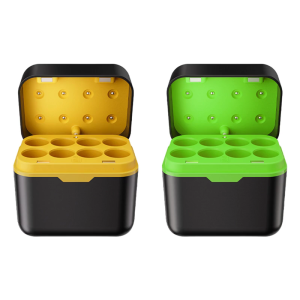
1.5V Li Box With Overcharge Protections for Electronics Toy Household Devices Power Supply
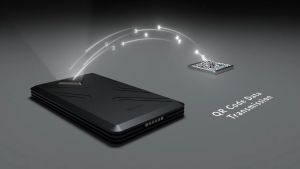
ELLIPAL Titan 2.0 Crypto Cold Wallet Hardware Wallet 100% offline Air-gapped - The Most Secure Crypto Wallet for 10000+ Coins & Tokens & NFTs