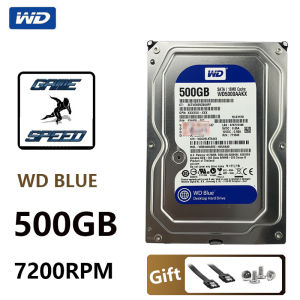
500GB Suitable for Desktop Computer 3.5\" Built-In Mechanical Hard Disk SATA 3Gb/s-6Gb/s HDD 5900-7200RPM 64MB/128MB Buffer
500GB Suitable for Desktop Computer 3.5" Built-In Mechanical Hard Disk SATA 3Gb/s-6Gb/s HDD 5900-7200RPM 64MB/128MB Buffer
Understanding the 500GB Built-In Mechanical Hard Disk
Key Features: 3.5 Inches & SATA 3Gb/s-6Gb/s Interface
The 500GB built-in mechanical hard disk is a reliable storage solution for desktop computers, offering a 3.5-inch form factor and SATA 3Gb/s-6Gb/s interface. This configuration ensures compatibility with various desktop models and delivers fast data transfer speeds. Additionally, the hard disk boasts a cache capacity of 8MB, which enhances its performance and responsiveness.
High-Speed Performance: 5900-7200RPM & 64MB/128MB Buffer
The 500GB built-in mechanical hard disk operates at a speed of 7200 RPM, providing excellent read and write speeds. It also comes with a buffer capacity of either 64MB or 128MB, depending on the specific model. This buffer capacity helps to improve the hard disk's overall performance and efficiency.
Choosing the Right Hard Disk for Your Desktop Computer
Evaluating Your Storage Needs: Capacity & Speed
When selecting a hard disk for your desktop computer, consider your storage needs and desired performance. The 500GB capacity is ideal for users who require ample space for their files, applications, and media. Additionally, the 5900-7200RPM speed range ensures fast data access and transfer rates, enhancing your computing experience.
Comparing Different Hard Drive Models: Features & Compatibility
It's essential to compare different hard drive models to find the best fit for your desktop computer. Consider factors such as capacity, speed, buffer size, and compatibility with your system. The 500GB built-in mechanical hard disk with SATA 3Gb/s-6Gb/s interface is compatible with most desktop computers and offers a balance of performance and storage capacity.
Installing & Configuring Your New Hard Disk
Step-by-Step Installation Guide: From Unboxing to Setup
Installing a new hard disk is a straightforward process. Follow these steps to set up your 500GB built-in mechanical hard disk:
- Unbox the hard disk and inspect it for any visible damage.
- Connect the SATA data cable to the hard disk and the motherboard.
- Connect the power cable to the hard disk and the power supply unit.
- Secure the hard disk to the desktop computer case using screws.
- Power on the computer and enter the BIOS settings.
- Configure the hard disk as a secondary or primary drive, depending on your system setup.
- Install the operating system and necessary drivers.
Optimizing Performance: BIOS Settings & Software Configuration
To optimize the performance of your new hard disk, adjust the BIOS settings and software configuration. In the BIOS, set the hard disk as a secondary or primary drive and enable AHCI mode for improved data transfer rates. Additionally, install the latest firmware updates and drivers to ensure optimal performance.
Maintaining & Troubleshooting Your Hard Disk
Regular Maintenance Tips: Cleaning & Backup Strategies
Regular maintenance is crucial to keep your hard disk running smoothly. Follow these tips to maintain your 500GB built-in mechanical hard disk:
- Keep the desktop computer clean and free from dust.
- Regularly back up important files and data to prevent loss.
- Monitor the hard disk's temperature to avoid overheating.
Common Issues & Solutions: Error Messages & Data Recovery
If you encounter issues with your hard disk, such as error messages or data loss, take the following steps:
- Check the hard disk's connection cables and power supply.
- Run a hard disk utility to check for errors and repair them.
- Use data recovery software to recover lost files and data.
In conclusion, the 500GB built-in mechanical hard disk is an excellent storage solution for desktop computers. With its high-speed performance, ample capacity, and compatibility with various systems, it offers a reliable and efficient storage option for users. By following the installation, configuration, maintenance, and troubleshooting guidelines, you can maximize the performance and longevity of your new hard disk.

Childhood paper plane
Review
You May Also Like
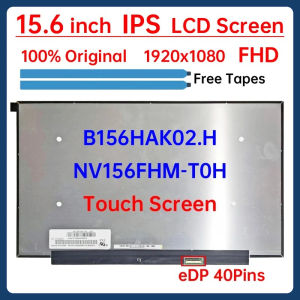
15.6 Inch Laptop LCD Touch Screen NV156FHM T0H NV156FHM-T0H B156HAK02.H Display Matrix Panel Replacement 1920x1080 eDP 40 Pins
For HP Server Power Supply ML370 G2 G3 216068-002 230993-001 EPS115 500W
AM4 CPU Air Cooler 6 Heatpipes PC Processor Tower Cooling fan for Intel LGA 2011 X79 X99 1700 1366 1200 115X AM5 AM3 ventilador
SPI I2C Compatible MAX31856 Temperatures Sensorings Module Supporting Thermocouples
Xiaomi Redmi Gaming Monitor G24 23.8 inch 165Hz Fast IPS Full HD HDR10 120%sRGB 8 bit Low Blue Light
ADDA AD0824HB-A70GL 8025 24V 0.16A 8CM Converter Cooling Fan 80x80x25mm
Circuitrocks Temperature & Humidity Capacitive Digital AM2301 DHT21 Sensor Circuitrock Am2301 Sensor De Humedad - Lazada
Lexar NS100 128GB 2.5" SATA SSD Up to 550MB/s read transfer write speeds lower

NEW 15.6 144Hz Laptop LCD LM156LF2F01 For ASUS FX505 FX506 FX507 FX571 FA506 G512 G513 G531 FHD Display 40pins
3PCS Efficient 4Pin Cooling Fan for GTX1060 1070 1080 Ensures Stable Prolongs Graphics Life 95CM T128010SU
3.5 Inch LCD Monitor: A Secondary Display for Your PC