ETQ Color Powder for TN263, TN261, TN451 & TN351: A Comprehensive Guide
ETQ Color Powder for TN263, TN261, TN451 & TN351: A Comprehensive Guide
Introduction to ETQ Color Powder
Overview of ETQ Color Powder
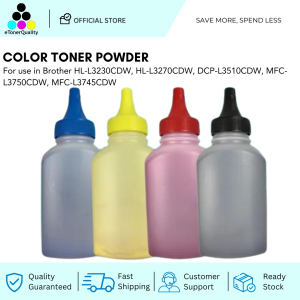
ETQ Color Powder is a high-quality color powder designed specifically for Brother TN series printers, including TN263, TN261, TN451, and TN351 models. This compatible color powder is perfect for e-commerce businesses and individuals looking for a cost-effective printing solution that delivers high-quality output.
Compatible TN Series Printers
The ETQ Color Powder is compatible with the following Brother printer models:
- HL-L3230CDW
- HL-L3270CDW
- DCP-L3510CDW
- MFC-L3750CDW
- MFC-L3745CDW
How to Use ETQ Color Powder
Preparing Your Printer
Before installing the ETQ Color Powder, ensure your printer is powered off and unplugged. Follow these steps to prepare your printer for installation:
- Open the front cover of your printer.
- Remove the existing toner cartridge from its slot.
- Clean the toner cartridge slot using a soft, lint-free cloth.
Installing the Color Powder
Now that your printer is prepared, follow these steps to install the ETQ Color Powder:
- Remove the ETQ Color Powder from its packaging.
- Carefully remove the protective film from the color powder.
- Insert the color powder into the toner cartridge slot, ensuring it clicks into place.
- Close the front cover of your printer.
- Power on your printer and allow it to perform its initial calibration process.
Optimizing Print Quality
To achieve optimal print quality, consider the following tips:
- Regularly clean your printer's rollers and fuser unit to prevent buildup of debris and toner residue.
- Adjust your printer's settings to match the type of paper you're using.
- Ensure your printer's firmware is up-to-date.
Benefits of Using ETQ Color Powder
High-Quality Output
ETQ Color Powder delivers vibrant, high-quality prints that rival those produced by original equipment manufacturer (OEM) toner cartridges. With its superior color accuracy and resolution, you can trust ETQ Color Powder to produce professional-grade prints every time.
Cost-Effective Printing Solution
ETQ Color Powder offers significant cost savings compared to OEM toner cartridges, making it an ideal choice for businesses and individuals looking to reduce printing expenses. With a 250g bottle size, ETQ Color Powder provides ample toner for your printing needs.
Easy to Replace and Maintain
ETQ Color Powder is easy to install and replace, requiring minimal downtime for your printer. Its compact design and user-friendly installation process make it a hassle-free solution for maintaining your Brother TN series printer.
By choosing ETQ Color Powder, you're investing in a reliable, cost-effective printing solution that delivers high-quality output and easy maintenance. Whether you're a small business owner or an individual looking to print at home, ETQ Color Powder is the perfect choice for your Brother TN series printer.

eTonerQuality Reference Number: 250919-16162227
Review

You May Also Like
RF Printing Supplies - 2in1 Dual-Purpose 3/4 inch ID Lace Phone String & Plastic Hook - 1pc-5pcs
OPC Drum DR2355 DR2455 DR2255 Compatible for Brother DCP L2540 L2540DW L2550 L2550DW (Black Gear)
Portable Silicone Case for Error Printing Calculator Cat Cat Machine N2 with Hand Carry Rope Dustproof High Definition Film
Silk Lime Green PLA Filament 1.75 mm 3D Printer Filament Consumables 1kg Spool Bright Neon Green 3D Printing Material FDM Printer Silky Metal Like Shiny Metallic Green PLA Filament CC3D Green Color
Epson Maintenance Boxes: A Comprehensive Guide
original Canon ink (BOX)set GI 790 / GI790 / GI-790 Black or Color ( Black / Cyan / Magenta / Yellow ) : PIXMA G100 / G1010 / G2000 / G2010 / G3000 / G3010 / G4000 / G4010
NefLaca N41 Direct thermal printer Xprinter A6 waybill printer is suitable for thermal labels of various sizes
YCALL Queue Number Printer: A Plug-and-play Que Number System for Ticket Dispenser
Genuine Original ink Btd60 black or Bt5000 cmy colored
Android Handheld POS Machine System 1G+8G Storage Come with NFC 58mm Thermal Printer and Camera for Scan Code Compatible with Retail Restaurant Food Delivery App
Aluminum Alloy 3D Printing Nozzle Wiping Set for Easy Maintenance in Home Studios School and Industrial Environment