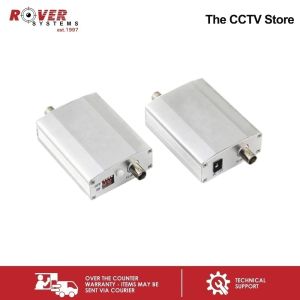
Endura 720P / 960P / 1080P Anti Interference Analog HD Active Transmitter + Receiver (Pair)
Endura 720P / 960P / 1080P Anti Interference Analog HD Active Transmitter + Receiver (Pair)
The Endura EHCA1P010BAI is a high-quality pair of anti-interference analog HD active transmitter and receiver designed to provide high-definition video transmission. This comprehensive guide will walk you through its key features, installation process, performance optimization, and troubleshooting tips.
Understanding the Endura EHCA1P010BAI
Key Features of the Transmitter & Receiver
-
Anti Interference: The Endura EHCA1P010BAI supports video signals from external electromagnetic interference, ensuring a stable and reliable connection.
-
High-Level Integration: The transmitter and receiver are compact in size, making them easy to install and integrate into various systems.
-
SMT Integrated Circuit: Low power consumption, powered by a 12V power supply.
-
Aluminum Alloy Shell: Durable and efficient heat dissipation.
-
Long Transmission Distance: Up to 750 meters.
How It Works: High Definition Video Transmission
The Endura EHCA1P010BAI transmitter and receiver pair work together to transmit high-definition video signals over long distances. By using analog HD technology, the system minimizes interference and provides clear, crisp video quality.
Installation & Setup
Connecting the Transmitter & Receiver
To install the Endura EHCA1P010BAI transmitter and receiver pair, follow these steps:
- Connect the transmitter to your video source using the appropriate cable.
- Connect the receiver to your display device using the appropriate cable.
- Power both the transmitter and receiver using the provided 12V power supply.
Power Supply & Configuration
The Endura EHCA1P010BAI transmitter and receiver pair require a 12V power supply to operate. Ensure that the power supply is properly connected before powering on the devices.
Maximizing Performance
Enhancing Signal Strength & Transmission Distance
To maximize the performance of the Endura EHCA1P010BAI transmitter and receiver pair, consider the following tips:
- Position the transmitter and receiver in a straight line to minimize signal loss.
- Ensure that there are no obstructions between the transmitter and receiver.
- Use high-quality cables to connect the transmitter and receiver to your video source and display device.
Minimizing Interference & Improving Video Quality
To minimize interference and improve video quality, consider the following tips:
- Keep the transmitter and receiver away from sources of electromagnetic interference, such as other electronic devices.
- Use the provided aluminum alloy shell to protect the transmitter and receiver from physical damage.
- Regularly clean the transmitter and receiver to prevent dust buildup, which can affect performance.
Troubleshooting & Maintenance
Common Issues & Solutions
If you encounter any issues with the Endura EHCA1P010BAI transmitter and receiver pair, refer to the following troubleshooting guide:
- No Video Signal: Check that the transmitter and receiver are properly connected to your video source and display device.
- Interference: Move the transmitter and receiver away from sources of electromagnetic interference.
- Poor Video Quality: Clean the transmitter and receiver to remove dust buildup.
Cleaning & Care Tips
To maintain the performance of the Endura EHCA1P010BAI transmitter and receiver pair, follow these cleaning and care tips:
- Regularly clean the transmitter and receiver using a soft, dry cloth.
- Store the transmitter and receiver in a cool, dry place when not in use.
- Avoid exposing the transmitter and receiver to extreme temperatures or humidity levels.
By following these guidelines, you can enjoy the benefits of high-definition video transmission with the Endura EHCA1P010BAI transmitter and receiver pair.

ROVER SYSTEMS
Review

You May Also Like
Xiaomi V380 Pro Mini IP Security Camera: Wireless Connectivity & Voice Call

4DRC RC Drone F11 PRO with ESC 6K Dual Camera Brushless Motor Professional Aerial Photography Super Long Duration RC Quadcopter Auto Return2000M Long Control DistanceSmart Follow

V380 Pro Dual Lens LED Light Bulb CCTV Camera connect cellphone AI Tracking Two Way Audio Night Vision Wireless Camera
V380 Pro 5G Bulb Dual Lens Dual Screen CCTV Camera Connect Cellphone Auto AI Tracking Two Way Audio Color Night Vision Home Outdoor Baby Security Waterproof Camera
Xiaomi | Xiaomi Smart Camera 4K Remote Mobile Monitoring 360° Panoramic Wireless Network Indoor Surveillance Camcorder with AI
1080p Night Vision Wireless CCTV Camera: Connect Cellphone & Two-way Audio
Adjustable 360 Degree Sports Camera Holder Quick Installation Camera Bracket for Car Rearviews Mirrors
V380 PRO 3 Lens 6MP PTZ Wireless CCTV Camera - 4G/WiFi Camera Outdoor Waterproof 2-Way Audio Night Vision

tp-link Tapo C120 Indoor/Outdoor Home Security Wi-Fi Camera | EJDalanon Enterprise
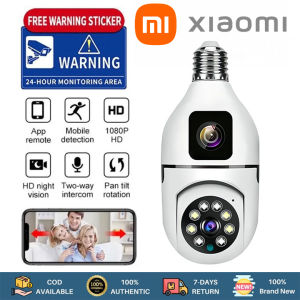
Xiaomi Dual Lens CCTV Camera: A Comprehensive Guide
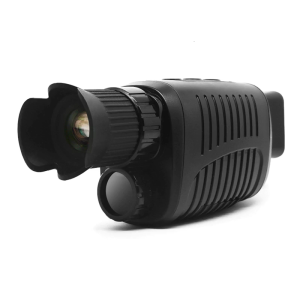
Infrare Night Visibility Monocular 10XZoom for Hunting and Outdoor Observation Up to 500m Detailed Viewing In Dark