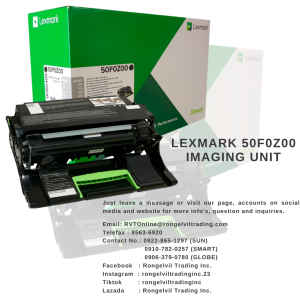
LEXMARK 50F0Z00 Imaging Unit: A High-Quality Replacement Solution
LEXMARK 50F0Z00 Imaging Unit: A High-Quality Replacement Solution
What is an Imaging Unit for LEXMARK Printers?
An imaging unit for LEXMARK printers is a crucial component responsible for transferring toner onto paper to produce printed documents. This unit includes the drum, toner cartridge, and other necessary parts required for the printing process. The imaging unit is designed to work seamlessly with LEXMARK printers, ensuring high-quality prints and optimal performance.
How Does It Work?
The imaging unit works by using an electrostatic charge to attract toner particles onto the paper. First, the drum is charged, creating a latent image of the document to be printed. Then, the toner particles are attracted to the charged areas of the drum, forming the visible image. Finally, the toner is transferred onto the paper, where it is fused permanently through heat and pressure.
Why Is It Important?
A high-quality imaging unit is essential for producing clear, sharp prints and maintaining the overall performance of your LEXMARK printer. By replacing your existing imaging unit with a new LEXMARK 50F0Z00 Imaging Unit, you can enjoy improved print quality, increased reliability, and extended printer life.
Key Features of the LEXMARK 50F0Z00 Imaging Unit
High-Quality Imaging Capabilities
The LEXMARK 50F0Z00 Imaging Unit is designed to deliver exceptional print quality, ensuring crisp, sharp text and vibrant images. This imaging unit is optimized for LEXMARK printers, making it an ideal choice for businesses and individuals who rely on consistent, high-quality printing.
Compatibility with LEXMARK Printers
One of the most significant advantages of the LEXMARK 50F0Z00 Imaging Unit is its compatibility with a wide range of LEXMARK printers. This imaging unit is specifically engineered to work seamlessly with various LEXMARK models, ensuring easy installation and optimal performance.
Long-Term Reliability & Durability
The LEXMARK 50F0Z00 Imaging Unit is built to last, offering long-term reliability and durability. This imaging unit is designed to withstand the rigors of daily use, providing consistent performance and extended printer life.
How to Replace Your Existing Imaging Unit
Replacing your existing imaging unit with a new LEXMARK 50F0Z00 Imaging Unit is a straightforward process that can be completed in just a few steps.
Preparing for Installation
Before replacing your existing imaging unit, ensure that your LEXMARK printer is turned off and unplugged from the power source. This will help prevent any potential damage during the installation process.
Step-by-Step Replacement Process
- Open the front cover of your LEXMARK printer and remove the old imaging unit by gently pulling it out.
- Carefully slide the new LEXMARK 50F0Z00 Imaging Unit into the printer, ensuring it is properly aligned and securely seated.
- Close the front cover of the printer and reconnect the power source.
- Turn on your LEXMARK printer and allow it to initialize the new imaging unit.
Troubleshooting Common Issues
If you encounter any issues during the installation process, consult the LEXMARK printer manual or contact LEXMARK customer support for assistance.
Conclusion & Next Steps
The LEXMARK 50F0Z00 Imaging Unit is a high-quality replacement solution that delivers exceptional print quality, compatibility with LEXMARK printers, and long-term reliability. By replacing your existing imaging unit with the LEXMARK 50F0Z00 Imaging Unit, you can enjoy improved print quality, increased reliability, and extended printer life. If you have any questions or concerns about installing this imaging unit, consult the LEXMARK printer manual or contact LEXMARK customer support for assistance.

Rongelvil Trading Inc.
Review

You May Also Like
Epson Workforce Pro WF-C5390: Chipless Refillable Inks & Borderless Printing

CLI-281 XXL Magenta Ink Cartridge Replacement for Canon 281XXL M Work with Canon PIXMA TR7520 TR8520 TS6320 TS8120 TS8320 TS9120 (2X CLI-281XXL M)
Epson 664 inks for L1300 L200 L220L300 L310 L350 L365 L565 L120 Printer - BK/CY/MG/YW
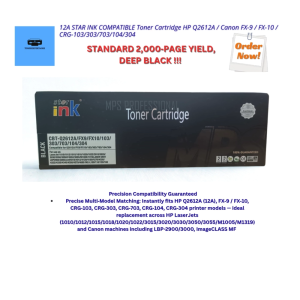
12A STAR INK COMPATIBLE Toner Cartridge HP Q2612A / Canon FX‑9 / FX‑10 / CRG‑103/303/703/104/304
Factory Premium Quality CE285A & CB435A Toner Cartridges for HP LaserJet Printers
3D Printer Tips Nozzle Assembly 3 Piece Set High Temperature Resistant Steel Enhances Durability For AD5X
![Compatible Toner Cartridge TN261 TN-261 TN 261 TN221 TN-221 TN 221 for Brother Color Printer [CMYB]](https://img.lazcdn.com/g/ff/kf/Sc6f9944069184dbd879ea3fc0099981aI.jpg_300x300q80.jpg)
Compatible Toner Cartridge TN261 TN-261 TN 261 TN221 TN-221 TN 221 for Brother Color Printer [CMYB]
OPC Drum DR2355 DR2455 DR2255 Compatible for Brother DCP L2540 L2540DW L2550 L2550DW (Black Gear)
Canon MC-08 Maintenance Tank 1320B006BB: A Comprehensive Guide

Premium 003 Refill Ink – High-Quality Compatible Cartridge Refills
Bundy Clock Ribbon (Amano Bx1500 / BX2000 Yokatta DX-5) Ink Cartridge