



Bluetooth Thermal Receipt Printer 80mm POS Printer: A Comprehensive Guide
Bluetooth Thermal Receipt Printer 80mm POS Printer: A Comprehensive Guide
Introduction to Bluetooth Thermal Receipt Printer
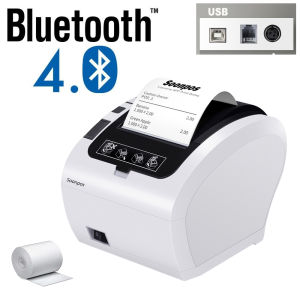
The Bluetooth Thermal Receipt Printer is an indispensable device for businesses looking to streamline their operations and enhance customer experience. With its compact size and versatile connectivity options, this printer is perfect for restaurants, supermarkets, and other retail establishments. This guide will provide an in-depth overview of the Bluetooth Thermal Receipt Printer, including its key features, benefits, compatible systems, installation process, usage, and maintenance.
Key Features & Benefits
The Bluetooth Thermal Receipt Printer offers numerous advantages for businesses of all sizes. Some of its key features include:
-
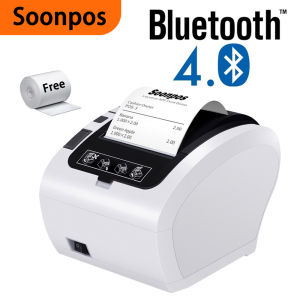
Bluetooth Compatibility: Connects effortlessly to Android devices via popular apps like Loyverse, Kyte, Pozool, Tashop, and SRS Top Up. Although iOS compatibility is currently unavailable, users can still connect to Windows and Mac systems using a USB port.
-
80mm POS Printer: Designed specifically for point-of-sale (POS) systems, this printer delivers high-quality, fast, and accurate receipts.
-
No Ink or Ribbon: Unlike traditional printers, this thermal receipt printer doesn't require ink or ribbon, reducing maintenance costs and minimizing downtime.
-
Auto Cutter and Cash Drawer Support: Equipped with an auto cutter for clean and precise cuts, this printer also supports cash drawer integration, making it ideal for retail environments.
-
Data Storage and Security: With a storage capacity of 256kbytes, this printer ensures that no orders are missed and keeps your data safe.
Compatible Systems & Applications
The Bluetooth Thermal Receipt Printer is compatible with various operating systems and applications, making it easy to integrate into existing workflows. On Android devices, users can connect to popular apps like Loyverse, Kyte, Pozool, Tashop, and SRS Top Up. For Windows and Mac systems, a simple USB connection enables seamless integration.
Installation & Setup
Setting up the Bluetooth Thermal Receipt Printer is straightforward and can be done in just a few steps. This section will cover the process for both countertop and wall-hanging installations, as well as USB connections on Windows and Mac systems.
Countertop & Wall-Hanging Options
The Bluetooth Thermal Receipt Printer offers flexible installation options, allowing users to choose between countertop and wall-hanging configurations. Both setups are designed to optimize space and minimize clutter, making them ideal for busy retail environments.
USB Connection on Windows & Mac
For Windows and Mac users, connecting the printer via USB is a simple process. Simply plug the USB cable into the printer and the corresponding port on your computer. Once connected, the printer will automatically install any necessary drivers, ensuring a smooth setup experience.
Usage & Maintenance
To ensure optimal performance and longevity, it's essential to understand how to use and maintain the Bluetooth Thermal Receipt Printer properly. This section will cover low noise and high-speed printing, auto cutter and cash drawer support, and data storage and security.
Low Noise & High-Speed Printing
The Bluetooth Thermal Receipt Printer is designed to operate quietly, minimizing disruption during busy periods. With its high-speed printing capabilities, this printer can handle even the busiest retail environments, ensuring that customers receive their receipts promptly.
Auto Cutter & Cash Drawer Support
Equipped with an auto cutter, the Bluetooth Thermal Receipt Printer delivers clean and precise cuts, eliminating the need for manual trimming. Additionally, the printer supports cash drawer integration, making it ideal for retail environments where secure transactions are essential.
Data Storage & Security
With a storage capacity of 256kbytes, the Bluetooth Thermal Receipt Printer ensures that no orders are missed and keeps your data safe. This feature is particularly useful during power outages or system crashes, as it allows businesses to recover lost data quickly and efficiently.
In conclusion, the Bluetooth Thermal Receipt Printer is an excellent choice for businesses looking to streamline their operations and enhance customer experience. Its key features, compatibility with various systems and applications, easy installation, and maintenance make it a valuable addition to any retail environment.

Soonpos Store
Review
You May Also Like

For Hp 712 XL 712XL 712B 3ED71A Color Remanufactured Inkjet Ink Cartridge for HP712 for HP Designjet T650 T250 T210 T230 Printer

Epson 003 Genuine Ink: Perfect Fit for L3210, L3150, L5290 & More

OPC Drum Compatible with Kyocera ECOSYS M6035 M6235 M6530 M6535 M6630 M6635 P6035 P6130 P6230 P6235
Compatible Xerox DocuCentre SC2022 for Copier Toner Cartridge DCC2022 DSCC2022N SC-2022NW
3D Printer Idler Drive Gear POM Gear For VORON Btech Extruder Shaft Extrusion Gear Upgraded Filaments Feeding Gear
3D Printer Mini 3d Printer Desktop Printer 3d Printer For Kids Education (JP Plug)100X100X100mm
Original HP GT52 & GT53 Ink Bottles: A Comprehensive Guide
HPee 19A (CF219A) Original LaserJet Imaging Drum
ETQ Compatible Toner Cartridge NPG28 for Canon ir2020 2016 2018 2022 NPG-28
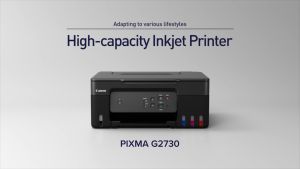
Canon PIXMA G2730 Multifunction Refillable Ink Tank Printer with Low-cost Ink Bottles
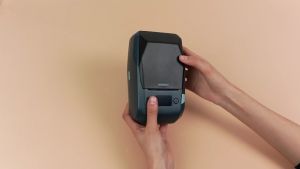
NIIMBOT M2 Thermal Transfer 2Inch Bluetooth Label Maker Smart Printing Sticker Printer Rechargeable for Office Small Business School Home Cable Storage Compatible with Phones & PC



















