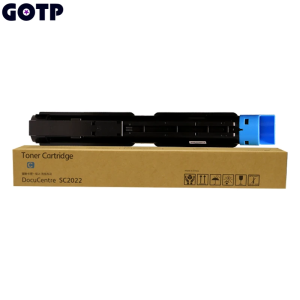
Compatible Xerox DocuCentre SC2022 for Copier Toner Cartridge DCC2022 DSCC2022N SC-2022NW

Hign-concerned Chemical None. Compatible Brand Xerox Toner Cartridge. Model Number SC2022 Toner Cartridge. Bulk Packaging Yes. Cartridge's Status Full. Feature Compatible. Brand Name BOLAIMO. Origin Mainland China. Type Toner Cartridge. For use in DocuCentre SC2022. Quality 100 test. Place of Origin Guangdong, China. Powder filling amount BK: 200g CMY: 200g. Page Yield(A4,5 BK: 10K CMY: 12K. chip ASIA. Color Black Cyan Magenta Yellow. After sales Quality problem 1:1 replacement. Product Informatio. Compatible Brand: Xerox Toner Cartridge. Model: SC2022 Toner cartridge. For use in: DocuCentre SC2022. Powder filling amount: BK: 200g CMY: 200g. Page Yield(A4,5: BK: 10K CMY: 12K. Chip: ASIA. Color: Black. Cyan. Magenta. Yellow. Delivery Time: Large Stock AFTER PAYMENT). Place of Origin Guangdong, China. Quality: The quality is guaranteed after the team test. After sales Quality problem 1:1 replacement

A'BOSS
A'BOSS

Seller ratings 97%

Review

Oops
This video has no reviews.

You May Also Like

L&C Brother BT6000 Black Dye Ink Refill for Compatible Printers
00:30

L&C Brother BT6000 Black Dye Ink Refill for Compatible Printers

ETQ Compatible C9345 Waste Ink Tank Maintenance Box for Epson ET-5800 L15150 L15160 M15140 Printer
00:12

ETQ Compatible C9345 Waste Ink Tank Maintenance Box for Epson ET-5800 L15150 L15160 M15140 Printer

Stainless Steel 3D Printer Detachable Nozzle Hotend Fast Speed Printing Detachable Nozzle For ABS and more Materials
00:20

Stainless Steel 3D Printer Detachable Nozzle Hotend Fast Speed Printing Detachable Nozzle For ABS and more Materials

L&C Refill Ink for Epson 001 Dye Ink Y100 Y200 Y300 Y400 - PH Ready Stock - Compatible with Epson L4150 L4160 L6160 L6170 L6190 Printers - High Quality Ink with Professional Assistance
00:44

L&C Refill Ink for Epson 001 Dye Ink Y100 Y200 Y300 Y400 - PH Ready Stock - Compatible with Epson L4150 L4160 L6160 L6170 L6190 Printers - High Quality Ink with Professional Assistance

32T Gear Compatible With Ricoh MP2014 MP2000 MP1900 MP1600
00:15

32T Gear Compatible With Ricoh MP2014 MP2000 MP1900 MP1600

MNLXM No Pollution Refills: A Comprehensive Guide to 3D Pen Refills & Low Temperature Filament
00:45

MNLXM No Pollution Refills: A Comprehensive Guide to 3D Pen Refills & Low Temperature Filament

12-15mm Inkless Thermal Label Printer Self Adhesive Sticker Labeling Machine Mini Portable Bluetooth P15 Maker with 12*40mm Roll
00:39

12-15mm Inkless Thermal Label Printer Self Adhesive Sticker Labeling Machine Mini Portable Bluetooth P15 Maker with 12*40mm Roll

Portable Mini Thermal Printer: Wirelessly BT & USB Cable Printing
01:01

Portable Mini Thermal Printer: Wirelessly BT & USB Cable Printing

EPSON 664 INK GENUINE 100% ORIGINAL (L360 L3110 L200 L565 L220 L130)\\n\\n Understanding EPSON 664 INK GENUINE\\n\\n What is EPSON 664 INK GENUINE?\\n\\nEPSON 664 INK GENUINE is a high-quality ink cartridge specifically designed for EPSON printers such as L360, L3110, L200, L565, L220, and L130. This ink cartridge guarantees optimal performance and print quality, ensuring your documents and photos look their best.\\n\\n Benefits of using 100% ORIGINAL EPSON INK\\n\\nUsing 100% original EPSON ink provides numerous benefits, including:\\n\\n- **Superior Print Quality**: Original EPSON ink cartridges produce vibrant colors and sharp text, making your prints stand out.\\n- **Reliability**: Genuine EPSON ink cartridges are tested and optimized for EPSON printers, reducing the risk of print errors and ensuring consistent performance.\\n- **Durability**: Original EPSON ink cartridges have a longer lifespan compared to compatible alternatives, providing cost savings over time.\\n\\n Compatible Ink for EPSON Printers\\n\\n Advantages of using compatible ink cartridges\\n\\nWhile original EPSON ink cartridges offer superior print quality and reliability, compatible ink cartridges can be a cost-effective alternative. Some advantages of using compatible ink cartridges include:\\n\\n- **Cost Savings**: Compatible ink cartridges often come at a lower price point, allowing you to save money on printing costs.\\n- **Wide Availability**: Compatible ink cartridges are readily available from various manufacturers, providing more options for consumers.\\n\\n How to choose the right compatible ink for your printer\\n\\nWhen selecting a compatible ink cartridge for your EPSON printer, consider the following factors:\\n\\n- **Compatibility**: Ensure the compatible ink cartridge is specifically designed for your printer model.\\n- **Quality**: Look for reputable manufacturers that prioritize quality and reliability.\\n- **Price**: Compare prices from different manufacturers to find the best value for your budget.\\n\\n Installing EPSON 664 INK GENUINE\\n\\n Step-by-step guide to installing genuine EPSON ink cartridges\\n\\nFollow these steps to install EPSON 664 INK GENUINE in your printer:\\n\\n1. Turn off your printer and open the ink cartridge access door.\\n2. Remove the old ink cartridge by gently pulling it out of its slot.\\n3. Carefully remove the new EPSON 664 INK GENUINE from its packaging.\\n4. Insert the new ink cartridge into its designated slot and close the ink cartridge access door.\\n5. Turn on your printer and allow it to initialize.\\n\\n Troubleshooting common ink installation issues\\n\\nIf you encounter any issues during the ink cartridge installation process, refer to the following troubleshooting tips:\\n\\n- **Print Quality Issues**: If your prints appear faded or blurry, try cleaning the print head or replacing the ink cartridge.\\n- **Ink Cartridge Not Detected**: Ensure the ink cartridge is properly inserted and the ink cartridge access door is closed.\\n\\n Maximizing Printer Performance\\n\\n Best practices for maintaining optimal printer performance\\n\\nTo keep your EPSON printer running smoothly, follow these best practices:\\n\\n- **Regular Maintenance**: Clean the print head and replace the ink cartridges regularly to maintain optimal print quality.\\n- **Proper Storage**: Store ink cartridges in a cool, dry place away from direct sunlight to prevent drying out.\\n- **Software Updates**: Keep your printer software up-to-date to ensure compatibility with the latest ink cartridges and features.\\n\\n Tips for extending the lifespan of your ink cartridges\\n\\nTo extend the lifespan of your EPSON 664 INK GENUINE, consider the following tips:\\n\\n- **Use the Right Paper**: Using high-quality paper can help prevent ink smudging and bleeding, reducing the amount of ink used.\\n- **Print in Draft Mode**: Printing in draft mode can reduce ink usage, extending the lifespan of your ink cartridges.\\n- **Store Ink Cartridges Properly**: Storing ink cartridges in a cool, dry place can help prevent drying out and extend their lifespan.\"
00:28

EPSON 664 INK GENUINE 100% ORIGINAL (L360 L3110 L200 L565 L220 L130)\\n\\n Understanding EPSON 664 INK GENUINE\\n\\n What is EPSON 664 INK GENUINE?\\n\\nEPSON 664 INK GENUINE is a high-quality ink cartridge specifically designed for EPSON printers such as L360, L3110, L200, L565, L220, and L130. This ink cartridge guarantees optimal performance and print quality, ensuring your documents and photos look their best.\\n\\n Benefits of using 100% ORIGINAL EPSON INK\\n\\nUsing 100% original EPSON ink provides numerous benefits, including:\\n\\n- **Superior Print Quality**: Original EPSON ink cartridges produce vibrant colors and sharp text, making your prints stand out.\\n- **Reliability**: Genuine EPSON ink cartridges are tested and optimized for EPSON printers, reducing the risk of print errors and ensuring consistent performance.\\n- **Durability**: Original EPSON ink cartridges have a longer lifespan compared to compatible alternatives, providing cost savings over time.\\n\\n Compatible Ink for EPSON Printers\\n\\n Advantages of using compatible ink cartridges\\n\\nWhile original EPSON ink cartridges offer superior print quality and reliability, compatible ink cartridges can be a cost-effective alternative. Some advantages of using compatible ink cartridges include:\\n\\n- **Cost Savings**: Compatible ink cartridges often come at a lower price point, allowing you to save money on printing costs.\\n- **Wide Availability**: Compatible ink cartridges are readily available from various manufacturers, providing more options for consumers.\\n\\n How to choose the right compatible ink for your printer\\n\\nWhen selecting a compatible ink cartridge for your EPSON printer, consider the following factors:\\n\\n- **Compatibility**: Ensure the compatible ink cartridge is specifically designed for your printer model.\\n- **Quality**: Look for reputable manufacturers that prioritize quality and reliability.\\n- **Price**: Compare prices from different manufacturers to find the best value for your budget.\\n\\n Installing EPSON 664 INK GENUINE\\n\\n Step-by-step guide to installing genuine EPSON ink cartridges\\n\\nFollow these steps to install EPSON 664 INK GENUINE in your printer:\\n\\n1. Turn off your printer and open the ink cartridge access door.\\n2. Remove the old ink cartridge by gently pulling it out of its slot.\\n3. Carefully remove the new EPSON 664 INK GENUINE from its packaging.\\n4. Insert the new ink cartridge into its designated slot and close the ink cartridge access door.\\n5. Turn on your printer and allow it to initialize.\\n\\n Troubleshooting common ink installation issues\\n\\nIf you encounter any issues during the ink cartridge installation process, refer to the following troubleshooting tips:\\n\\n- **Print Quality Issues**: If your prints appear faded or blurry, try cleaning the print head or replacing the ink cartridge.\\n- **Ink Cartridge Not Detected**: Ensure the ink cartridge is properly inserted and the ink cartridge access door is closed.\\n\\n Maximizing Printer Performance\\n\\n Best practices for maintaining optimal printer performance\\n\\nTo keep your EPSON printer running smoothly, follow these best practices:\\n\\n- **Regular Maintenance**: Clean the print head and replace the ink cartridges regularly to maintain optimal print quality.\\n- **Proper Storage**: Store ink cartridges in a cool, dry place away from direct sunlight to prevent drying out.\\n- **Software Updates**: Keep your printer software up-to-date to ensure compatibility with the latest ink cartridges and features.\\n\\n Tips for extending the lifespan of your ink cartridges\\n\\nTo extend the lifespan of your EPSON 664 INK GENUINE, consider the following tips:\\n\\n- **Use the Right Paper**: Using high-quality paper can help prevent ink smudging and bleeding, reducing the amount of ink used.\\n- **Print in Draft Mode**: Printing in draft mode can reduce ink usage, extending the lifespan of your ink cartridges.\\n- **Store Ink Cartridges Properly**: Storing ink cartridges in a cool, dry place can help prevent drying out and extend their lifespan.\"

Bambu Cool Plate (SuperTack) Bambu Lab X1 P1 A1 Series FAP023
00:11

Bambu Cool Plate (SuperTack) Bambu Lab X1 P1 A1 Series FAP023

Tianwei Neutral OKI Printer Ribbon Rack 5600f 5700f Ribbon Strip 7700f 7500f 5200f 5250f Needle Printer Ribbon Core Ribbon Frame
00:10

Tianwei Neutral OKI Printer Ribbon Rack 5600f 5700f Ribbon Strip 7700f 7500f 5200f 5250f Needle Printer Ribbon Core Ribbon Frame

12V 24V 40W Heating Rod Ceramic Heating Cartridge High Durability Enhances 3D Printing
00:16

12V 24V 40W Heating Rod Ceramic Heating Cartridge High Durability Enhances 3D Printing