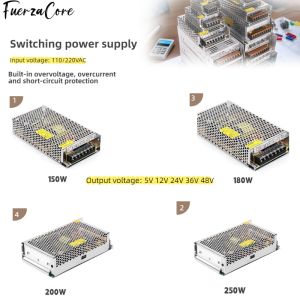
Power Supply 15V 12V 24V 36V 48VDC 150W 180W 200W 250W SMPS Power Transformer 110/220V AC-DC for LED Lights Motors and Displays

Power Supply 15V12V24V36V48VDC 150W180W200W250W SMPS Power Transformer 110/220V AC-DC for LED Lights Motors and Displays

GlobalLifestyle

GlobalLifestyle

Seller ratings 97%

Review

Oops
This video has no reviews.

You May Also Like
DIY Kit Infrared Wireless Module ICSK054A IR Wireless Module Kit 12V/4-12V Sound Transmission Module
00:10

DIY Kit Infrared Wireless Module ICSK054A IR Wireless Module Kit 12V/4-12V Sound Transmission Module

G STORM 120mm RGB Fan: A Comprehensive Guide
00:50

G STORM 120mm RGB Fan: A Comprehensive Guide

Crucial 8GB & 4GB DDR3 1866Mhz RAM: A Comprehensive Guide\\n\\n What is Crucial DDR3 Laptop RAM?\\n\\nCrucial DDR3 Laptop RAM is a type of Random Access Memory (RAM) designed specifically for laptops and notebooks. This particular RAM module is available in two capacities - 8GB and 4GB - and operates at various speeds including 1866MHz, 1600MHz, 1333MHz, and 1066MHz. It supports PC3-14900, PC3-12800, PC3-10600, and PC3-8500 speed ratings, making it compatible with a wide range of notebook models.\\n\\n Key Features of Crucial DDR3 RAM\\n\\n- **Capacity**: Available in 8GB and 4GB configurations\\n- **Speed**: Supports 1866MHz, 1600MHz, 1333MHz, and 1066MHz speeds\\n- **Voltage**: 1.5V 204pin SO-DIMM memory\\n- **Compatibility**: PC3-14900, PC3-12800, PC3-10600, and PC3-8500 speed ratings\\n\\n Compatibility with Various Notebooks\\n\\nCrucial DDR3 Laptop RAM is compatible with a wide range of notebook models, including those from popular manufacturers like Dell, HP, Lenovo, and Acer. To ensure compatibility with your specific laptop model, refer to the manufacturer's specifications or consult Crucial's compatibility checker.\\n\\n How to Choose the Right Crucial RAM for Your Notebook\\n\\nChoosing the right Crucial DDR3 Laptop RAM for your notebook involves understanding your laptop's RAM requirements and identifying the appropriate speed rating.\\n\\n Understanding PC3-14900 & Other Speed Ratings\\n\\nThe speed ratings of Crucial DDR3 Laptop RAM include PC3-14900, PC3-12800, PC3-10600, and PC3-8500. These ratings represent the theoretical peak transfer rate of the memory module, measured in megabytes per second (MB/s).\\n\\n- **PC3-14900**: 1866MHz speed, 14,900 MB/s transfer rate\\n- **PC3-12800**: 1600MHz speed, 12,800 MB/s transfer rate\\n- **PC3-10600**: 1333MHz speed, 10,600 MB/s transfer rate\\n- **PC3-8500**: 1066MHz speed, 8,500 MB/s transfer rate\\n\\n Identifying Your Laptop's RAM Requirements\\n\\nTo determine the appropriate Crucial DDR3 Laptop RAM for your notebook, consult the manufacturer's specifications or use Crucial's compatibility checker. Consider factors such as the maximum supported capacity, voltage, and speed rating when selecting the right RAM module for your laptop.\\n\\n Installing Crucial DDR3 RAM: A Step-by-Step Guide\\n\\nInstalling Crucial DDR3 Laptop RAM is a straightforward process that involves preparing for installation, inserting the RAM module into your notebook, and verifying installation success.\\n\\n Preparing for Installation\\n\\nBefore installing Crucial DDR3 Laptop RAM, ensure that your laptop is powered off and unplugged from any power sources. Gather necessary tools, such as a screwdriver, and prepare a clean, static-free workspace.\\n\\n Inserting the RAM Module into Your Notebook\\n\\n1. Open your laptop's RAM compartment by removing the screws securing the panel.\\n2. Align the notches on the Crucial DDR3 Laptop RAM module with the slots on your notebook's motherboard.\\n3. Gently press the RAM module into place until it clicks.\\n4. Replace the screws securing the RAM compartment panel.\\n\\n Verifying Installation Success\\n\\nAfter installing Crucial DDR3 Laptop RAM, power on your laptop and enter the BIOS/UEFI settings to verify that the new RAM module is recognized. Check your operating system's system information to confirm that the correct amount of RAM is installed.\\n\\n Maximizing Performance with Crucial DDR3 RAM\\n\\nTo maximize performance with Crucial DDR3 Laptop RAM, optimize your laptop's settings and enhance system stability and speed.\\n\\n Optimizing Your Laptop's Settings\\n\\nAdjust your laptop's power settings, disable unnecessary startup programs, and configure the operating system's virtual memory settings to improve overall performance.\\n\\n Enhancing System Stability & Speed\\n\\nRegularly update your operating system and drivers, defragment your hard drive, and run system maintenance tasks to maintain optimal system stability and speed.\\n\\n Conclusion: Upgrade Your Notebook with Crucial DDR3 RAM\\n\\nUpgrading your notebook with Crucial DDR3 Laptop RAM can significantly enhance performance and stability. By understanding your laptop's RAM requirements, choosing the right Crucial DDR3 Laptop RAM, and following the installation process, you can enjoy faster system speeds and improved overall performance.\"
00:40

Crucial 8GB & 4GB DDR3 1866Mhz RAM: A Comprehensive Guide\\n\\n What is Crucial DDR3 Laptop RAM?\\n\\nCrucial DDR3 Laptop RAM is a type of Random Access Memory (RAM) designed specifically for laptops and notebooks. This particular RAM module is available in two capacities - 8GB and 4GB - and operates at various speeds including 1866MHz, 1600MHz, 1333MHz, and 1066MHz. It supports PC3-14900, PC3-12800, PC3-10600, and PC3-8500 speed ratings, making it compatible with a wide range of notebook models.\\n\\n Key Features of Crucial DDR3 RAM\\n\\n- **Capacity**: Available in 8GB and 4GB configurations\\n- **Speed**: Supports 1866MHz, 1600MHz, 1333MHz, and 1066MHz speeds\\n- **Voltage**: 1.5V 204pin SO-DIMM memory\\n- **Compatibility**: PC3-14900, PC3-12800, PC3-10600, and PC3-8500 speed ratings\\n\\n Compatibility with Various Notebooks\\n\\nCrucial DDR3 Laptop RAM is compatible with a wide range of notebook models, including those from popular manufacturers like Dell, HP, Lenovo, and Acer. To ensure compatibility with your specific laptop model, refer to the manufacturer's specifications or consult Crucial's compatibility checker.\\n\\n How to Choose the Right Crucial RAM for Your Notebook\\n\\nChoosing the right Crucial DDR3 Laptop RAM for your notebook involves understanding your laptop's RAM requirements and identifying the appropriate speed rating.\\n\\n Understanding PC3-14900 & Other Speed Ratings\\n\\nThe speed ratings of Crucial DDR3 Laptop RAM include PC3-14900, PC3-12800, PC3-10600, and PC3-8500. These ratings represent the theoretical peak transfer rate of the memory module, measured in megabytes per second (MB/s).\\n\\n- **PC3-14900**: 1866MHz speed, 14,900 MB/s transfer rate\\n- **PC3-12800**: 1600MHz speed, 12,800 MB/s transfer rate\\n- **PC3-10600**: 1333MHz speed, 10,600 MB/s transfer rate\\n- **PC3-8500**: 1066MHz speed, 8,500 MB/s transfer rate\\n\\n Identifying Your Laptop's RAM Requirements\\n\\nTo determine the appropriate Crucial DDR3 Laptop RAM for your notebook, consult the manufacturer's specifications or use Crucial's compatibility checker. Consider factors such as the maximum supported capacity, voltage, and speed rating when selecting the right RAM module for your laptop.\\n\\n Installing Crucial DDR3 RAM: A Step-by-Step Guide\\n\\nInstalling Crucial DDR3 Laptop RAM is a straightforward process that involves preparing for installation, inserting the RAM module into your notebook, and verifying installation success.\\n\\n Preparing for Installation\\n\\nBefore installing Crucial DDR3 Laptop RAM, ensure that your laptop is powered off and unplugged from any power sources. Gather necessary tools, such as a screwdriver, and prepare a clean, static-free workspace.\\n\\n Inserting the RAM Module into Your Notebook\\n\\n1. Open your laptop's RAM compartment by removing the screws securing the panel.\\n2. Align the notches on the Crucial DDR3 Laptop RAM module with the slots on your notebook's motherboard.\\n3. Gently press the RAM module into place until it clicks.\\n4. Replace the screws securing the RAM compartment panel.\\n\\n Verifying Installation Success\\n\\nAfter installing Crucial DDR3 Laptop RAM, power on your laptop and enter the BIOS/UEFI settings to verify that the new RAM module is recognized. Check your operating system's system information to confirm that the correct amount of RAM is installed.\\n\\n Maximizing Performance with Crucial DDR3 RAM\\n\\nTo maximize performance with Crucial DDR3 Laptop RAM, optimize your laptop's settings and enhance system stability and speed.\\n\\n Optimizing Your Laptop's Settings\\n\\nAdjust your laptop's power settings, disable unnecessary startup programs, and configure the operating system's virtual memory settings to improve overall performance.\\n\\n Enhancing System Stability & Speed\\n\\nRegularly update your operating system and drivers, defragment your hard drive, and run system maintenance tasks to maintain optimal system stability and speed.\\n\\n Conclusion: Upgrade Your Notebook with Crucial DDR3 RAM\\n\\nUpgrading your notebook with Crucial DDR3 Laptop RAM can significantly enhance performance and stability. By understanding your laptop's RAM requirements, choosing the right Crucial DDR3 Laptop RAM, and following the installation process, you can enjoy faster system speeds and improved overall performance.\"

Thermal Conductivity Pads & Silicon Grease: Enhancing Graphics Card & CPU Heat Dissipation
00:57

Thermal Conductivity Pads & Silicon Grease: Enhancing Graphics Card & CPU Heat Dissipation

USB2.0 Female to 5Pin Female USB IDC Header USB IDC Motherboard Header Cable for Easy Installation and Stable Connection
00:14

USB2.0 Female to 5Pin Female USB IDC Header USB IDC Motherboard Header Cable for Easy Installation and Stable Connection

Dynamic Neck Microphone Enhances Sound Tours Mic with Foam Cover 1m Cable For Clear Sound Handheld Microphone
00:14

Dynamic Neck Microphone Enhances Sound Tours Mic with Foam Cover 1m Cable For Clear Sound Handheld Microphone

Multipurpose HDTV to VGA Adapters Cable 1080P/60Hz Output for Computer Player Monitor Anti Interferences Construction
00:20

Multipurpose HDTV to VGA Adapters Cable 1080P/60Hz Output for Computer Player Monitor Anti Interferences Construction

4010 Fan PWM Ball High Speed Brushless 4cm Cooling Small Fan 12V/24V/USB Small DC Temperature Control 5V
00:10

4010 Fan PWM Ball High Speed Brushless 4cm Cooling Small Fan 12V/24V/USB Small DC Temperature Control 5V

AMD | AMD Ryzen CPU with Cooler original disassembly radiator
00:15

AMD | AMD Ryzen CPU with Cooler original disassembly radiator

140W PD3.1 TYPE-C USB PD Voltage Trigger Adapter 5V 9V 12V 15V 20V 28V Fast Charging Protocol Male USB QC/ PD TO DC Power Supply
00:16

140W PD3.1 TYPE-C USB PD Voltage Trigger Adapter 5V 9V 12V 15V 20V 28V Fast Charging Protocol Male USB QC/ PD TO DC Power Supply

KingSpec  NVMe 2280 SSD M2 ssd m.2 NVMe pcie SSD capacity 512gb 128gb 256GB For Laptop Desktop MSI Ssd Nvme M 2 - Lazada
00:41

KingSpec NVMe 2280 SSD M2 ssd m.2 NVMe pcie SSD capacity 512gb 128gb 256GB For Laptop Desktop MSI Ssd Nvme M 2 - Lazada

ARZOPA 16.1 144Hz Z1FC Portable Gaming Monitor 1080P HDR with USB 3.1 HDMI Laptop Computer Monitor for Switch PlayStation Xbox PS5 Mac
00:50

ARZOPA 16.1 144Hz Z1FC Portable Gaming Monitor 1080P HDR with USB 3.1 HDMI Laptop Computer Monitor for Switch PlayStation Xbox PS5 Mac