


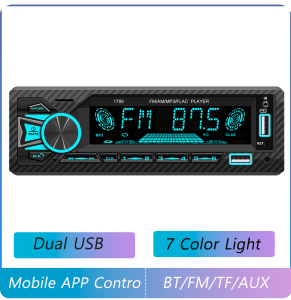
BQCC | BQCC 1 Din MP3 Car Player Mobile APP Control Voice Copy Function Dual USB 7 Color Light Wiring Protection BT/FM/AM/RDS Car Audio
BQCC 1 Din MP3 Car Player Mobile APP Control Voice Copy Function Dual USB 7 Color Light Wiring Protection BT/FM/AM/RDS Car Audio Welcome to my store! Have a good shopping time! Loving life, and love shopping. 100% brand new and high quality. ☆ Tips: 1. Installation requires certain knowledge of electronic products. Please install with the help of professionals; 2. After receiving the product, please test the machine to check whether it is normal before installing it (test method: red and yellow wires are connected to the positive pole of the 12V power supply, and the black wire is connected to the negative pole of the 12V power supply). Please be careful not to connect the wrong wires during installation to avoid affecting normal use. When connecting the speaker wire, pay attention to the positive and negative poles. 3. If this product is an Android system, you can download the required software including maps, which is very convenient. Functions 1. BQCC car audio | car radio | Bluetooth 5.0 and hands-free calling: Experience seamless audio streaming and hands-free calling through Bluetooth 5.0 to ensure clear communication during the journey. 2. Positioning and finding the car: Download the APP on your mobile phone, and the mobile phone will remember the parking location after parking, so you don’t have to worry about not being able to find the car in a large parking lot. 3. FM/AM radio: Keep up with the latest information through FM/AM radio, add radio station information and enhance reception function. 4. Colorful lights: Different light color changes make you happy and enhance operability in dark environments. 5. Audio source recording: You can record radio music, Bluetooth music, and AUX music to USB/SD card storage devices, and record beautiful sounds at any time. 6.Dual USB ports: Equipped with two USB ports, you can read USB flash drives and play your favorite music and videos while charging your mobile phone. 7.Power positive and negative reverse connection protection function (wrong positive and negative connection of the power line will not cause the circuit board to burn). Basic parametersModel : 1789Type : Car MP3Software solution : 5301HRadio frequency : FM 87.5~108MHz AM522~1620KHz (default Europe, optional national standard radio frequency)Radio IC : 5301HPower amplifier IC : CD7388CZOutput power : 60Wx4Working voltage : 12~14.4VWorking temperature : -10~60℃Bluetooth : version 5.1 (default name: SWL-BT) Performance parametersCPU : 5301HScreen size : LCD _VA display (colorful light large screen 110x28mm) Size parametersInstallation size : 178x50mmFace shell size : 18858mmHost depth : 63MMColor box size : 20580125mm (color box)Full box size : 430mm430mm*520mmCTNS: 40 Units Weight parameterSingle unit weight : 0.47KGNet weight of the whole box :18.80KGGross weight of the whole box : 19.80KG Function parameterFront USB : 2-way USB interface, one for charging and one for USB2.0 readingTF card : supportedReset button : support RCA port parametersAudio output : 4 channels (2 left channels + 2 right channels)Subwoofer output : 2 channelsRear microphone input : Rear inputAudio input : front AUX input (left channel + right channel) Format parametersAudio format : MP3/WMA/WAV/FLAC/APE Language parametersEnglish Basic functions1. Radio2. Card reader USB disk (audio)3. AUX function4. Bluetooth function5. RCA audio output6. Subwoofer output function7. Colorful lights8. USB mobile phone charging function (2.1A)9. Voice assistant function (In BT mode, press the No. 2 button to start the voice assistant function of the mobile phone)10. Mobile phone APP function, positioning and finding car function (connect to the car computer through the mobile phone APP, and you can find the location where the car is parked when it is turned off and left on the mobile phone)11. Audio source copy function (when SD/USB is inserted, long press the knob button to start the audio source copy function)12. RDS function13. Rear microphone input function14. Power positive and negative reverse connection protection function (the power line is connected incorrectly, and the circuit board function will not be burned)Accessories 1x1 Host 1x1 Power cord 1X1 Horn Cables1x1 Remote control 1x1 Manual 1x2 Disassembly key (Accessories, manuals, and packaging will be updated from time to time, subject to actual receipt of the goods) FAQ:1) Why can't I turn on the car radio?1. Please check the car radio voltage: DC 12 V2. When testing this car radio, you can combine the red and yellow wires and connect them to the positive pole of the power supply. The black wire is connected to the negative pole of the power supply.3. Replace the same type of fuse to test the car radio.Note: Please use our power cord to connect our car radio, and you cannot directly plug the original car plug into our machine.2) Why does the car radio display "No Signal" when we reverse?Please make sure that the camera cable is correctly connected to the car radio.Note: The video port on the rear camera should be plugged into the "CAMIN" car radio port.3) Why does the camera display "!" and "Cannot watch videos while driving" when I use USB to watch videos?Please turn off the "Warning" function in the settings, and then it will be fine4) Why can't I search for FM?1: Plug in the radio antenna;2: Please make sure that the radio antenna is plugged in before plugging in more antennas.

Prime Supply_Play Life
You May Also Like

5Pcs Thickened Super Absorbent Car Cleaning Towel Extra Large Super Absorbent Rags Polyester Fiber Car Washing Cloth Wet and Dry Car Care Drying Cleaning Cloth Multipurpose Double-sided Home Washing Rag

【 Random】Outdoor seamless versatile magic headscarf cycling headscarf face mask neck cover windproof sun
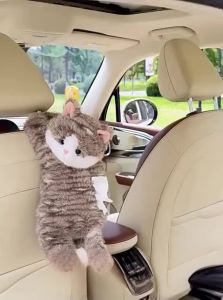
XIONGDECHUANSHUO | Hanging Car Tissue Box
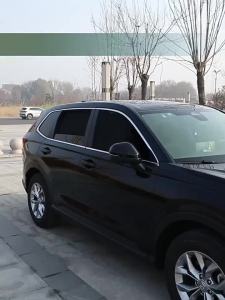
dncnf For Subaru Forester MK5 SK 2019~2024 2022 2023 Car Mesh Privacy Sunshade Side Window Sun Shade Sunscreen Accessories B3K9H
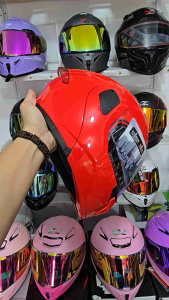
HNJ 937 modular helmet dual visor full face half face motorcycle helmet
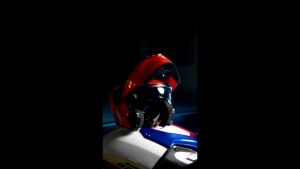
Zebra A113 RITZY Helmet For Motorcycle Full Face original With ICC Dual Visor Modular helmet women and men

SUNTAL TRANSMISSION SET CLICK 125 V1/NEW BEAT FI V2/CLICK 150I V2/MIO I 125
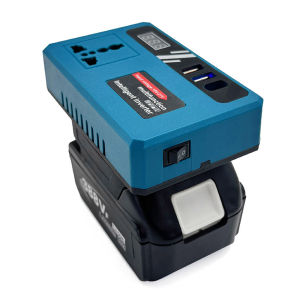
Car Power Inverter 18V/21V DC to 220V AC with Dual USB Ports for Mobile Device Charging
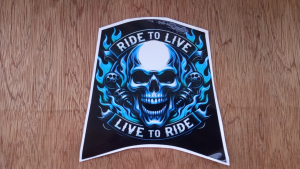
SKULL | GUNDAM | BOT DESIGN FOR YAMAHA AEROX V3 – YAMAHA AEROX VERSION 3 GUNDAM | BOT | SKULL DESIGN UPPERTAIL COVER STICKER- YAMAHA AEROX VERSION 3 UPPERTAIL COVER STICKER GUNDAM |BOT | SKULL DESIGN- AEROX V3 UPPERTAIL COVER STICKER GUNDAM |BOT|SKULL DES
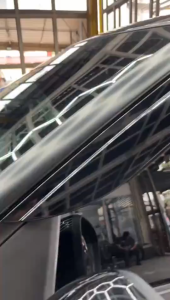
MITSUBISHI XFORCE 2024 - 2027 RAIN GUARD WINDOW VISOR HIGH QUALITY

LZD Applicable to Wrangler JL JK TJ Jeep Gladiator JT Side CB Antenna Modification Bracket Car Exterior Accessories