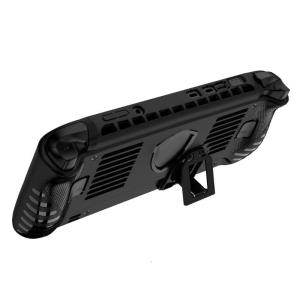
Lightweight TPU Sleeve For Claw 8 AI+ Gaming Console Feature Antiscratch Surfaces And Precise Cutout For Port And Button

The TPU protective case is designing specifically for gaming console, ensuring a perfect fit and enhances protective against scratches, and other potential damage. Crafted from soft TPU materials, this lightweight case features antislip texture to provide a secure grip and prevent accidental drop. For gaming console users, especially gaming enthusiasts and those seek additional protective for their devices. Lightweight TPU Sleeve For Claw 8 AI Gaming Console Feature Antiscratch Surfaces And Precise Cutout For Port And Button. Features: The TPU protective case is designing specifically for gaming console, ensuring a perfect fit and enhances protective against scratches, and other potential damage. Crafted from soft TPU materials, this lightweight case features antislip texture to provide a secure grip and prevent accidental drop. For gaming console users, especially gaming enthusiasts and those seek additional protective for their devices. Whether at homes, traveling, or during outdoor

Top Trendz1
Top Trendz1

Seller ratings 95%

Review

Oops
This video has no reviews.

You May Also Like

KUAIQU Upgrade Battery Charging Adjustable DC Power Supply Optional OCP Output Switch USB Type-C Quick Charging 30V 10A 60V 120V
01:28

KUAIQU Upgrade Battery Charging Adjustable DC Power Supply Optional OCP Output Switch USB Type-C Quick Charging 30V 10A 60V 120V

Professional Grade XLR Sound Splitter Over Ethernet Cable Low Noise Sound Expander for Multiple Device Signal Distribution
00:12

Professional Grade XLR Sound Splitter Over Ethernet Cable Low Noise Sound Expander for Multiple Device Signal Distribution

6 Heat Pipes CPU Air Cooler 4Pin PWM PC Procesor Tower Cooler for Intel LGA 1700 1200 1150 1151 1155 2011 X79 X99 1366 AM5 AM4
00:25

6 Heat Pipes CPU Air Cooler 4Pin PWM PC Procesor Tower Cooler for Intel LGA 1700 1200 1150 1151 1155 2011 X79 X99 1366 AM5 AM4

For Delta AUB0912VH 9CM 12V 0.6A Dual Ball Bearing High-Speed Cooling Fan for PCs Servers and High-Performance Cooling
00:38

For Delta AUB0912VH 9CM 12V 0.6A Dual Ball Bearing High-Speed Cooling Fan for PCs Servers and High-Performance Cooling

Acer V920 No Screws Throughout Full View Case ITX/Micro ATX gaming case
00:29

Acer V920 No Screws Throughout Full View Case ITX/Micro ATX gaming case

TITAN ARMY P43UGD 43" ADS IPS 120Hz 1ms DFHD 3840x 1080 100%sRGB Adaptive Sync Ultrawide White Gaming Monitor
00:23

TITAN ARMY P43UGD 43" ADS IPS 120Hz 1ms DFHD 3840x 1080 100%sRGB Adaptive Sync Ultrawide White Gaming Monitor

HyperX FURY 16GB 8GB 4GB DDR4 3200MHz 2666MHz 2400MHz 2133MHz Desktop RAM Memory 1.2V DIMM 288-pin Desktop Inter&AMD Memory\\n\\nIn this comprehensive guide, we will explore the world of HyperX FURY DDR4 RAM, including its specifications, benefits, compatibility, installation, optimization, and troubleshooting. We will cover various aspects of the HyperX FURY RAM, including its 3200MHz & 2666MHz speeds, 288-pin DIMM desktop design, and 1.2V low voltage operation. This guide aims to help you make an informed decision about which HyperX FURY RAM configuration best suits your needs.\\n\\n Understanding HyperX FURY RAM Specifications\\n\\n What is 3200MHz & 2666MHz RAM?\\n\\nHyperX FURY DDR4 RAM is available in various speeds, including 3200MHz and 2666MHz. These speeds refer to the clock frequency of the RAM, which determines how quickly it can transfer data to and from the system. Higher clock frequencies generally result in faster performance. However, it's important to note that the actual performance improvement depends on other factors, such as the CPU, motherboard, and storage devices used in the system.\\n\\n How Does 288-pin DIMM Desktop RAM Work?\\n\\nHyperX FURY DDR4 RAM is designed as a 288-pin DIMM module, which is a standard form factor for desktop computers. This type of RAM is installed in the memory slots on the motherboard and communicates with the CPU via the memory controller. The 288-pin design allows for a high-speed data transfer rate, ensuring that the RAM can keep up with the demands of modern applications and games.\\n\\n What Are the Benefits of 1.2V Low Voltage RAM?\\n\\nHyperX FURY DDR4 RAM operates at a low voltage of 1.2V, which offers several benefits. Lower voltage requirements result in reduced power consumption, leading to lower operating temperatures and improved energy efficiency. Additionally, low voltage RAM can help extend the lifespan of the memory module by reducing the stress on its components.\\n\\n Choosing the Right HyperX FURY RAM\\n\\n How to Select Between 16GB, 8GB, & 4GB RAM?\\n\\nHyperX FURY DDR4 RAM is available in various capacities, including 16GB, 8GB, and 4GB. When choosing the right configuration, consider the demands of your applications and games. More RAM allows for better multitasking and improved performance in memory-intensive tasks. However, it's essential to balance capacity with cost and system requirements.\\n\\n How Does HyperX FURY RAM Compare to Other Brands?\\n\\nHyperX FURY DDR4 RAM competes with other popular brands like Corsair, G.Skill, and Crucial. While all these brands offer high-quality RAM, HyperX FURY stands out due to its low voltage operation, compatibility with both Intel and AMD platforms, and excellent performance at various clock speeds.\\n\\n What Are the Compatibility Requirements for Inter&AMD Memory?\\n\\nHyperX FURY DDR4 RAM is designed to work with both Intel and AMD platforms, ensuring broad compatibility. However, it's important to check the specifications of your motherboard and CPU to ensure they support the desired RAM configuration. Additionally, some systems may require specific BIOS updates or settings adjustments to achieve optimal performance.\\n\\n Installing & Optimizing HyperX FURY RAM\\n\\n How to Install 1x RAM Memory Module?\\n\\nInstalling HyperX FURY DDR4 RAM is relatively straightforward. First, power off your computer and unplug all cables. Next, open the case and locate the memory slots on the motherboard. Insert the RAM module at a 45-degree angle, then press down until it clicks into place. Finally, close the case, reconnect the cables, and power on the system.\\n\\n How to Optimize Performance with HyperX FURY RAM?\\n\\nTo optimize performance with HyperX FURY DDR4 RAM, consider the following tips:\\n\\n- Ensure that your motherboard and CPU support the desired RAM configuration.\\n- Install the RAM modules in pairs for dual-channel operation, if possible.\\n- Adjust the BIOS settings to enable XMP (Extreme Memory Profile) or manually configure the RAM timings and voltage.\\n- Keep the system clean and well-ventilated to maintain optimal operating temperatures.\\n\\n Troubleshooting Common Issues with HyperX FURY RAM\\n\\nIf you encounter issues with HyperX FURY DDR4 RAM, consider the following troubleshooting steps:\\n\\n- Verify that the RAM is properly seated in the memory slots.\\n- Check the system BIOS for any updates or settings adjustments.\\n- Ensure that the RAM configuration is supported by the motherboard and CPU.\\n- Try installing the RAM in a different slot or removing other RAM modules to isolate the issue.\\n\\nBy following this comprehensive guide, you'll be well-equipped to choose, install, optimize, and troubleshoot HyperX FURY DDR4 RAM for your desktop computer. Remember to consider your system requirements, compatibility, and performance goals when making your decision.\n}
00:20

HyperX FURY 16GB 8GB 4GB DDR4 3200MHz 2666MHz 2400MHz 2133MHz Desktop RAM Memory 1.2V DIMM 288-pin Desktop Inter&AMD Memory\\n\\nIn this comprehensive guide, we will explore the world of HyperX FURY DDR4 RAM, including its specifications, benefits, compatibility, installation, optimization, and troubleshooting. We will cover various aspects of the HyperX FURY RAM, including its 3200MHz & 2666MHz speeds, 288-pin DIMM desktop design, and 1.2V low voltage operation. This guide aims to help you make an informed decision about which HyperX FURY RAM configuration best suits your needs.\\n\\n Understanding HyperX FURY RAM Specifications\\n\\n What is 3200MHz & 2666MHz RAM?\\n\\nHyperX FURY DDR4 RAM is available in various speeds, including 3200MHz and 2666MHz. These speeds refer to the clock frequency of the RAM, which determines how quickly it can transfer data to and from the system. Higher clock frequencies generally result in faster performance. However, it's important to note that the actual performance improvement depends on other factors, such as the CPU, motherboard, and storage devices used in the system.\\n\\n How Does 288-pin DIMM Desktop RAM Work?\\n\\nHyperX FURY DDR4 RAM is designed as a 288-pin DIMM module, which is a standard form factor for desktop computers. This type of RAM is installed in the memory slots on the motherboard and communicates with the CPU via the memory controller. The 288-pin design allows for a high-speed data transfer rate, ensuring that the RAM can keep up with the demands of modern applications and games.\\n\\n What Are the Benefits of 1.2V Low Voltage RAM?\\n\\nHyperX FURY DDR4 RAM operates at a low voltage of 1.2V, which offers several benefits. Lower voltage requirements result in reduced power consumption, leading to lower operating temperatures and improved energy efficiency. Additionally, low voltage RAM can help extend the lifespan of the memory module by reducing the stress on its components.\\n\\n Choosing the Right HyperX FURY RAM\\n\\n How to Select Between 16GB, 8GB, & 4GB RAM?\\n\\nHyperX FURY DDR4 RAM is available in various capacities, including 16GB, 8GB, and 4GB. When choosing the right configuration, consider the demands of your applications and games. More RAM allows for better multitasking and improved performance in memory-intensive tasks. However, it's essential to balance capacity with cost and system requirements.\\n\\n How Does HyperX FURY RAM Compare to Other Brands?\\n\\nHyperX FURY DDR4 RAM competes with other popular brands like Corsair, G.Skill, and Crucial. While all these brands offer high-quality RAM, HyperX FURY stands out due to its low voltage operation, compatibility with both Intel and AMD platforms, and excellent performance at various clock speeds.\\n\\n What Are the Compatibility Requirements for Inter&AMD Memory?\\n\\nHyperX FURY DDR4 RAM is designed to work with both Intel and AMD platforms, ensuring broad compatibility. However, it's important to check the specifications of your motherboard and CPU to ensure they support the desired RAM configuration. Additionally, some systems may require specific BIOS updates or settings adjustments to achieve optimal performance.\\n\\n Installing & Optimizing HyperX FURY RAM\\n\\n How to Install 1x RAM Memory Module?\\n\\nInstalling HyperX FURY DDR4 RAM is relatively straightforward. First, power off your computer and unplug all cables. Next, open the case and locate the memory slots on the motherboard. Insert the RAM module at a 45-degree angle, then press down until it clicks into place. Finally, close the case, reconnect the cables, and power on the system.\\n\\n How to Optimize Performance with HyperX FURY RAM?\\n\\nTo optimize performance with HyperX FURY DDR4 RAM, consider the following tips:\\n\\n- Ensure that your motherboard and CPU support the desired RAM configuration.\\n- Install the RAM modules in pairs for dual-channel operation, if possible.\\n- Adjust the BIOS settings to enable XMP (Extreme Memory Profile) or manually configure the RAM timings and voltage.\\n- Keep the system clean and well-ventilated to maintain optimal operating temperatures.\\n\\n Troubleshooting Common Issues with HyperX FURY RAM\\n\\nIf you encounter issues with HyperX FURY DDR4 RAM, consider the following troubleshooting steps:\\n\\n- Verify that the RAM is properly seated in the memory slots.\\n- Check the system BIOS for any updates or settings adjustments.\\n- Ensure that the RAM configuration is supported by the motherboard and CPU.\\n- Try installing the RAM in a different slot or removing other RAM modules to isolate the issue.\\n\\nBy following this comprehensive guide, you'll be well-equipped to choose, install, optimize, and troubleshoot HyperX FURY DDR4 RAM for your desktop computer. Remember to consider your system requirements, compatibility, and performance goals when making your decision.\n}

JEYI Graphene Copper Foil M.2 SSD Heatsink NVMe NGFF 2280 Graphene Cooler SSD Radiator for Laptop PC PS5 2280 Drive 2-Pack
00:49

JEYI Graphene Copper Foil M.2 SSD Heatsink NVMe NGFF 2280 Graphene Cooler SSD Radiator for Laptop PC PS5 2280 Drive 2-Pack

12RPM to 1360 RPM 25GA370 Micro Speed Reversible Geared Motor 6V/12V/24V High Torque Motor with Eccentric Output Shaft
00:15

12RPM to 1360 RPM 25GA370 Micro Speed Reversible Geared Motor 6V/12V/24V High Torque Motor with Eccentric Output Shaft

AHXJKA 11.6" Portable Monitor 1366X768 lcd display 16:9  Travel Gaming Display for Laptop Switch  HDMI-Compatible  ps4 ps5 Xbox
01:02

AHXJKA 11.6" Portable Monitor 1366X768 lcd display 16:9 Travel Gaming Display for Laptop Switch HDMI-Compatible ps4 ps5 Xbox

DC6-36V Step Down Power Supply Module Wide Input Ranging (6V-36V) Optional Output (3.3V/5V/9V/12V) 3A
00:20

DC6-36V Step Down Power Supply Module Wide Input Ranging (6V-36V) Optional Output (3.3V/5V/9V/12V) 3A

Xingu Pro Endless Sea View Room No Column Side Transparent 360 Water Cooling ATX Desktop Computer Matx Main Board Case
00:34

Xingu Pro Endless Sea View Room No Column Side Transparent 360 Water Cooling ATX Desktop Computer Matx Main Board Case