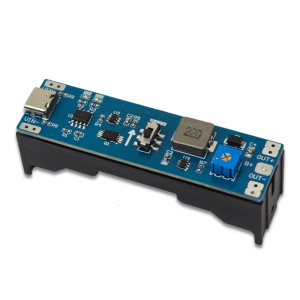
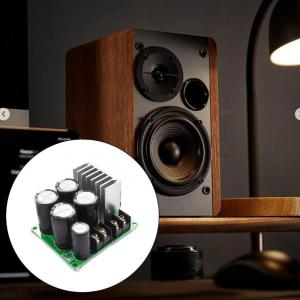
35V 8A Rectifier Board Unregulated Power Supply Module For High Current Amplifiers And Industrial

Design for highly power applications, this 35V/50V rectifier board delivers stable unregulated output up to 8A current with overloads/short circuits protections, ideal for amplifiers and industrial. Featuring high efficiency rectifier diodes, large capacity electrolytic capacitors, and optimized filtering circuits, this power supply module ensures low noise operation. Perfect for audiophiles, electronics engineers, and industrial technicians requiring reliable high current power solution in professional audios systems, motor drive tool, or lab testing setups. 35V8A Rectifier Board Unregulated Power Supply Module For High Current Amplifiers And Industrial Features Design for highly power applications, this 35V/50V rectifier board delivers stable unregulated output up to 8A current with overloads/short circuits protections, ideal for amplifiers and industrial Featuring high efficiency rectifier diodes, large capacity electrolytic capacitors, and optimized filtering circuits, this power s

Active Zone1
Active Zone1

Seller ratings 92%

Review

Oops
This video has no reviews.

You May Also Like

48W/60W Ceramic Heater Thermistor High Temperature with Fixing Clip 3D Printer Hotend Assembly for P1P P1S/X1C
00:20

48W/60W Ceramic Heater Thermistor High Temperature with Fixing Clip 3D Printer Hotend Assembly for P1P P1S/X1C

UPSIREN Walrus Guard 120 Digital Display 4 Heatpipe CPU Cooler: A Comprehensive Guide
00:11

UPSIREN Walrus Guard 120 Digital Display 4 Heatpipe CPU Cooler: A Comprehensive Guide

UPSIREN Walrus Assassin 90 Digital Display 4 Heatpipe CPU Cooler 92mm Cooling Fan Radiator Air Cooler  For LGA1700/1200 AM4 AM5
00:11

UPSIREN Walrus Assassin 90 Digital Display 4 Heatpipe CPU Cooler 92mm Cooling Fan Radiator Air Cooler For LGA1700/1200 AM4 AM5

Goma / Viewpoint 24-inch Wide LED Monitor - 1920x1080 Resolution, 75Hz Refresh Rate, TN Panel, VGA + HDMI+ DC Ports, 6 Months Warranty
00:52

Goma / Viewpoint 24-inch Wide LED Monitor - 1920x1080 Resolution, 75Hz Refresh Rate, TN Panel, VGA + HDMI+ DC Ports, 6 Months Warranty

DRV8833 Double H Bridge DCMotor Controller 2.7 10.8V Input High Current Drive Module Compatible for Projects
00:12

DRV8833 Double H Bridge DCMotor Controller 2.7 10.8V Input High Current Drive Module Compatible for Projects

DC5V Fast Speed Cooling Fan USB Power 80x80x25mm Efficient Fan For Computer 3D Printer
00:12

DC5V Fast Speed Cooling Fan USB Power 80x80x25mm Efficient Fan For Computer 3D Printer

Crucial 8GB & 4GB DDR3 1866Mhz RAM: A Comprehensive Guide\\n\\n What is Crucial DDR3 Laptop RAM?\\n\\nCrucial DDR3 Laptop RAM is a type of Random Access Memory (RAM) designed specifically for laptops and notebooks. This particular RAM module is available in two capacities - 8GB and 4GB - and operates at various speeds including 1866MHz, 1600MHz, 1333MHz, and 1066MHz. It supports PC3-14900, PC3-12800, PC3-10600, and PC3-8500 speed ratings, making it compatible with a wide range of notebook models.\\n\\n Key Features of Crucial DDR3 RAM\\n\\n- **Capacity**: Available in 8GB and 4GB configurations\\n- **Speed**: Supports 1866MHz, 1600MHz, 1333MHz, and 1066MHz speeds\\n- **Voltage**: 1.5V 204pin SO-DIMM memory\\n- **Compatibility**: PC3-14900, PC3-12800, PC3-10600, and PC3-8500 speed ratings\\n\\n Compatibility with Various Notebooks\\n\\nCrucial DDR3 Laptop RAM is compatible with a wide range of notebook models, including those from popular manufacturers like Dell, HP, Lenovo, and Acer. To ensure compatibility with your specific laptop model, refer to the manufacturer's specifications or consult Crucial's compatibility checker.\\n\\n How to Choose the Right Crucial RAM for Your Notebook\\n\\nChoosing the right Crucial DDR3 Laptop RAM for your notebook involves understanding your laptop's RAM requirements and identifying the appropriate speed rating.\\n\\n Understanding PC3-14900 & Other Speed Ratings\\n\\nThe speed ratings of Crucial DDR3 Laptop RAM include PC3-14900, PC3-12800, PC3-10600, and PC3-8500. These ratings represent the theoretical peak transfer rate of the memory module, measured in megabytes per second (MB/s).\\n\\n- **PC3-14900**: 1866MHz speed, 14,900 MB/s transfer rate\\n- **PC3-12800**: 1600MHz speed, 12,800 MB/s transfer rate\\n- **PC3-10600**: 1333MHz speed, 10,600 MB/s transfer rate\\n- **PC3-8500**: 1066MHz speed, 8,500 MB/s transfer rate\\n\\n Identifying Your Laptop's RAM Requirements\\n\\nTo determine the appropriate Crucial DDR3 Laptop RAM for your notebook, consult the manufacturer's specifications or use Crucial's compatibility checker. Consider factors such as the maximum supported capacity, voltage, and speed rating when selecting the right RAM module for your laptop.\\n\\n Installing Crucial DDR3 RAM: A Step-by-Step Guide\\n\\nInstalling Crucial DDR3 Laptop RAM is a straightforward process that involves preparing for installation, inserting the RAM module into your notebook, and verifying installation success.\\n\\n Preparing for Installation\\n\\nBefore installing Crucial DDR3 Laptop RAM, ensure that your laptop is powered off and unplugged from any power sources. Gather necessary tools, such as a screwdriver, and prepare a clean, static-free workspace.\\n\\n Inserting the RAM Module into Your Notebook\\n\\n1. Open your laptop's RAM compartment by removing the screws securing the panel.\\n2. Align the notches on the Crucial DDR3 Laptop RAM module with the slots on your notebook's motherboard.\\n3. Gently press the RAM module into place until it clicks.\\n4. Replace the screws securing the RAM compartment panel.\\n\\n Verifying Installation Success\\n\\nAfter installing Crucial DDR3 Laptop RAM, power on your laptop and enter the BIOS/UEFI settings to verify that the new RAM module is recognized. Check your operating system's system information to confirm that the correct amount of RAM is installed.\\n\\n Maximizing Performance with Crucial DDR3 RAM\\n\\nTo maximize performance with Crucial DDR3 Laptop RAM, optimize your laptop's settings and enhance system stability and speed.\\n\\n Optimizing Your Laptop's Settings\\n\\nAdjust your laptop's power settings, disable unnecessary startup programs, and configure the operating system's virtual memory settings to improve overall performance.\\n\\n Enhancing System Stability & Speed\\n\\nRegularly update your operating system and drivers, defragment your hard drive, and run system maintenance tasks to maintain optimal system stability and speed.\\n\\n Conclusion: Upgrade Your Notebook with Crucial DDR3 RAM\\n\\nUpgrading your notebook with Crucial DDR3 Laptop RAM can significantly enhance performance and stability. By understanding your laptop's RAM requirements, choosing the right Crucial DDR3 Laptop RAM, and following the installation process, you can enjoy faster system speeds and improved overall performance.\"
00:40

Crucial 8GB & 4GB DDR3 1866Mhz RAM: A Comprehensive Guide\\n\\n What is Crucial DDR3 Laptop RAM?\\n\\nCrucial DDR3 Laptop RAM is a type of Random Access Memory (RAM) designed specifically for laptops and notebooks. This particular RAM module is available in two capacities - 8GB and 4GB - and operates at various speeds including 1866MHz, 1600MHz, 1333MHz, and 1066MHz. It supports PC3-14900, PC3-12800, PC3-10600, and PC3-8500 speed ratings, making it compatible with a wide range of notebook models.\\n\\n Key Features of Crucial DDR3 RAM\\n\\n- **Capacity**: Available in 8GB and 4GB configurations\\n- **Speed**: Supports 1866MHz, 1600MHz, 1333MHz, and 1066MHz speeds\\n- **Voltage**: 1.5V 204pin SO-DIMM memory\\n- **Compatibility**: PC3-14900, PC3-12800, PC3-10600, and PC3-8500 speed ratings\\n\\n Compatibility with Various Notebooks\\n\\nCrucial DDR3 Laptop RAM is compatible with a wide range of notebook models, including those from popular manufacturers like Dell, HP, Lenovo, and Acer. To ensure compatibility with your specific laptop model, refer to the manufacturer's specifications or consult Crucial's compatibility checker.\\n\\n How to Choose the Right Crucial RAM for Your Notebook\\n\\nChoosing the right Crucial DDR3 Laptop RAM for your notebook involves understanding your laptop's RAM requirements and identifying the appropriate speed rating.\\n\\n Understanding PC3-14900 & Other Speed Ratings\\n\\nThe speed ratings of Crucial DDR3 Laptop RAM include PC3-14900, PC3-12800, PC3-10600, and PC3-8500. These ratings represent the theoretical peak transfer rate of the memory module, measured in megabytes per second (MB/s).\\n\\n- **PC3-14900**: 1866MHz speed, 14,900 MB/s transfer rate\\n- **PC3-12800**: 1600MHz speed, 12,800 MB/s transfer rate\\n- **PC3-10600**: 1333MHz speed, 10,600 MB/s transfer rate\\n- **PC3-8500**: 1066MHz speed, 8,500 MB/s transfer rate\\n\\n Identifying Your Laptop's RAM Requirements\\n\\nTo determine the appropriate Crucial DDR3 Laptop RAM for your notebook, consult the manufacturer's specifications or use Crucial's compatibility checker. Consider factors such as the maximum supported capacity, voltage, and speed rating when selecting the right RAM module for your laptop.\\n\\n Installing Crucial DDR3 RAM: A Step-by-Step Guide\\n\\nInstalling Crucial DDR3 Laptop RAM is a straightforward process that involves preparing for installation, inserting the RAM module into your notebook, and verifying installation success.\\n\\n Preparing for Installation\\n\\nBefore installing Crucial DDR3 Laptop RAM, ensure that your laptop is powered off and unplugged from any power sources. Gather necessary tools, such as a screwdriver, and prepare a clean, static-free workspace.\\n\\n Inserting the RAM Module into Your Notebook\\n\\n1. Open your laptop's RAM compartment by removing the screws securing the panel.\\n2. Align the notches on the Crucial DDR3 Laptop RAM module with the slots on your notebook's motherboard.\\n3. Gently press the RAM module into place until it clicks.\\n4. Replace the screws securing the RAM compartment panel.\\n\\n Verifying Installation Success\\n\\nAfter installing Crucial DDR3 Laptop RAM, power on your laptop and enter the BIOS/UEFI settings to verify that the new RAM module is recognized. Check your operating system's system information to confirm that the correct amount of RAM is installed.\\n\\n Maximizing Performance with Crucial DDR3 RAM\\n\\nTo maximize performance with Crucial DDR3 Laptop RAM, optimize your laptop's settings and enhance system stability and speed.\\n\\n Optimizing Your Laptop's Settings\\n\\nAdjust your laptop's power settings, disable unnecessary startup programs, and configure the operating system's virtual memory settings to improve overall performance.\\n\\n Enhancing System Stability & Speed\\n\\nRegularly update your operating system and drivers, defragment your hard drive, and run system maintenance tasks to maintain optimal system stability and speed.\\n\\n Conclusion: Upgrade Your Notebook with Crucial DDR3 RAM\\n\\nUpgrading your notebook with Crucial DDR3 Laptop RAM can significantly enhance performance and stability. By understanding your laptop's RAM requirements, choosing the right Crucial DDR3 Laptop RAM, and following the installation process, you can enjoy faster system speeds and improved overall performance.\"

Grace Second HDD Caddy SATA 2.5" HDD SSD 9.5mm Enclosure For Apple Macbook DVD
00:29

Grace Second HDD Caddy SATA 2.5" HDD SSD 9.5mm Enclosure For Apple Macbook DVD

AMD Ryzen 5 gaming console with 16GB DDR4 RAM 512GB SSD RTX 3050 NB DUO 8GB-V graphics card five RGB fans and a 650W power supply. Complete gaming desktop [Local Shipping]
00:35

AMD Ryzen 5 gaming console with 16GB DDR4 RAM 512GB SSD RTX 3050 NB DUO 8GB-V graphics card five RGB fans and a 650W power supply. Complete gaming desktop [Local Shipping]

New KIT 4GB 8GB 16GB DDR3 RAM 1333MHz 1600MHz 1866mhz Desktop Memory DDR3L 1.35V 240 Pins DIMM HyperX FURY Gaming Memory-Black
00:40

New KIT 4GB 8GB 16GB DDR3 RAM 1333MHz 1600MHz 1866mhz Desktop Memory DDR3L 1.35V 240 Pins DIMM HyperX FURY Gaming Memory-Black

ON SALE!!BYONE 15.6 inch Portable Gaming Monitor Brand New Tablet Protector Smart Cover 144Hz Monitor 1920*1080p HDMI IPS Portable Screen 100% sRGB Gaming Monitor for Laptop ps3 ps4 ps5 XBOX
00:38

ON SALE!!BYONE 15.6 inch Portable Gaming Monitor Brand New Tablet Protector Smart Cover 144Hz Monitor 1920*1080p HDMI IPS Portable Screen 100% sRGB Gaming Monitor for Laptop ps3 ps4 ps5 XBOX

32 Inch Ultra-Thin Display: A Comprehensive Guide
00:49

32 Inch Ultra-Thin Display: A Comprehensive Guide