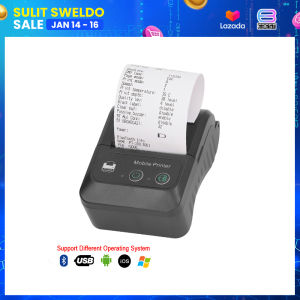
PT-280 Receipt Printer Bluetooth Thermal | 50mm Receipt Paper | Line Thermal Printer | Android iOS Windows | Plastic

PT-280 Receipt Printer Bluetooth Thermal | 50mm Receipt Paper | Line Thermal Printer | Android iOS Windows | Plastic
Officom

Ebest Solutions
Seller ratings 98%
Review

Oops
This video has no reviews.
You May Also Like
00:44
GTCODESTAR X-1801B Qr 1D 2D Bar Code Reader Wireless Barcode Scanner Android Handheld Scanner bluetooth with Charging Cradlememory

00:41
Intax-Inspired Lollipop Photo Set: Perfect Valentine's Day Gift & Giveaways

00:45
20 Pieces A4 Inkjet Backlit Film Sheets For Dye And Pigment Ink Printer

00:58
GZQIANJI COD All in One Android 8.1 Handheld PDA Printer Smart POS Terminal Wireless Portable Printers Intelligent Payment Terminal Function Bluetooth WiFi 3G Communication Support Loyverse POS GrabMerchant app

00:29
Waste Ink Tank Sponge for Epson L800, L801, L805, L810, L850, R270, R290, R330, R390, T50, T60

00:52
PGI72 PGI-72 Color Compatible Printer Ink Cartridge for Canon PIXMA Pro-10 Pro 10 PRO-10S PRO 10S Printer\\n\\n Introduction to Tatrix PGI 72 Ink Cartridge\\n\\nThe Tatrix PGI 72 Ink Cartridge is a high-quality, compatible ink cartridge designed specifically for use with Canon PIXMA Pro-10S printers. This ink cartridge offers a cost-effective alternative to Canon's original ink cartridges while maintaining the same level of quality and performance.\\n\\n What is the Tatrix PGI 72 Ink Cartridge?\\n\\nThe Tatrix PGI 72 Ink Cartridge is a compatible ink cartridge designed to work seamlessly with Canon PIXMA Pro-10S printers. It is compatible with Canon's original ink cartridge model number PGI-72 and offers the same vibrant colors and print quality.\\n\\n How Does It Compare to Canon PIXMA Pro-10S Original Ink?\\n\\nWhile the Tatrix PGI 72 Ink Cartridge offers similar print quality and performance to Canon's original ink cartridges, it provides a more cost-effective solution for users who require frequent printing. The Tatrix PGI 72 Ink Cartridge is designed to work perfectly with Canon PIXMA Pro-10S printers, providing high-quality prints at a lower cost.\\n\\n Key Features of Tatrix PGI 72 Compatible Ink Cartridge\\n\\nThe Tatrix PGI 72 Ink Cartridge offers several key features that make it a great choice for users looking for a cost-effective, high-quality ink cartridge solution.\\n\\n Full Ink Cartridge with Chip for Perfect Compatibility\\n\\nThe Tatrix PGI 72 Ink Cartridge comes pre-filled with ink and includes a chip that ensures perfect compatibility with Canon PIXMA Pro-10S printers. This chip allows the printer to recognize the ink cartridge and print at its highest quality.\\n\\n Bulk Packaging for Cost-Effective Printing\\n\\nThe Tatrix PGI 72 Ink Cartridge is available in bulk packaging, making it an ideal solution for users who require frequent printing. By purchasing in bulk, users can save money on their printing costs while still maintaining high-quality prints.\\n\\n Dye-Based Ink for Vivid Colors\\n\\nThe Tatrix PGI 72 Ink Cartridge uses dye-based ink, which provides vivid colors and excellent print quality. This makes it a great choice for users who require high-quality prints for professional or personal use.\\n\\n How to Install Tatrix PGI 72 Compatible Ink Cartridge\\n\\nInstalling the Tatrix PGI 72 Ink Cartridge is easy and straightforward. Follow these steps to install the ink cartridge in your Canon PIXMA Pro-10S printer:\\n\\n Step-by-Step Guide to Installing Tatrix PGI 72\\n\\n1. Turn on your Canon PIXMA Pro-10S printer and open the front cover.\\n2. Remove the original ink cartridge from the printer.\\n3. Insert the Tatrix PGI 72 Ink Cartridge into the printer, making sure it is seated properly.\\n4. Close the front cover of the printer and press the \"Start\" button to begin the installation process.\\n\\n Troubleshooting Common Installation Issues\\n\\nIf you encounter any issues during the installation process, try the following troubleshooting tips:\\n\\n* Make sure the ink cartridge is seated properly in the printer.\\n* Check that the ink cartridge is compatible with your printer model.\\n* If the printer does not recognize the ink cartridge, try restarting the printer.\\n\\n Maximizing Printer Performance with Tatrix PGI 72\\n\\nTo ensure optimal performance from your Canon PIXMA Pro-10S printer, follow these tips:\\n\\n* Always use high-quality paper for printing.\\n* Clean the print head regularly to maintain optimal print quality.\\n* Follow the manufacturer's instructions for ink cartridge installation and maintenance.\\n\\nIn conclusion, the Tatrix PGI 72 Ink Cartridge is a great choice for users looking for a cost-effective, high-quality ink cartridge solution for their Canon PIXMA Pro-10S printer. With its full ink cartridge, bulk packaging, and dye-based ink, the Tatrix PGI 72 Ink Cartridge offers excellent value and performance.\"\n}

00:34
HP 67 & HP67XL Ink Cartridges: Compatible Options for HP Printers

00:14
MX-5500 8-Digit Price Tagger: A Retail Inventory Management Solution

00:12
AOS OPC Drum Compatible for Use in Ricoh MP2014 MP2014AD MP2014C MP2014HS MP2000 MP2550 MP3025 MP2852 MP3553 MP1600 SERIES

00:03
EPSON ROLLER Tire Set For Epson Printers

00:13
ORIGINAL TRODAT INK 28ML

00:47
Bluetooth Thermal Printer for A6 Waybill Address Marking Barcode Label Printing
Hot Search
red sungkorlpg gas level indicatorVlogging 4K Digital Camerahighwaist shorts zaracamping power generatorheight growth maximizercrankcase cover for rusi 1103xl hoodies menusb 3 0 cableconcrete waterproofing clear paintid lace personalized with namehonda beat carburetorvans jacket for men originalsilicon seat cushion for chairgreenfield inverter welding machine