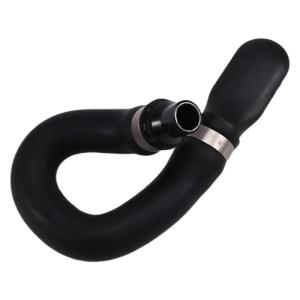
Automotive Accessories for W212 A207 C207 C218 X218 E500 E550 Water Cooling Pipe Heater Hose A2128302300 A2128302896

Optimize engine performances with this high efficiency water cooling pipe heater hose, engineered to enhances coolant flow. Crafted from industrial grade synthetic rubber, it withstands extreme temperatures while reducing fluid resistance for reliable cooling system operation. Ideal for owners seeking corrosion resistant component to maintain vehicle performances. Automotive Accessories for W212 A207 C207 C218 X218 E500 E550 Water Cooling Pipe Heater Hose A2128302300 A2128302896 Features: Optimize engine performances with this high efficiency water cooling pipe heater hose, engineered to enhances coolant flow. Crafted from industrial grade synthetic rubber, it withstands extreme temperatures while reducing fluid resistance for reliable cooling system operation. Ideal for owners seeking corrosion resistant component to maintain vehicle performances. Perfect for daily commutes, highway driving, or harsh weather conditions, ensuring stable engine temperatures and enhances fuel efficiency

Lemon cart
Lemon cart

Seller ratings 96%

Review

Oops
This video has no reviews.

You May Also Like

ICON laptop brand new original Intel Win11 Intel Pentium 6500Y Core i7 256G 512G Solid State Hard Disk 15.6-Inch HD Portable Student Office Business Game Laptop Rose Gold
00:27

ICON laptop brand new original Intel Win11 Intel Pentium 6500Y Core i7 256G 512G Solid State Hard Disk 15.6-Inch HD Portable Student Office Business Game Laptop Rose Gold

ESP32 WROOM-32 Development Board TYPE-C Micro USB WiFi Bluetooth Ultra-Low Power Consumption Dual Core Wireless BT Module 30 pin
00:40

ESP32 WROOM-32 Development Board TYPE-C Micro USB WiFi Bluetooth Ultra-Low Power Consumption Dual Core Wireless BT Module 30 pin

Whalekom High-Performance 2.5" SATA III SSD 128GB/256GB/512GB/1TB Internal Solid State Drive for PC Laptop
00:17

Whalekom High-Performance 2.5" SATA III SSD 128GB/256GB/512GB/1TB Internal Solid State Drive for PC Laptop

AMD RYZEN 5 3500X Gaming PC Set With RX580 8GB Video Card Full Set Desktop Computer For Gamer Office
00:59

AMD RYZEN 5 3500X Gaming PC Set With RX580 8GB Video Card Full Set Desktop Computer For Gamer Office

Crucial 8GB & 4GB DDR3 1866Mhz RAM: A Comprehensive Guide\\n\\n What is Crucial DDR3 Laptop RAM?\\n\\nCrucial DDR3 Laptop RAM is a type of Random Access Memory (RAM) designed specifically for laptops and notebooks. This particular RAM module is available in two capacities - 8GB and 4GB - and operates at various speeds including 1866MHz, 1600MHz, 1333MHz, and 1066MHz. It supports PC3-14900, PC3-12800, PC3-10600, and PC3-8500 speed ratings, making it compatible with a wide range of notebook models.\\n\\n Key Features of Crucial DDR3 RAM\\n\\n- **Capacity**: Available in 8GB and 4GB configurations\\n- **Speed**: Supports 1866MHz, 1600MHz, 1333MHz, and 1066MHz speeds\\n- **Voltage**: 1.5V 204pin SO-DIMM memory\\n- **Compatibility**: PC3-14900, PC3-12800, PC3-10600, and PC3-8500 speed ratings\\n\\n Compatibility with Various Notebooks\\n\\nCrucial DDR3 Laptop RAM is compatible with a wide range of notebook models, including those from popular manufacturers like Dell, HP, Lenovo, and Acer. To ensure compatibility with your specific laptop model, refer to the manufacturer's specifications or consult Crucial's compatibility checker.\\n\\n How to Choose the Right Crucial RAM for Your Notebook\\n\\nChoosing the right Crucial DDR3 Laptop RAM for your notebook involves understanding your laptop's RAM requirements and identifying the appropriate speed rating.\\n\\n Understanding PC3-14900 & Other Speed Ratings\\n\\nThe speed ratings of Crucial DDR3 Laptop RAM include PC3-14900, PC3-12800, PC3-10600, and PC3-8500. These ratings represent the theoretical peak transfer rate of the memory module, measured in megabytes per second (MB/s).\\n\\n- **PC3-14900**: 1866MHz speed, 14,900 MB/s transfer rate\\n- **PC3-12800**: 1600MHz speed, 12,800 MB/s transfer rate\\n- **PC3-10600**: 1333MHz speed, 10,600 MB/s transfer rate\\n- **PC3-8500**: 1066MHz speed, 8,500 MB/s transfer rate\\n\\n Identifying Your Laptop's RAM Requirements\\n\\nTo determine the appropriate Crucial DDR3 Laptop RAM for your notebook, consult the manufacturer's specifications or use Crucial's compatibility checker. Consider factors such as the maximum supported capacity, voltage, and speed rating when selecting the right RAM module for your laptop.\\n\\n Installing Crucial DDR3 RAM: A Step-by-Step Guide\\n\\nInstalling Crucial DDR3 Laptop RAM is a straightforward process that involves preparing for installation, inserting the RAM module into your notebook, and verifying installation success.\\n\\n Preparing for Installation\\n\\nBefore installing Crucial DDR3 Laptop RAM, ensure that your laptop is powered off and unplugged from any power sources. Gather necessary tools, such as a screwdriver, and prepare a clean, static-free workspace.\\n\\n Inserting the RAM Module into Your Notebook\\n\\n1. Open your laptop's RAM compartment by removing the screws securing the panel.\\n2. Align the notches on the Crucial DDR3 Laptop RAM module with the slots on your notebook's motherboard.\\n3. Gently press the RAM module into place until it clicks.\\n4. Replace the screws securing the RAM compartment panel.\\n\\n Verifying Installation Success\\n\\nAfter installing Crucial DDR3 Laptop RAM, power on your laptop and enter the BIOS/UEFI settings to verify that the new RAM module is recognized. Check your operating system's system information to confirm that the correct amount of RAM is installed.\\n\\n Maximizing Performance with Crucial DDR3 RAM\\n\\nTo maximize performance with Crucial DDR3 Laptop RAM, optimize your laptop's settings and enhance system stability and speed.\\n\\n Optimizing Your Laptop's Settings\\n\\nAdjust your laptop's power settings, disable unnecessary startup programs, and configure the operating system's virtual memory settings to improve overall performance.\\n\\n Enhancing System Stability & Speed\\n\\nRegularly update your operating system and drivers, defragment your hard drive, and run system maintenance tasks to maintain optimal system stability and speed.\\n\\n Conclusion: Upgrade Your Notebook with Crucial DDR3 RAM\\n\\nUpgrading your notebook with Crucial DDR3 Laptop RAM can significantly enhance performance and stability. By understanding your laptop's RAM requirements, choosing the right Crucial DDR3 Laptop RAM, and following the installation process, you can enjoy faster system speeds and improved overall performance.\"
00:40

Crucial 8GB & 4GB DDR3 1866Mhz RAM: A Comprehensive Guide\\n\\n What is Crucial DDR3 Laptop RAM?\\n\\nCrucial DDR3 Laptop RAM is a type of Random Access Memory (RAM) designed specifically for laptops and notebooks. This particular RAM module is available in two capacities - 8GB and 4GB - and operates at various speeds including 1866MHz, 1600MHz, 1333MHz, and 1066MHz. It supports PC3-14900, PC3-12800, PC3-10600, and PC3-8500 speed ratings, making it compatible with a wide range of notebook models.\\n\\n Key Features of Crucial DDR3 RAM\\n\\n- **Capacity**: Available in 8GB and 4GB configurations\\n- **Speed**: Supports 1866MHz, 1600MHz, 1333MHz, and 1066MHz speeds\\n- **Voltage**: 1.5V 204pin SO-DIMM memory\\n- **Compatibility**: PC3-14900, PC3-12800, PC3-10600, and PC3-8500 speed ratings\\n\\n Compatibility with Various Notebooks\\n\\nCrucial DDR3 Laptop RAM is compatible with a wide range of notebook models, including those from popular manufacturers like Dell, HP, Lenovo, and Acer. To ensure compatibility with your specific laptop model, refer to the manufacturer's specifications or consult Crucial's compatibility checker.\\n\\n How to Choose the Right Crucial RAM for Your Notebook\\n\\nChoosing the right Crucial DDR3 Laptop RAM for your notebook involves understanding your laptop's RAM requirements and identifying the appropriate speed rating.\\n\\n Understanding PC3-14900 & Other Speed Ratings\\n\\nThe speed ratings of Crucial DDR3 Laptop RAM include PC3-14900, PC3-12800, PC3-10600, and PC3-8500. These ratings represent the theoretical peak transfer rate of the memory module, measured in megabytes per second (MB/s).\\n\\n- **PC3-14900**: 1866MHz speed, 14,900 MB/s transfer rate\\n- **PC3-12800**: 1600MHz speed, 12,800 MB/s transfer rate\\n- **PC3-10600**: 1333MHz speed, 10,600 MB/s transfer rate\\n- **PC3-8500**: 1066MHz speed, 8,500 MB/s transfer rate\\n\\n Identifying Your Laptop's RAM Requirements\\n\\nTo determine the appropriate Crucial DDR3 Laptop RAM for your notebook, consult the manufacturer's specifications or use Crucial's compatibility checker. Consider factors such as the maximum supported capacity, voltage, and speed rating when selecting the right RAM module for your laptop.\\n\\n Installing Crucial DDR3 RAM: A Step-by-Step Guide\\n\\nInstalling Crucial DDR3 Laptop RAM is a straightforward process that involves preparing for installation, inserting the RAM module into your notebook, and verifying installation success.\\n\\n Preparing for Installation\\n\\nBefore installing Crucial DDR3 Laptop RAM, ensure that your laptop is powered off and unplugged from any power sources. Gather necessary tools, such as a screwdriver, and prepare a clean, static-free workspace.\\n\\n Inserting the RAM Module into Your Notebook\\n\\n1. Open your laptop's RAM compartment by removing the screws securing the panel.\\n2. Align the notches on the Crucial DDR3 Laptop RAM module with the slots on your notebook's motherboard.\\n3. Gently press the RAM module into place until it clicks.\\n4. Replace the screws securing the RAM compartment panel.\\n\\n Verifying Installation Success\\n\\nAfter installing Crucial DDR3 Laptop RAM, power on your laptop and enter the BIOS/UEFI settings to verify that the new RAM module is recognized. Check your operating system's system information to confirm that the correct amount of RAM is installed.\\n\\n Maximizing Performance with Crucial DDR3 RAM\\n\\nTo maximize performance with Crucial DDR3 Laptop RAM, optimize your laptop's settings and enhance system stability and speed.\\n\\n Optimizing Your Laptop's Settings\\n\\nAdjust your laptop's power settings, disable unnecessary startup programs, and configure the operating system's virtual memory settings to improve overall performance.\\n\\n Enhancing System Stability & Speed\\n\\nRegularly update your operating system and drivers, defragment your hard drive, and run system maintenance tasks to maintain optimal system stability and speed.\\n\\n Conclusion: Upgrade Your Notebook with Crucial DDR3 RAM\\n\\nUpgrading your notebook with Crucial DDR3 Laptop RAM can significantly enhance performance and stability. By understanding your laptop's RAM requirements, choosing the right Crucial DDR3 Laptop RAM, and following the installation process, you can enjoy faster system speeds and improved overall performance.\"

Barrowch PC Memory RAM Water Block +2 Armors Vest Multi-mode Display Module Cooling Cooler Set Flash Stick 5V ARGB FBRWB-PA3
00:46

Barrowch PC Memory RAM Water Block +2 Armors Vest Multi-mode Display Module Cooling Cooler Set Flash Stick 5V ARGB FBRWB-PA3

Switching Power Supply 5V 9V 12V 24V  AC To 220V DC Transformer LED Strip Switch Driver 1A 2A 3A 5A 8A 10A 15A 20A
00:24

Switching Power Supply 5V 9V 12V 24V AC To 220V DC Transformer LED Strip Switch Driver 1A 2A 3A 5A 8A 10A 15A 20A

Western Digital WD Green 2.5 SATA III SSD: The Ultimate Laptop & Desktop Storage Solution
00:37

Western Digital WD Green 2.5 SATA III SSD: The Ultimate Laptop & Desktop Storage Solution

Adjustable PC Graphics Card Bracket Metal GPU Support GPU Stand GPU Bracket 6-96mm
00:12

Adjustable PC Graphics Card Bracket Metal GPU Support GPU Stand GPU Bracket 6-96mm

Heltec WiFi Lora 32 V3 IoT Module with ESP32-S3FN8 & 0.96 Inch OLED Display
00:15

Heltec WiFi Lora 32 V3 IoT Module with ESP32-S3FN8 & 0.96 Inch OLED Display

5Port PC Cooling Hubs 12V 4Pin Pwms Fan Speed Control Satas Power Connectors For Multiple Case Fan Back Sticker Mount
00:12

5Port PC Cooling Hubs 12V 4Pin Pwms Fan Speed Control Satas Power Connectors For Multiple Case Fan Back Sticker Mount

METALFISH ZH1400 CPU Cooler 4 HeatPipes 4PIN PWM Silent ARGB Fan For Intel 1700 1200 115X 1366 2011 AM5 AM4 AM3 x99 x79
00:14

METALFISH ZH1400 CPU Cooler 4 HeatPipes 4PIN PWM Silent ARGB Fan For Intel 1700 1200 115X 1366 2011 AM5 AM4 AM3 x99 x79