Advanced USB Camera Module for Professional 3D Printing Applications Delivers Clear Live Feed with Wide Angle View and Sturdy Design
Advanced USB Camera Module for Professional 3D Printing Applications Delivers Clear Live Feed with Wide Angle View and Sturdy Design
Introduction
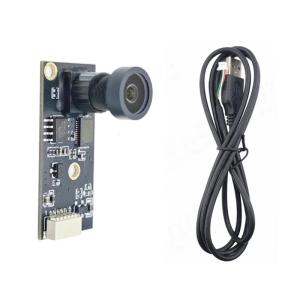
The Advanced USB Camera Module is a specialized device designed to enhance the capabilities of 3D printers by providing real-time monitoring through a high-resolution live feed. With a wide angle view and sturdy design, this camera module caters to the needs of professional designers, educators, and users requiring remote monitoring. In this article, we will delve into the key features, benefits, and usage of the Advanced USB Camera Module, as well as discuss its importance in the realm of 3D printing applications.
What is the Advanced USB Camera Module?
The Advanced USB Camera Module is a Plug and Play camera module specifically developed for 3D printers. It allows users to monitor their prints in real-time, ensuring optimal results and minimizing errors. This camera module is equipped with high-resolution sensors and a wide angle lens, providing comprehensive coverage of the 3D printing process. Moreover, the module is housed in a casing suitable for multiple operating systems, making it compatible with various devices.
Key Features & Benefits
The Advanced USB Camera Module offers numerous advantages for 3D printing enthusiasts and professionals alike. Some of the key features include:
- Clear Live Feed: The high-resolution sensors ensure a crisp and clear live feed, allowing users to monitor their prints effortlessly.
- Wide Angle View: The wide angle lens provides comprehensive coverage of the 3D printing process, capturing every detail of the print.
- Sturdy Design: The camera module is built to withstand the rigors of 3D printing, ensuring long-lasting performance.
- Compatibility: The module is compatible with multiple operating systems, making it accessible to a wide range of users.
These features make the Advanced USB Camera Module an indispensable tool for anyone involved in 3D printing applications.
How to Use the Advanced USB Camera Module
Using the Advanced USB Camera Module is simple and straightforward. Here are the steps to connect and set up the camera module:
Connecting the Camera Module
To connect the camera module, simply plug it into an available USB port on your computer. No drivers are required, as the module is Plug and Play compatible.
Setting Up the Camera Module
Once connected, the camera module will automatically detect and configure itself. No additional setup is required, allowing you to start monitoring your prints immediately.
Monitoring Your 3D Print with Live Feed
With the camera module connected and set up, you can now monitor your 3D prints in real-time. The live feed provides a clear and comprehensive view of the printing process, enabling you to identify any issues and make adjustments as needed.
The Importance of Clear Live Feed & Wide Angle View
In the world of 3D printing, having a clear live feed and wide angle view is crucial for ensuring optimal results. Here's why these features matter:
Why Clear Live Feed Matters
A clear live feed allows users to monitor their prints effortlessly, identifying any issues and making adjustments as needed. This ensures that the final product meets the desired specifications and quality standards.
The Benefits of Wide Angle View
A wide angle view provides comprehensive coverage of the 3D printing process, capturing every detail of the print. This enables users to make informed decisions and optimize their printing settings for the best possible results.
Sturdy Design & Compatibility
In addition to its clear live feed and wide angle view, the Advanced USB Camera Module boasts a sturdy design and compatibility with multiple operating systems. Here's why these features matter:
Why Sturdy Design Matters
A sturdy design ensures that the camera module can withstand the rigors of 3D printing, providing long-lasting performance. This is essential for users who rely on the camera module for critical applications.
Compatibility with Multiple Operating Systems
The Advanced USB Camera Module is compatible with multiple operating systems, making it accessible to a wide range of users. This ensures that everyone can benefit from its features and capabilities, regardless of their preferred device.
Conclusion
In conclusion, the Advanced USB Camera Module is a valuable tool for anyone involved in 3D printing applications. With its clear live feed, wide angle view, sturdy design, and compatibility with multiple operating systems, this camera module delivers exceptional performance and reliability. Whether you're a professional designer, educator, or 3D printing enthusiast, the Advanced USB Camera Module is an indispensable addition to your toolkit.

SZ 3C Electronics
Review

You May Also Like
Compatible Chips for DocuPrint M455 & M455df
Original Epson 001 Ink for Epson L4150 L4160 L6160 L6170 L6190 L14150: A Comprehensive Guide
BrotherR DR 2255 (DR-2255) Black Original Toner Cartridge
30mmx100m Hot Foil Ribbon for DY8 HP241B Coding Printer Machine by Codephil Inc
Canon Original G-Series Refill Ink GI-790 / 790 / GI790 (Black / Cyan / Magenta / Yellow) 1 Set - for G1000 / G1010 / G2000 / G2010 / G3000 / G3010 / G4000 / G4010 Printer
AOS Compatible ERC 30/34/38 Black Printer Ribbons (6 packs)
Epson 664 ink Original Genuine Bottle T664 ink L350 L110 L355 L365 L120 L121 L200 L1300 L220 L300 L310 L565 Printer Epson ink Bote ng
Brandnew Ink Cartridge 46: Black or 46 Colored
GZQIANJI Peripage A40 Portable A4 Printer Paper Mini Inkless Thermal Wireless Bluetooth Printer Maker for Phone Document Office Use
L18050 ET8550 L8050 8500 L8180 L1800 External Waste Ink Bottle Container For DTF DTG UV Modification Easy Maintenance Visible
SUNLU Filament Dryer for 3D Printer Filament S1 Plus Filament Dehydrator with Fan Design Filament Storage can Keep 1.75 2.85 3.00mm PLA PETG ABS Filament Dry During 3D Printing (Black)