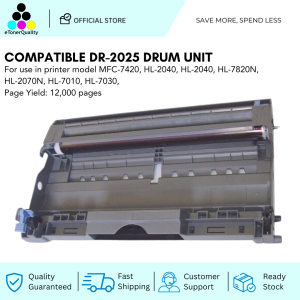
How to Replace Your ETQ Compatible Drum Unit DR-2025
How to Replace Your ETQ Compatible Drum Unit DR-2025
What is a Drum Unit?
A drum unit is a crucial component of a laser printer, responsible for transferring toner onto paper during the printing process. It consists of several parts, including the drum itself, a magnetic roller, and a toner cartridge. Understanding the functionality of a drum unit is essential before attempting to replace it.
Understanding the Functionality of a Drum Unit
The drum unit plays a vital role in the printing process by attracting toner particles onto its surface and then transferring them onto the paper. This process occurs through a series of electrostatic charges and magnetic forces. The drum unit is designed to last for a specific number of prints before it needs to be replaced, which is typically indicated by the printer's error messages or a noticeable decline in print quality.
Identifying the DR-2025 Drum Unit
The DR-2025 drum unit is compatible with ETQ printers and is designed to ensure optimal print quality. It is essential to identify the correct drum unit model for your printer to avoid compatibility issues and ensure smooth operation.
Preparing for Drum Unit Replacement
Before replacing the drum unit, it is crucial to gather the necessary tools and materials and take appropriate safety measures and precautions.
Gather Necessary Tools & Materials
To replace the DR-2025 drum unit, you will need the following items:
- A new DR-2025 drum unit
- A clean, flat workspace
- A soft cloth or lint-free paper towel
- Optional: gloves and safety glasses
Safety Measures & Precautions
When handling toner and drum units, it is essential to take safety measures and precautions to avoid potential health risks and damage to your printer. Follow these guidelines:
- Work in a well-ventilated area
- Wear gloves and safety glasses if desired
- Avoid inhaling toner dust
- Keep the drum unit and toner cartridge away from children and pets
Step-by-Step Guide to Replace the Drum Unit
Replacing the DR-2025 drum unit is a straightforward process that involves removing the old drum unit and installing the new one.
Removing the Old Drum Unit
- Turn off the printer and unplug it from the power source.
- Open the printer's front cover and gently remove the old drum unit.
- Place the old drum unit on a clean, flat surface.
Installing the New DR-2025 Drum Unit
- Remove the new DR-2025 drum unit from its packaging.
- Carefully remove any protective tape or covers from the drum unit.
- Insert the new drum unit into the printer, aligning it with the guide rails.
- Close the printer's front cover.
Finalizing the Replacement Process
After installing the new drum unit, it is essential to perform a few final steps to ensure proper operation:
- Plug the printer back into the power source.
- Turn on the printer and run a test print to verify that the new drum unit is functioning correctly.
Maintaining Your ETQ Compatible Drum Unit DR-2025
Regular maintenance and troubleshooting common issues can help extend the life of your DR-2025 drum unit and ensure optimal print quality.
Regular Maintenance Tips
To maintain the performance of your DR-2025 drum unit, follow these tips:
- Clean the drum unit regularly using a soft cloth or lint-free paper towel.
- Store the drum unit in a cool, dry place when not in use.
- Keep the printer clean and free of dust and debris.
Troubleshooting Common Issues
If you encounter any issues with your DR-2025 drum unit, refer to the following troubleshooting tips:
- Check the printer's error messages and follow the instructions provided.
- Verify that the drum unit is properly installed and aligned.
- Clean the drum unit if necessary.
Conclusion
Replacing your ETQ compatible drum unit DR-2025 is a simple process that can help maintain optimal print quality and extend the life of your printer. By following the steps outlined in this guide and performing regular maintenance, you can ensure that your DR-2025 drum unit continues to function correctly for years to come.

eTonerQuality Reference Number: 250919-16162227
Review

You May Also Like

20Rolls Thermals Printer Paper SelfAdhesive Sticker Labels Compatible for Most Mini Printers BPAFree for School Project
Double Sided Spring Steel Sheet No Warping Easy to Remove 3D Printer Hotbed Build Plate Removal PEO PEI Double Sides

Infini3D Custom 3D Printing Services
Shenglong HP-241B Desktop Automatic Ribbon Printer Small Production Date Production Batch Number Printer Electric Stamping Machine Convenient Paper Box Film Leather Coding Machine Label Printing Machine
SoonMark M4201 Thermal Transfer Printer WiFi Bluetooth
CF256A (56A) Compatible Toner for HP LaserJet MFP
Eyoyo 2D Bluetooth Barcode ScannerPhone Back Clip On ScannerPortable3-In-1 USB & Wireless Rechargeable Bar Code Reader for Retail Warehouse Inventory Management Compatible with iPhoneAndroid iOS
12.7mm Portable Inkjet Printer Mini Handheld Label Printer 600dpi Multiple Languages for Batch Serial Number Plastic Wood Fabric
T6193 Maintenance Box Chip Resetter for Epson Surecolor F6000 | T3000 | T5000 | T7000 | T3070 | T5070

GM803 Series UART USB DC 3.3V Barcode Scanner Reader Module 1D/2D QR Bar Code Reader For Android Arduino
MOTEX embossing machine waterproof sticker manufacturer E-5500 E-505 motex label maker with 6mm 9mm 12mm label tape refill Roll