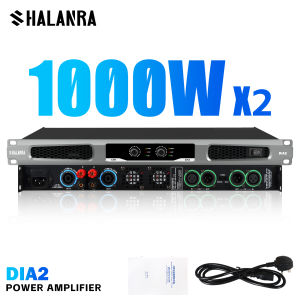
SHALANRA MC80S PRO/DIA6/8 1U Rack Amp: A Comprehensive Guide
SHALANRA MC80S PRO/DIA6/8 1U Rack Amp: A Comprehensive Guide
Overview of SHALANRA MC80S PRO/DIA6/8 1U Rack Amp
The SHALANRA MC80S PRO/DIA6/8 1U rack amp is a powerful outdoor audio amplifier that supports both 2 and 4 channels, making it an ideal choice for various applications. This Class D amplifier delivers up to 1200Watts of output power, providing exceptional sound quality and reliability.
Product Specifications
- Model: SHALANRA MC80S PRO/DIA6/8
- Type: Outdoor Power Amplifier
- Channels: 2/4 Channels
- Class: Class D
- Power Output: 1200Watts
- Mounting Type: 1U Rack Mount
Key Features
- Durable Design: The SHALANRA MC80S PRO/DIA6/8 is built to withstand harsh outdoor conditions, ensuring reliable performance in any environment.
- High-Quality Sound: With its powerful Class D amplifier, this device delivers crystal-clear sound quality, making it perfect for concerts, events, and other outdoor gatherings.
- Various Purification Functions: The SHALANRA MC80S PRO/DIA6/8 offers multiple purification functions to optimize sound quality and enhance listening experiences.
How to Install and Set Up the SHALANRA MC80S PRO/DIA6/8 1U Rack Amp
Setting up the SHALANRA MC80S PRO/DIA6/8 is straightforward and easy. Follow these steps to install and set up your outdoor power amplifier:
Step-by-Step Installation Process
- Unpack the Device: Carefully unpack the SHALANRA MC80S PRO/DIA6/8 from its packaging and inspect for any damage.
- Mount the Rack Amp: Securely mount the 1U rack amp onto a standard 19-inch rack using the included mounting hardware.
- Connect the Power Supply: Plug the power supply into a suitable power outlet and connect it to the amplifier's power input.
- Connect the Audio Source: Connect the audio source (e.g., mixer, receiver) to the amplifier's input terminals.
- Connect the Speakers: Connect the speakers to the amplifier's output terminals.
- Power On and Adjust Settings: Turn on the power switch and adjust the settings according to your preferences.
Connecting the Outdoor Audio System
To ensure optimal performance, follow these guidelines when connecting your outdoor audio system:
- Use High-Quality Cables: Invest in high-quality cables to minimize signal loss and interference.
- Keep Connections Secure: Make sure all connections are secure and tight to prevent loose wires or accidental disconnections.
- Grounding: Ground the system to avoid electrical noise and improve sound quality.
Optimizing the Performance of SHALANRA MC80S PRO/DIA6/8 1U Rack Amp
To get the most out of your SHALANRA MC80S PRO/DIA6/8, follow these tips for maximizing sound quality and utilizing various purification functions:
Maximizing Sound Quality
- Adjust Gain Levels: Fine-tune the gain levels to achieve the desired volume and clarity.
- Equalization: Use the equalizer to balance the frequency response and enhance the overall sound quality.
- Limiters: Implement limiters to protect your speakers and prevent distortion.
Utilizing Various Purification Functions
The SHALANRA MC80S PRO/DIA6/8 offers several purification functions to optimize sound quality. These include:
- Noise Reduction: Reduce unwanted noise and interference for a cleaner sound.
- Distortion Control: Minimize distortion and maintain a smooth, natural sound.
- Dynamic Range Compression: Enhance the dynamic range for a more balanced and engaging listening experience.
Troubleshooting Common Issues with SHALANRA MC80S PRO/DIA6/8 1U Rack Amp
Encountering problems with your SHALANRA MC80S PRO/DIA6/8? Here are some tips for identifying and resolving issues:
Identifying and Resolving Problems
- Check Connections: Ensure all connections are secure and properly connected.
- Verify Power Supply: Check if the power supply is functioning correctly and supplying sufficient voltage.
- Inspect Cables: Inspect cables for any damage or wear that may affect signal transmission.
- Reset Settings: Reset the amplifier's settings to default values and reconfigure them according to your preferences.
Tips for Maintaining Optimal Performance
- Regular Maintenance: Clean the amplifier regularly to remove dust and debris that may affect performance.
- Monitor Temperature: Keep the amplifier in a well-ventilated area to prevent overheating.
- Update Firmware: Regularly check for firmware updates and install them to ensure optimal performance.

BRYANT AUDIO
You May Also Like

Precise Fit Earbud Ear Pad For Fitness/Everyday Headsets Earpads Breathable Ear Cushions Earmuff for Sports Commuting

V8/K08 Transparent Mecha Music Speakers: A Comprehensive Guide

X91 OWS Earhook Earphones Bluetooth 5.3 Low Latency Gaming Sport Headset HiFi Stereo Noise Reduction Wireless Headphones Earbuds
![NSS 3 Band Radio FM AM original NS-108High Fidelity soundsupport FM/AM/TV Channel Radio AC or DC Charging FM Radio [COD]](https://img.lazcdn.com/g/p/187003b2bf6e25c55c741f4c94aeb4c8.jpg_300x300q80.jpg)
NSS 3 Band Radio FM AM original NS-108High Fidelity soundsupport FM/AM/TV Channel Radio AC or DC Charging FM Radio [COD]

Baofeng K5M Portable type Walkie Talkies 5W High Power 10 KM Long Range 999 Dual Band FM Radio Long Range Type-C Chargin

TANG STORE 2023 New WiFi MP3 MP4 Player Bluetooth Full Touch Screen HiFi Sound Music Player with FM Recorder Ebook Clock Browser

2pcs Wireless Kids Walkie Talkie Radio Interphone With 50m Range

20KM Motorola GP360 Portable Mini Radio Walkie Talkie Long Range 10W 4800mAh 199 Channels AM/FM Clear Audio Handheld Two Way Radio Long Range Walkie-Talkies Outdoor/School/Mountain area/Hotel/Kitchen/Underpass/High Rise IP54 Water/dust/shockproof
MeeGoo E19 Bluetooth Earphones Noise Cancelling TWS Wireless Earpods Touch Screen
4-Inch Rechargeable Portable Karaoke Bluetooth Speaker with Microphone KTS-1111
1 Pair Of Open Wireless Earbuds Touch Operation Low Latency 144 Languages And Real-time Translation. Gaming Earphones With Built-in Condenser Microphone SeaSpark