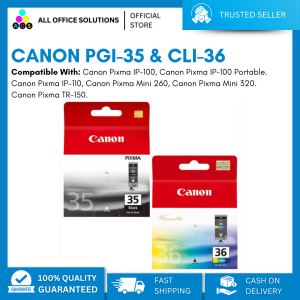
Original Canon PGI-35 Black & CLI-36 Color Ink Cartridge
Original Canon PGI-35 Black & CLI-36 Color Ink Cartridge
What Are Original Canon Ink Cartridges?
Original Canon ink cartridges are designed specifically for use with Canon printers. These high-quality Canon printer ink cartridges provide superior print quality, longevity, and reliability compared to generic or third-party alternatives.
High-Quality Canon Printer Ink Cartridges
When it comes to printing, nothing beats the performance and consistency of genuine Canon ink cartridges. Their advanced ink formulations ensure vibrant colors and sharp text, while their durable construction minimizes waste and reduces downtime.
Benefits of Using Original Canon Ink Cartridges
There are several advantages to using original Canon ink cartridges:
- Superior Print Quality: Original Canon ink cartridges produce high-resolution prints with accurate colors and crisp text.
- Longevity: Canon ink cartridges are built to last, providing consistent performance over time.
- Reliability: Genuine Canon ink cartridges are designed to work seamlessly with Canon printers, minimizing the risk of compatibility issues.
How to Choose the Right Canon Ink Cartridge
Choosing the right Canon ink cartridge depends on your printer model and print needs. Two popular choices are the CLI-36 color ink cartridge and the Canon PGI-35 black ink cartridge.
CLI-36 Color Ink Cartridge
The CLI-36 color ink cartridge is perfect for users who require vibrant, accurate colors in their prints. This cartridge is compatible with various Canon printers, including the PIXMA series.
Canon PGI-35 Black Ink Cartridge
For those who primarily print text documents, the Canon PGI-35 black ink cartridge is an excellent choice. This cartridge delivers sharp, clear text and is compatible with several Canon printer models.
How to Install & Replace Canon Ink Cartridges
Installing and replacing Canon ink cartridges is a straightforward process that can be completed in just a few minutes.
Step-by-Step Guide to Installing Original Canon Ink Cartridges
- Turn on your Canon printer and open the ink cartridge access door.
- Remove any empty ink cartridges by gently pulling them out of their slots.
- Open the packaging of the new ink cartridge and remove the protective tape.
- Insert the new ink cartridge into its corresponding slot and press down until it clicks into place.
- Close the ink cartridge access door and allow the printer to initialize the new ink cartridges.
Troubleshooting Common Issues with Canon Ink Cartridges
If you experience issues with your Canon ink cartridges, try these troubleshooting tips:
- Print Head Alignment: Run the print head alignment tool in your printer settings to ensure accurate printing.
- Ink Cartridge Cleaning: Clean the ink cartridge contacts using a soft, lint-free cloth to improve connectivity.
- Printer Reset: Perform a printer reset to clear any software-related issues.
Maximizing Your Canon Printer's Performance
To get the most out of your Canon printer, follow these tips for maintaining your printer and extending the life of your ink cartridges.
Tips for Maintaining Your Canon Printer
- Regularly clean the printer exterior and interior components to prevent dust buildup.
- Keep the printer software updated to ensure optimal performance.
- Store the printer in a cool, dry location away from direct sunlight.
Extending the Life of Your Canon Ink Cartridges
- Print only when necessary to conserve ink.
- Use draft mode for non-critical prints to reduce ink consumption.
- Store unused ink cartridges in a cool, dry place to prevent premature drying.

AllOfficeSolutions Reference Number: 250923-161608
Review

You May Also Like
Brother DCP-L2540DW Mono Laser Multi-function Printer
Epson Replacement Parts For Epson 120 Ink Damper. Epson L360 Ink Hose. Epson L121 Ink Damper Hose. L220 L210 Refurbished
Brother Compatible Toner Powder Refill 1000g 500g (Premium Quality)
300DPI/203dpi PeriPage A4 Portable Thermal Printer Bluetooth Photo PDF Document Tattoo Tranfer Paper/Folded/Rolls Paper Printing
3D Printer Enhances Durability Easy Replacement Heavy Duty Printing Needs for 5M 3D Printer Accessories
LIOTOG M2 Label Printer: A Compact & Portable Inkless Thermal Printer for Photo Sticker Making and Adhesive Paper Printing
【PH Ready Stock】L&C Refill Ink For Brother Ink BTD60 BT5000 BT6000 Dye Ink For Printer DCP-T420W T710W 108ML btd60 brother ink

GZQIANJI Android 11 Terminal POS System With 58mm Receipt Printer Scan 1D/2D Code By Camera Android All-in-one Handheld POS Machine
LOWEST PRICE SHINY COLOR SUBLIMATION INK - 1 LITER - High Quality (per bottle/1 SET)
30 Bright Non-Repeat Colors 3D Pen Filament diameter 1.75mm PLA/PCL/ABS 150m Total Length with 40 Pages of Copy Paintings
eTONER Compatible TN-2150 Toner Cartridge for use in HL-2140 HL-2117W