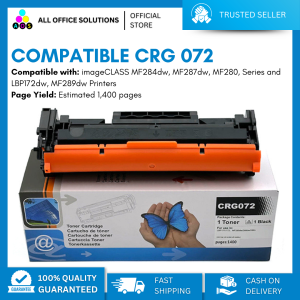
AOS Compatible CRG-072 CRG072H CRG072 Toner Cartridge for ImageCLASs LBP 172dw 170 MF284dw MF287 MF289 MF280 Printer
AOS Compatible CRG-072 CRG072H CRG072 Toner Cartridge for ImageCLASs LBP 172dw 170 MF284dw MF287 MF289 MF280 Printer
Introduction to AOS Compatible CRG-072 Toner Cartridges
What is an AOS Compatible CRG-072 Toner Cartridge?
The AOS Compatible CRG-072 Toner Cartridge is a high-quality toner cartridge designed to work seamlessly with ImageCLAS LBP and MF printers, including the LBP 172dw, LBP 170, MF284dw, MF287, MF289, and MF280 printers. This toner cartridge is compatible with CRG-072, CRG072H, and CRG072 models, providing a cost-effective alternative to original equipment manufacturer (OEM) toner cartridges.
Benefits of Using AOS Compatible CRG-072 Toner Cartridges
Using AOS Compatible CRG-072 Toner Cartridges offers several benefits, including:
- Cost-effective: AOS Compatible CRG-072 Toner Cartridges provide high-quality prints at a lower cost compared to OEM toner cartridges.
- Compatibility: These toner cartridges work seamlessly with ImageCLAS LBP and MF printers, ensuring reliable performance.
- High-quality prints: AOS Compatible CRG-072 Toner Cartridges deliver sharp, clear, and consistent prints, making them ideal for both personal and professional use.
Choosing the Right Toner Cartridge for Your Printer
High-Quality Toner Cartridge Options for ImageCLAS LBP & MF Printers
When choosing a toner cartridge for your ImageCLAS LBP or MF printer, consider the following factors:
- Compatibility: Ensure the toner cartridge is compatible with your specific printer model.
- Quality: Look for high-quality toner cartridges that deliver sharp, clear, and consistent prints.
- Cost-effectiveness: Consider the cost of the toner cartridge and compare it to OEM options.
How to Identify the Correct Toner Cartridge for Your Printer
To identify the correct toner cartridge for your ImageCLAS LBP or MF printer, follow these steps:
- Check the model number of your printer.
- Consult the user manual or manufacturer's website for information on compatible toner cartridges.
- Verify that the toner cartridge you choose is compatible with your specific printer model.
Installing and Using the AOS Compatible CRG-072 Toner Cartridge
Step-by-Step Guide to Installing the CRG-072 Toner Cartridge
To install the AOS Compatible CRG-072 Toner Cartridge, follow these steps:
- Turn off your printer and unplug it from the power source.
- Open the front cover of your printer.
- Remove the old toner cartridge by gently pulling it out of the slot.
- Carefully remove the new toner cartridge from its packaging.
- Remove any protective tape or labels from the new toner cartridge.
- Insert the new toner cartridge into the slot, making sure it is securely in place.
- Close the front cover of your printer.
- Turn on your printer and allow it to perform its initialization process.
Tips for Maximizing the Life of Your Toner Cartridge
To maximize the life of your AOS Compatible CRG-072 Toner Cartridge, follow these tips:
- Store the toner cartridge properly: Keep the toner cartridge in a cool, dry place away from direct sunlight.
- Use the printer regularly: Regularly using the printer helps prevent the toner from drying out.
- Clean the printer regularly: Cleaning the printer helps prevent dust and debris from clogging the toner cartridge.
Troubleshooting Common Issues with AOS Compatible CRG-072 Toner Cartridges
Addressing Problems with Print Quality and Toner Usage
If you experience issues with print quality or toner usage, consider the following solutions:
- Check the toner cartridge: Ensure the toner cartridge is properly installed and not damaged.
- Clean the printer: Clean the printer to remove any dust or debris that may be affecting print quality.
- Reset the printer: Resetting the printer can help resolve issues with toner usage.
Solutions for Common Issues with AOS Compatible CRG-072 Toner Cartridges
If you continue to experience issues with your AOS Compatible CRG-072 Toner Cartridge, consider the following solutions:
- Contact customer support: Reach out to the manufacturer's customer support for assistance.
- Replace the toner cartridge: If the toner cartridge is damaged or not functioning properly, replace it with a new one.
- Consult the user manual: Refer to the user manual for troubleshooting tips and guidance.

AllOfficeSolutions Reference Number: 250923-161608
Review

You May Also Like
Epson 664 ink Original Genuine Bottle T664 ink L350 L110 L355 L365 L120 L121 L200 L1300 L220 L300 L310 L565 Printer Epson ink Bote ng
Suction tools for empty cartridges or refill kit
ETQ Compatible Oki C332 OC332 Toner Cartridge for OKI MC363 C332dn Color Printer
AOS Compatible DR267CL DR263CL DR-267 DR-263 DR 267CL DR 263CL for Brother Printer
Epson Printer Carriage Motor: A Comprehensive Guide
Paper Pickup Roller for HP 1102 1132 1212 P1102 M1132 M1212nf M1214nfh M1217nfw P1102w for Canon MF3010 RL1-1442-000 RL1-2593-000 Pickup Roller For HP P1005 M1132 M125a M127FN P1102 P1102W CP2020 CP2025 for Canon LBP 3018 3108
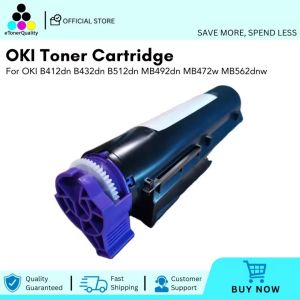
ETQ Compatible OKI Toner Cartridge For OKI B412dn B432dn B512dn MB492dn MB472w MB562dnw
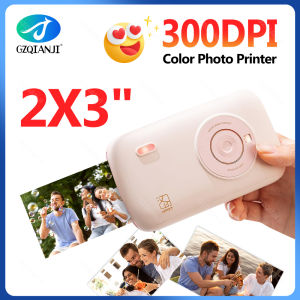
Portable Color Photo Printer Mini Pocket 300dpi Bluetooth for DIY Share Photo Picture Work Home CP2100 Machine 2x3 inch Papers

Deli 7500 Single Row 8 Price Tag Machine Supermarket Product Pricing Machine Price Tag Printer Pricing Device
Phomemo A4 Thermal Paper Quick-dry Continuous Thermal Printing Paper Compatible with M08F/M832/M833/M834 MT810 and Other Portable Thermal Printer 8.5\"x11\" Documents Study Notes 2 Rolls
1Pcs Wax Ribbon Printing 30mm x 100m Hot Foil Ribbon For DY8 HP241B Coding Machine By Codephil Inc