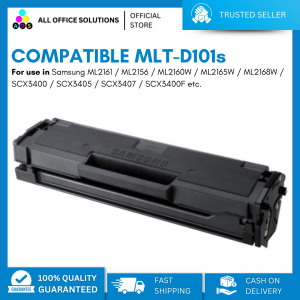
Brand New Compatible Laser Toner Cartridge MLT-D101 MLT D101S for use in Samsung Printer
Brand New Compatible Laser Toner Cartridge MLT-D101 MLT D101S for use in Samsung Printer
Introduction to High-Quality Printer Toner
In today's digital age, printing remains a vital aspect of our daily lives. Whether it's for business purposes, educational needs, or personal projects, having a high-quality printer toner cartridge is essential. In this article, we will focus on the MLT-D101 Compatible Toner and MLT D101S Laser Toner, both specifically designed for Samsung printers.
What is MLT-D101 Compatible Toner
The MLT-D101 Compatible Toner is a brand new, high-quality printer toner cartridge designed to work seamlessly with Samsung printers. It offers superior print quality, cost-effectiveness, and environmental benefits compared to generic alternatives.
How to Identify High-Quality Printer Toner
When shopping for printer toner cartridges, it's crucial to know how to identify high-quality products. Look for reputable brands, genuine OEM parts, and certifications like ISO 9001 or ISO 14001. A high-quality toner cartridge should have a consistent print output, minimal smudging, and a long shelf life.
Benefits of Using Brand New Compatible Toner
Enhanced Print Quality
One of the primary advantages of using brand new compatible toner cartridges is the improved print quality they offer. The MLT-D101 and MLT D101S toners produce sharp, crisp, and clear prints, making them ideal for professional and personal use.
Cost-Effective Printing Solution
Another significant benefit of using brand new compatible toner cartridges is their cost-effectiveness. Compared to OEM toner cartridges, compatible toners are often more affordable, allowing you to save money on printing costs without compromising on quality.
Environmentally Friendly Printing Option
Finally, using brand new compatible toner cartridges is an environmentally friendly choice. These toners are designed to reduce waste and minimize the carbon footprint associated with printing. By opting for compatible toners, you can contribute to a greener planet while enjoying high-quality prints.
How to Install MLT-D101 & MLT D101S Toner Cartridge
To get the most out of your MLT-D101 and MLT D101S toner cartridges, it's essential to know how to install them properly. Follow these steps to ensure a smooth installation process:
Preparing Your Printer for Installation
Before installing the new toner cartridge, make sure your printer is turned off and unplugged. Remove the old toner cartridge and dispose of it according to local regulations.
Step-by-Step Installation Process
- Open the front cover of your printer and locate the toner cartridge compartment.
- Remove the protective tape from the new toner cartridge.
- Insert the new toner cartridge into the compartment, ensuring it is aligned correctly.
- Close the front cover of your printer and plug it back in.
- Turn on your printer and follow the on-screen instructions to initialize the new toner cartridge.
Troubleshooting Common Issues
If you encounter any issues during the installation process, refer to your printer's user manual or contact Samsung customer support for assistance. Common problems include misaligned toner cartridges, incorrect insertion, or low toner levels.
Conclusion: Maximizing Printer Performance with Brand New Compatible Toner
In conclusion, using brand new compatible toner cartridges like the MLT-D101 and MLT D101S can significantly enhance your printing experience. These toners offer superior print quality, cost-effectiveness, and environmental benefits compared to generic alternatives. By following the installation steps and troubleshooting tips provided in this article, you can maximize your printer's performance and enjoy high-quality prints for years to come.

AllOfficeSolutions Reference Number: 250923-161608
Review

You May Also Like

INKSCRIBED CRG331 CRG131 CRG731 CRG316 CRG116 CRG716 Compatible Colored Toner Cartridge for Canon
Original Zebra Ribbon Cartridge Printing Consumables 800300-301CN/250CN /252CN/250DW/250TW YMCKO Color Ribbon Printing Supplies For PVC Card Printer Zebra ZC100/300 Printing Supplies
SQUID INK RIBBON LX310 LQ310

Japan Transfer Belt for Use and Compatible with MPC 2003 2503 3003 3503 4503 5503 6003 6503 2004 2504 3004 3504 5504 6004
KRYON 102x152mm Size High Glossy Photo Paper 4x6 Inches 100 Sheets 48Ib 180Gsm For Inkjet Printer
300Pcs Glittering Thermal Label Water Oil Resistant Adhesive Label Sticker Label Scratch Resistant Address Labels
Innovative Aluminum LED Light Kit for 3D Printing Projects Assembly Required No Cover Included
High-Blackness Universal Toner Refill for Brother DCP 2540/2700/5900/8910 HL1000 | Crisp Prints | PH Office/Home Ready
Epson EcoTank Monochrome M1170 Wi-Fi Ink Tank Printer
Compatible for Brother LC263 LC261 Ink Cartridges: Suitable for Brother MFC-J480DW, DCP-J562DW, MFC-J680DW, MFC-J880DW Printers
PPS UV Ink Damper Square for DX4/DX5/XP600/TX800/DX11/I3200 Printhead