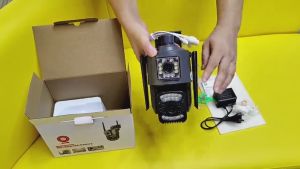
ICSEE XM R6 Dual Lens CCTV Camera: Features & Benefits
ICSEE XM R6 Dual Lens CCTV Camera: Features & Benefits
The ICSEE XM R6 Dual Lens CCTV Camera is a versatile security solution designed to provide comprehensive surveillance coverage both indoors and outdoors. This 360-degree WiFi security camera offers a robust feature set that ensures clear monitoring from far and near. In this article, we'll delve into the key features, setup process, security enhancements, and frequently asked questions surrounding the ICSEE XM R6 Dual Lens CCTV Camera.
Key Features of ICSEE XM R6 Dual Lens CCTV Camera
Dual Lens Design
The ICSEE XM R6 boasts a dual-lens design, with the top lens being 3.6mm and the bottom lens being 6mm. This combination of wide-angle viewing and long-distance viewing enables clear monitoring from various distances, making it ideal for both indoor and outdoor applications.
Pan Tilt Move Functionality
The bottom lens of the ICSEE XM R6 offers horizontal pan movement of up to 270 degrees and vertical tilt movement of up to 90 degrees. This pan tilt move functionality allows users to capture a broader field of view and track objects or individuals within the camera's range.
Connectivity & Storage Options
The ICSEE XM R6 supports both 2.4G WiFi and RJ45 network ports for internet access, ensuring reliable connectivity to your home or business network. Additionally, the camera offers TF storage and cloud storage options, allowing users to choose their preferred method of storing recorded footage.
How to Set Up & Use ICSEE XM R6 Dual Lens CCTV Camera
Connecting the Camera to Wi-Fi
To connect the ICSEE XM R6 to your Wi-Fi network, follow these steps:
- Power on the camera and ensure it is connected to a power source.
- Download the iCSee app from the App Store or Google Play Store.
- Open the app and follow the on-screen instructions to connect the camera to your Wi-Fi network.
Setting Up Cloud Storage
To set up cloud storage for the ICSEE XM R6, follow these steps:
- Open the iCSee app and navigate to the camera settings.
- Select the cloud storage option and enter your payment details.
- Once the payment is processed, your camera will be connected to the cloud storage service.
Configuring Audio & Video Intercom
To enable two-way voice intercom and video synchronous recording and playback, follow these steps:
- Open the iCSee app and navigate to the camera settings.
- Enable the audio and video intercom options.
- Test the functionality by initiating a call or recording from the app.
Enhancing Security with ICSEE XM R6 Dual Lens CCTV Camera
Motion Detection & Smart Alerts
The ICSEE XM R6 offers motion detection capabilities, which trigger smart alerts when movement is detected within the camera's range. Users can receive push notifications and alarm recordings via the iCSee app, allowing them to respond quickly to potential security threats.
Auto Tracking Feature
The auto tracking feature allows the ICSEE XM R6 to automatically move and follow objects or individuals within its range. This feature enhances the camera's ability to capture and monitor suspicious activity, ensuring comprehensive coverage and security.
Humanoid Detection
The ICSEE XM R6 also offers humanoid detection capabilities, which differentiate between human and non-human objects. This feature reduces false alarms and ensures that users are alerted only when a potential threat is detected.
Frequently Asked Questions about ICSEE XM R6 Dual Lens CCTV Camera
Is the camera waterproof?
Yes, the ICSEE XM R6 is an outdoor waterproof camera, making it suitable for use in various weather conditions.
Can I set up night vision infrared and night vision full color?
Yes, the ICSEE XM R6 offers dual light source design, with built-in infrared light and white light. Users can set up night vision infrared and night vision full color modes according to their preferences.
What is the difference between dual lens and dual sensor?
Dual lens refers to the two lenses used in the ICSEE XM R6, while dual sensor refers to the two sensors used to capture footage from each lens. The dual-lens dual-sensor design allows users to capture clear footage from various distances and angles.
In conclusion, the ICSEE XM R6 Dual Lens CCTV Camera offers a comprehensive feature set that enhances security coverage both indoors and outdoors. With its robust connectivity options, motion detection capabilities, and auto tracking feature, the ICSEE XM R6 is an ideal choice for users seeking reliable and versatile surveillance solutions.

V380 PRO
Review

You May Also Like

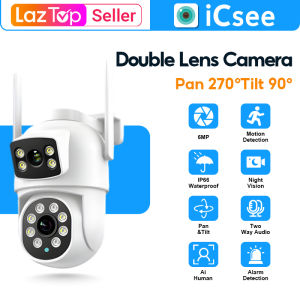
V380 Dual Lens 2K 1080P Ultra HD CCTV PTZ Camera Motion Detect 360 Degree Rotation Infrared Night Vision Two-Way Voice Audio Surveillance Monitoring Security Color Camera Video WIFI Wireless Connection Phone Indoor Outdoor
TP-Link VIGI C320I - 2MP Outdoor IR Bullet Network CCTV Waterproof Camera
【BUY 1 TAKE 2】Original Genuine A9 Cctv camera connect cellphone 1080P Ultra HD no need internet no need wifi with Night Vision with 360°panoramic Infrared Security Camera Motion Detection HD cctv camera
EZVIZ H6 3K/5MP IP Camera Wifi Camera Smart Night Vision CCTV with audio and speaker cctv camera connect cellphone

Outdoor Camera Warm Baby Heating Patch for Mobile Phone Play Camera Anti-Freeze Warmth Essential Tool Lazy Bird Brand
Mini Spy Camera Package Set: A Comprehensive Guide
V380 PRO Dual Lens Bulb CCTV Camera: A Comprehensive Guide
TP-Link Official Store | Tapo C500 | 2MP Indoor Outdoor 360 Degrees Pan and Tilt Motion Tracking WiFi IP Security Cctv Sale Camera Connect to Cellphone with Mic and Speaker
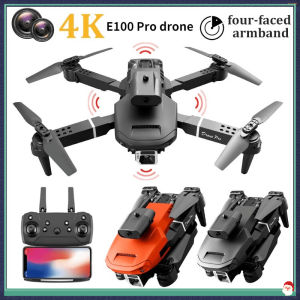
E100 Pro drone 4K HD drone camera WiFi remote control obstacle avoidance portable mini dron
Waterproof Camera Shield: A Comprehensive Guide
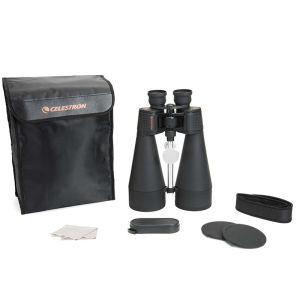
Original Genuine Celestron SkyMaster 25X70HD Pro High Power Astronomy Binoculars Bak4 Optics Low Night Vision Telescope for Birds Moon Observation