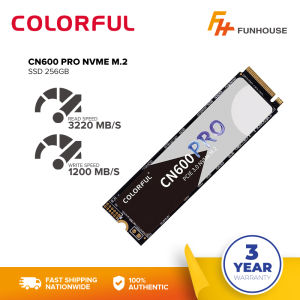
Funhouse | Colorful CN600 NVMe M.2 and CN600 Pro PCIe 3.0 NVMe M.2 SSD
Funhouse | Colorful CN600 NVMe M.2 and CN600 Pro PCIe 3.0 NVMe M.2 SSD
Introduction to High-Performance SSDs
What is a high-performance SSD?
High-performance SSDs, or solid-state drives, are storage devices designed to provide faster data access and transfer rates compared to traditional hard disk drives (HDDs). They offer superior performance, reliability, and durability, making them ideal for various applications, including gaming, video editing, and software development.
What are M.2 SSD storage options?
M.2 SSD storage options refer to the form factor of the solid-state drive. M.2 SSDs are compact, slim, and designed to fit into a specific slot on a motherboard. They offer a wide range of storage capacities and are available in different interface types, such as NVMe, SATA, and PCIe.
CN600 NVMe M.2 SSD
Key features of CN600 NVMe M.2 SSD
The CN600 NVMe M.2 SSD is a high-performance storage solution that offers excellent read and write speeds, making it perfect for gaming, video editing, and software development. It supports PCIe 3.0 interface and NVMe protocol, providing faster data access and transfer rates. The CN600 NVMe M.2 SSD comes in various storage capacities, ranging from 256GB to 2TB, allowing users to choose the perfect fit for their needs.
How to install CN600 NVMe M.2 SSD
Installing the CN600 NVMe M.2 SSD is straightforward. First, ensure your computer supports M.2 SSD storage options. Next, power off your computer and disconnect all cables. Open the case and locate the M.2 slot on the motherboard. Carefully insert the CN600 NVMe M.2 SSD into the slot, making sure it is securely seated. Close the case, reconnect the cables, and power on your computer. Follow the on-screen instructions to initialize the drive and install the operating system.
CN600 Pro PCIe 3.0 NVMe M.2 SSD
Key features of CN600 Pro PCIe 3.0 NVMe M.2 SSD
The CN600 Pro PCIe 3.0 NVMe M.2 SSD is an upgraded version of the CN600 NVMe M.2 SSD, offering even faster read and write speeds and improved reliability. It supports PCIe 3.0 interface and NVMe protocol, providing superior performance and data transfer rates. The CN600 Pro PCIe 3.0 NVMe M.2 SSD comes in various storage capacities, ranging from 256GB to 2TB, allowing users to choose the perfect fit for their needs.
How to install CN600 Pro PCIe 3.0 NVMe M.2 SSD
Installing the CN600 Pro PCIe 3.0 NVMe M.2 SSD is similar to installing the CN600 NVMe M.2 SSD. First, ensure your computer supports M.2 SSD storage options. Next, power off your computer and disconnect all cables. Open the case and locate the M.2 slot on the motherboard. Carefully insert the CN600 Pro PCIe 3.0 NVMe M.2 SSD into the slot, making sure it is securely seated. Close the case, reconnect the cables, and power on your computer. Follow the on-screen instructions to initialize the drive and install the operating system.
Conclusion: Choosing the Right High-Performance SSD
In conclusion, choosing the right high-performance SSD depends on your specific needs and budget. Both the CN600 NVMe M.2 SSD and CN600 Pro PCIe 3.0 NVMe M.2 SSD offer excellent performance and reliability, making them ideal for gaming, video editing, and software development. The CN600 Pro PCIe 3.0 NVMe M.2 SSD offers even faster read and write speeds and improved reliability, making it the better choice for users who require the highest level of performance.

Funhouse
Review
You May Also Like

YOOSEE Power Supply: A Comprehensive Guide
EXPOSE Gaming Monitor for PC 27 Inch 4K 165Hz/144Hz Desktop PC 24 Curve Monitor 24 Inch Monitor 165HZ Monitor for Laptop
140W PD3.1 TYPE-C USB PD Voltage Trigger Adapter 5V 9V 12V 15V 20V 28V Fast Charging Protocol Male USB QC/ PD TO DC Power Supply

Computer Case Desktop Desktop Casings Computer Case 5 Side Transparent Glass White DIY Office Gaming PC Case
DisplayPort to VGA Adapter Cable Double Magnetic Rings Anti Interferences Design Ensures Long Distanced Connection

Circuitrocks Conductive Tape 3M Z-Axis9703 - 2"x6" (50mm x 150mm) Strip

14" Laptop LCD Touch Screen NV140WUM-T08 N140JCN-EEK B140UAK01.3 R140NW4D R9 Display Matrix Panel Replacement 1920x1200 40 Pins
Ulmod Desktop Computer Cooling Fan Screw Fixed Chassis Screw DIY Restoration Heat Dissipation

Mechanic Master C25Plus Portable Mini-tower ITX Aluminum Chassis with Side Transparency Compatible with SFX/ATX Power Supplies.

【In Stock】Eyoyo 7 Inch LCD Small Monitor 140°for Car Office Home Security HDMI VGA with Remote Control
EXPOSE PC Case T8 For Gaming Computer 3 RGB Fans MATX Mini-ITX Gaming Case Home Office Business