Second HDD Caddy SATA 2.5\" HDD SSD 9.5mm Enclosure For Apple Macbook DVD/MS
Second HDD Caddy SATA 2.5" HDD SSD 9.5mm Enclosure For Apple Macbook DVD/MS

What is a Second HDD Caddy SATA 2.5" HDD SSD 9.5mm Enclosure?
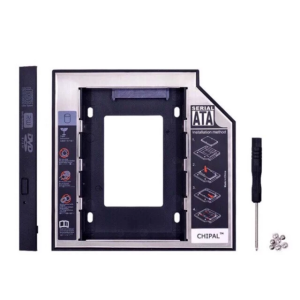
The Second HDD Caddy SATA 2.5" HDD SSD 9.5mm Enclosure is a versatile storage solution designed specifically for Apple Macbooks. This enclosure allows users to replace their DVD/MS drive with a secondary hard drive or solid-state drive (SSD), providing additional storage space for their Macbook.
Key Features
- Compatible with Apple Macbooks
- Supports SATA 2.5" HDD/SSD drives
- 9.5mm thickness
- Easy installation process
Benefits
- Increased storage capacity
- Improved performance with SSD options
- Compact design
- Cost-effective alternative to built-in storage upgrades
Why Choose a Second HDD Caddy SATA 2.5" HDD SSD 9.5mm Enclosure for Your Apple Macbook?
Upgrading your Macbook's storage capacity can greatly enhance its performance and usability. The Second HDD Caddy SATA 2.5" HDD SSD 9.5mm Enclosure is an excellent choice for those looking to add more storage space to their Macbook while maintaining a sleek and compact design.
Compatibility
This enclosure is compatible with various Apple Macbook models, including the MacBook Pro and MacBook Air. It supports SATA 2.5" HDD/SSD drives, making it a versatile solution for different storage needs.
Performance
By replacing the DVD/MS drive with a secondary hard drive or SSD, users can experience improved performance and faster data access speeds. This upgrade can significantly enhance the overall efficiency of their Macbook.
How to Install a Second HDD Caddy SATA 2.5" HDD SSD 9.5mm Enclosure on Your Apple Macbook
Installing the Second HDD Caddy SATA 2.5" HDD SSD 9.5mm Enclosure is a straightforward process that can be completed with minimal effort.
Tools Required
- Phillips head screwdriver
- Pentalobe screwdriver (for older Macbook models)
Step-by-Step Guide
- Power off your Macbook and disconnect all cables and accessories.
- Remove the battery (if applicable) and the screws securing the bottom case.
- Carefully remove the bottom case to access the internal components.
- Disconnect the DVD/MS drive connector and remove the screws holding it in place.
- Insert the Second HDD Caddy SATA 2.5" HDD SSD 9.5mm Enclosure into the empty bay.
- Secure the enclosure with screws and reconnect the SATA cable.
- Reassemble the Macbook by replacing the bottom case and screws.
- Power on your Macbook and verify that the new drive is recognized.
Common Issues and Troubleshooting Tips
While installing the Second HDD Caddy SATA 2.5" HDD SSD 9.5mm Enclosure is generally a simple process, some users may encounter issues.
Installation Problems
- Ensure that all screws are securely tightened before reassembling the Macbook.
- Double-check that the SATA cable is properly connected to both the enclosure and the motherboard.
Performance Issues
- If the new drive is not recognized, try restarting your Macbook.
- Verify that the drive is compatible with your Macbook's operating system.
Conclusion
The Second HDD Caddy SATA 2.5" HDD SSD 9.5mm Enclosure is an excellent choice for users looking to increase their Macbook's storage capacity while maintaining a sleek and compact design. By following the installation guide and troubleshooting tips, users can easily upgrade their Macbook and enjoy improved performance and faster data access speeds.

morningstar
Review

You May Also Like
![Speed Controller Adapter PC 1 to 10 4Pin PWM Cooling Fans HUB Cooler Controller Splitter Adapter [Vktech]](https://img.lazcdn.com/g/p/2bb425bdb62ece1bf4ae0cba8411a65b.jpg_300x300q80.jpg)
Speed Controller Adapter PC 1 to 10 4Pin PWM Cooling Fans HUB Cooler Controller Splitter Adapter [Vktech]

USB Sound Adapter External Sound Card for PC and Laptop,USB Microphones Adapter to 3.5mm(1/8inch) for Headphone Speaker

COMFAST 1300Mbps Wifi USB Adapter 802.11AC Dual Band Wi Fi Adapter 2.4G/5ghz Wireless Adaptador Wi-fi Dongle Win 10/11 Mac Linux

LPO Desktop Segotep Intel Core i5-7400: A Comprehensive Guide

Locking Wheel Owner Rack for Desktop PC Tower Modifiable Width Floor Storage Solution

Jungle Leopard Interstellar V2 CPU Block Fan ARGB 120mm White Prism Lian li Same Model Infinite Mirror Building Block Splicing Single PC Fan 5V 3PIN Mainboard Lighting Sync

Beelink SER5 Max Ryzen 7 5800H TDP 54W Mini PC Win 11 Pro AMD DDR4 RAM M.2 SSD 5560U WiFi6 BT5.2 Triple 4K HD Display Desktop Computer

Desktop Set | Intel Core2Duo LGA775 Socket Assemble DIY Computer Set with RGB Keyboard Mouse and Complete Cables Very Affordable Computer Package REFURBISHED

UpHere Gpu Holder Support Anti Sag Protect Graphics Card Aluminum Material Bracket GL01

Wide Input Voltage Power Supply: A Comprehensive Guide

15.6" 144Hz LCD Screen NE156FHM-NX9 B156HAN15.K M156NWF9 R4 MNF601BA1-4 For Lenovo LOQ 15AHP10 LOQ 15IRX10 Display Matrix Panel