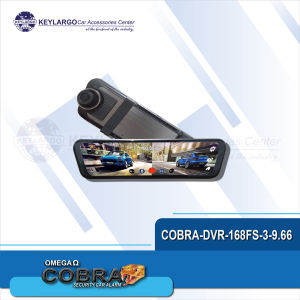
COBRA DIGITAL VIDEO RECORDER 9.66 VIEW MIRROR 4K FRONT + REAR 1080 + WIFI HARD WIRE 6M WIRE WITH REAR CAMERA WITHOUT SD CARD BLACK
COBRA DIGITAL VIDEO RECORDER 9.66 VIEW MIRROR 4K FRONT + REAR 1080 + WIFI HARD WIRE 6M WIRE WITH REAR CAMERA WITHOUT SD CARD BLACK
What is the COBRA Digital Video Recorder 9.66 View Mirror?
The COBRA Digital Video Recorder 9.66 View Mirror is a cutting-edge security solution designed to enhance safety and provide real-time monitoring for vehicles. This product offers a 4K front camera and a 1080p rear camera, both connected via a hard-wire system with a 6-meter cable. Additionally, it includes built-in WiFi capabilities and a black rear camera, making it an ideal choice for drivers seeking reliable video recording and security features.
Key Features
- 4K front camera and 1080p rear camera
- Hard-wire system with a 6-meter cable
- Built-in WiFi capabilities
- Black rear camera
Benefits
- Enhanced safety and security for drivers
- Real-time monitoring and recording
- Easy-to-install hard-wire system
- High-quality video resolution
Target Market
The COBRA Digital Video Recorder 9.66 View Mirror is designed for American drivers looking for a reliable and efficient security solution for their vehicles. It is suitable for both personal and commercial use, making it an excellent choice for individuals and businesses alike.
How to Install the COBRA Digital Video Recorder 9.66 View Mirror
Installing the COBRA Digital Video Recorder 9.66 View Mirror is a straightforward process that can be completed in just a few steps. Follow this step-by-step guide to ensure a successful installation.
Step-by-Step Guide
- Prepare your workspace: Clear a flat surface and gather all necessary tools and equipment.
- Remove the rearview mirror: Carefully detach the existing rearview mirror from your vehicle.
- Install the COBRA Digital Video Recorder: Mount the new mirror onto the vehicle's mounting bracket, ensuring it is securely fastened.
- Connect the hard-wire system: Attach the 6-meter cable to the rear camera and connect it to the front camera.
- Test the system: Power on the COBRA Digital Video Recorder and verify that both cameras are functioning correctly.
Required Tools & Equipment
- Screwdriver
- Wire cutters/strippers
- Electrical tape
- COBRA Digital Video Recorder 9.66 View Mirror
Troubleshooting Tips
- Ensure all connections are secure and properly seated.
- Verify that the power source is functioning correctly.
- Check the camera lenses for obstructions or damage.
Maximizing the Potential of the COBRA Digital Video Recorder 9.66 View Mirror
The COBRA Digital Video Recorder 9.66 View Mirror offers numerous benefits beyond its basic functionality. Here are some ways to maximize its potential:
Enhancing Security & Safety
- Utilize the built-in WiFi capabilities to remotely monitor your vehicle.
- Set up motion detection alerts to receive notifications when someone approaches your vehicle.
Monitoring & Recording
- Regularly review recorded footage to identify potential security threats or incidents.
- Share recorded footage with law enforcement or insurance providers in case of accidents or theft.
Compatibility & Integration
- Connect the COBRA Digital Video Recorder to other security systems or smart home devices for added convenience.
- Explore third-party apps or software to enhance the functionality of the system.
FAQs About the COBRA Digital Video Recorder 9.66 View Mirror
Common Questions
Q: Is the COBRA Digital Video Recorder compatible with all vehicles? A: While the COBRA Digital Video Recorder is designed to fit most vehicles, some customization may be required for certain models.
Q: Can I purchase an SD card separately? A: Yes, you can purchase an SD card separately to store recorded footage.
Troubleshooting FAQs
Q: My cameras aren't working. What should I do? A: Check all connections, verify the power source, and inspect the camera lenses for obstructions or damage.
Q: How do I connect my COBRA Digital Video Recorder to WiFi? A: Follow the manufacturer's instructions to connect the system to your WiFi network.
Additional Tips
- Regularly clean the camera lenses to maintain optimal image quality.
- Store the COBRA Digital Video Recorder in a cool, dry place when not in use.

KEYLARGO CAR ACCESSORIES
Review

You May Also Like
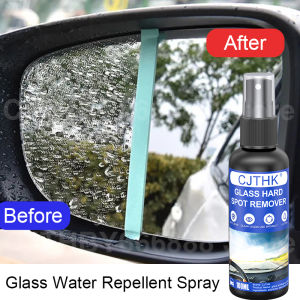
Water Repellent Spray Anti Rain Coating For Car Glass Hydrophobic Anti-rain Car Liquid Windshield Mirror Mask Auto Polish Kit
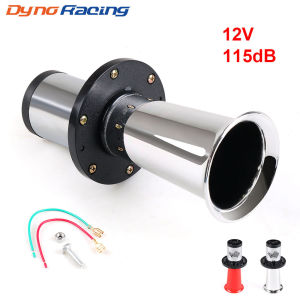
Ahooga Klaxon 12V 115dB Antique Classical Vintage Old School T Style Motorbike Car Air Horn Chrome for Ford Model OO-GA
Motorcycle modified retro foldable foot pedal Electric vehicle aluminum alloy front and rear footboards 8mm Universal Pedal
For Toyota RAV4 CHR Corolla Camry Highlander Auris Harrier Prius Crown Prado 120 150 PU Car Seat Gap Leak Proof Sealing Strip

Novsight N70 6500K Super Bright LED Lights: A Comprehensive Guide
RCB Rubber Handle Grip Universal Handle Grip Rubber Motorcycle Retrofit Handlebar Cover Original 2PCS
5-Bulb Laser Shooting Lights: A Comprehensive Guide
Clutch Disassembly Equipment: A Comprehensive Guide

6Pcs Car Hood Bonnet Shock Struts For Subaru BRZ Toyota GR86 2021-2023 Accessories Car Front Engine Cover Hood Bonnet Lift Support Bar
Wear Resistant Power Seat Gear Mechanism strong Automotive Seat Adjustment Part Seat Drive Mechanism for ASX C4

【Quick fix】Original Scratch remover for car 30ML Paint repair for car For quick repair of scratches on cars and motorcycles Fits all colors Car scratch remover Paint scratch remover Repair car scratches Paint repair for car Paint care kit