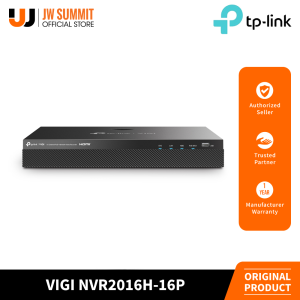
TP-Link VIGI NVR2016H-16P: A High-Capacity Surveillance System
What is TP-Link VIGI NVR2016H-16P?
The TP-Link VIGI NVR2016H-16P is a powerful, 16-channel simultaneous playback PoE+ network video recorder designed for businesses and homeowners who require a reliable, high-capacity surveillance system. This device offers exceptional performance, ease of use, and a host of features that make it an ideal choice for monitoring and securing your premises.
Key Features & Benefits
- 16 Channels: The TP-Link VIGI NVR2016H-16P supports up to 16 channels of simultaneous playback, allowing you to monitor multiple cameras at once without compromising image quality.
- Simultaneous Playback: With its ability to handle multiple camera feeds simultaneously, this NVR ensures that no critical moment goes unnoticed.
- PoE+ Support: The device includes Power over Ethernet Plus (PoE+) technology, which simplifies installation by providing power and data transmission through a single cable.
- User-Friendly Interface: The intuitive web interface makes it easy to configure and manage your surveillance system, even if you have limited technical experience.
How It Works
The TP-Link VIGI NVR2016H-16P works by connecting to IP cameras via PoE+ technology, which provides both power and data transmission through a single cable. Once connected, the NVR records and stores video footage from each camera, allowing you to view live feeds and review recorded events remotely using a computer, smartphone, or tablet.
Setting Up Your Simultaneous Playback NVR
Setting up the TP-Link VIGI NVR2016H-16P is a straightforward process that can be completed in just a few steps. Here's a step-by-step guide to help you get started:
Step-by-Step Guide
- Connect the NVR to your router using an Ethernet cable.
- Power on the device and wait for it to boot up.
- Open a web browser and enter the default IP address (found in the user manual) to access the web interface.
- Follow the on-screen prompts to configure your network settings, camera connections, and recording preferences.
- Once setup is complete, you can begin monitoring live feeds and reviewing recorded events remotely.
Troubleshooting Common Issues
If you encounter any issues during setup or while using the TP-Link VIGI NVR2016H-16P, refer to the user manual or contact TP-Link support for assistance. Some common problems include:
- Network connectivity issues: Ensure that the NVR is properly connected to your router and that all cables are securely plugged in.
- Camera connection problems: Verify that each camera is correctly connected to the NVR via PoE+ and that the camera firmware is up-to-date.
- Recording issues: Check that the NVR has sufficient storage capacity and that the recording settings are configured correctly.
Maximizing the Potential of PoE+ Network Video Recorder
To get the most out of your TP-Link VIGI NVR2016H-16P, follow these best practices for installation and system performance optimization:
Best Practices for Installation
- Place the NVR in a secure location that is easily accessible for maintenance and upgrades.
- Install cameras in strategic locations that provide optimal coverage of your premises.
- Use high-quality cabling and connectors to ensure reliable network connectivity.
- Regularly update the NVR firmware to take advantage of new features and security enhancements.
Enhancing System Performance
- Configure the NVR to record video at the highest possible resolution and frame rate.
- Enable motion detection and other intelligent features to improve monitoring efficiency.
- Monitor storage usage and upgrade storage capacity as needed to avoid recording interruptions.
- Implement strong password policies and other security measures to protect against unauthorized access.
Comparing TP-Link VIGI NVR2016H-16P with Competitors
When comparing the TP-Link VIGI NVR2016H-16P to similar products from other manufacturers, consider the following factors:
Features & Pricing
The TP-Link VIGI NVR2016H-16P offers a compelling combination of features and affordability, making it an attractive option for businesses and homeowners on a budget. Some key differentiators include:
- 16 Channels: The ability to monitor up to 16 cameras simultaneously sets this NVR apart from many competitors.
- PoE+ Support: The inclusion of Power over Ethernet Plus technology simplifies installation and reduces cable clutter.
- User-Friendly Interface: The intuitive web interface makes it easy to configure and manage your surveillance system.
User Reviews & Testimonials
Many users have praised the TP-Link VIGI NVR2016H-16P for its reliability, ease of use, and cost-effectiveness. Here are some sample reviews:
- "The TP-Link VIGI NVR2016H-16P has been a game-changer for our business. It's easy to set up, intuitive to use, and provides excellent performance at a great price point." - John D., Small Business Owner
- "I was skeptical about buying a network video recorder, but the TP-Link VIGI NVR2016H-16P exceeded my expectations. It's a solid product that delivers on its promises." - Sarah L., Homeowner
Conclusion & Next Steps
In conclusion, the TP-Link VIGI NVR2016H-16P is a powerful, reliable, and affordable surveillance system that offers exceptional value for businesses and homeowners. With its ability to support up to 16 channels of simultaneous playback, PoE+ technology, and user-friendly interface, this NVR is an ideal choice for monitoring and securing your premises.
Summarizing Key Takeaways
- The TP-Link VIGI NVR2016H-16P is a high-capacity surveillance system that supports up to 16 channels of simultaneous playback.
- PoE+ technology simplifies installation by providing power and data transmission through a single cable.
- The intuitive web interface makes it easy to configure and manage your surveillance system.
Future Updates & Improvements
TP-Link is committed to continuously improving the TP-Link VIGI NVR2016H-16P by releasing regular firmware updates and introducing new features to enhance its performance and functionality. Keep an eye out for future updates to stay ahead of the curve and maximize the potential of your surveillance system.

JW Summit
Review

You May Also Like

Panasonic Lumix S PRO 24-70mm f/2.8 (L-Mount) Full-Frame Mirrorless Camera Zoom Lens

4G Remote Intelligent Surveillance Camera Family Enterprise Security Surveillance Camera Security Alerts Night Vision Camera HD 1080p

4G Solar Built-in Battery Router 2.4Ghz WiFi Repeater 4G Router Solar IP66 Waterproof Long Time Standby

Null Portable camera 2K WiFi Mini Sports Camera 1.3 inch Portable Digital Video Recorder Infrared BodyCam Police Camcorder

8MP Dual Lens WiFi Camera Dual Screen Wifi Surveillance Camera 8X Zoom Indoor Waterproof Auto Tracking Security Wireless Cameras

Panasonic Lumix S9 (20-60mm lens) Mirrorless Full Frame Camera For Vlogging and Content Creators

3-9x40EG Telescope/Sight High-quality 3 to 9x40EG Optical Zoom Lighting Sight with 11mm/20mm Mount

WNC V380 12MP HD Camera Solar Camera Dual lens 4G Sim Card Wifi IP Wireless CCTV Motion Detection 360°Degree IP66 Waterproof Indoor Outdoor

NICELECT YOOSEE FHD 4K 8MP Dual Lens Baby Monitor: Features & Benefits

X9 Small Cube HD Smart Camera: 4G Remote Monitoring & Long-Lasting Battery Life

V380 PRO 2MP CCTV Camera With Display Screen: A Smart Baby Monitor with Two-Way Audio