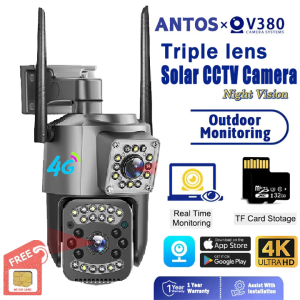
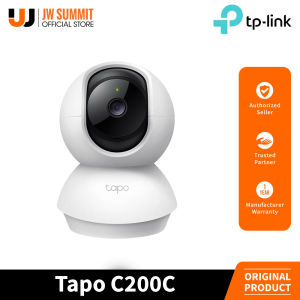
TP-Link Tapo C200C Pan/Tilt Home Security Wi-Fi Camera
TP-Link Tapo C200C Pan/Tilt Home Security Wi-Fi Camera
What Is TP-Link Tapo C200C?
The TP-Link Tapo C200C Pan/Tilt Home Security Wi-Fi Camera is a versatile security solution designed to provide peace of mind and protect your home from potential threats. This smart camera features night vision, pan/tilt functionality, motion detection, and alerts, making it an ideal choice for homeowners looking to enhance their home security system.
Key Features
- Security Camera with Night Vision: Equipped with infrared LEDs, the Tapo C200C offers clear visibility even in low-light conditions.
- Smart Wi-Fi Camera for Home: Connect to your home Wi-Fi network for easy setup and remote monitoring.
- Wireless Home Surveillance Camera: No need for complicated wiring; simply mount the camera and connect it to your Wi-Fi network.
- Pan/Tilt Home Security Camera: Enjoy a wide field of view with the camera's pan and tilt capabilities.
- TP-Link Tapo C200C Wi-Fi Camera: Secure your home with this reliable and user-friendly security camera.
Package Contents
- Tapo C200C Camera
- Power Adapter
- Quick Start Guide
- Mounting Screws
- Mounting Template
- Camera Base
- Mounting Anchors
How to Install TP-Link Tapo C200C
Setting up the TP-Link Tapo C200C Pan/Tilt Home Security Wi-Fi Camera is a straightforward process. Follow these steps to get started:
Mounting Instructions
- Choose a suitable location for the camera, ideally near a power outlet and within range of your Wi-Fi network.
- Use the mounting template to mark the mounting holes on the wall or ceiling.
- Drill holes and insert the mounting anchors.
- Attach the camera base to the wall or ceiling using the provided screws.
- Place the Tapo C200C Camera onto the base and secure it.
Connecting to Wi-Fi
- Connect the power adapter to the camera and plug it into an electrical outlet.
- Download the Tapo app from the Google Play Store or Apple App Store.
- Open the Tapo app and select "Add Device."
- Follow the on-screen instructions to connect the camera to your Wi-Fi network.
- Once connected, configure the camera settings according to your preferences.
Smart Home Integration
Integrating the TP-Link Tapo C200C Pan/Tilt Home Security Wi-Fi Camera into your smart home system can enhance its functionality and convenience.
Compatibility with Home Automation Systems
The Tapo C200C is compatible with popular home automation systems such as Amazon Alexa, Google Assistant, and Apple HomeKit. Connect your camera to these platforms to control it using voice commands or through their respective apps.
Voice Control with Smart Speakers
Using smart speakers like Amazon Echo or Google Nest Hub, you can control the Tapo C200C Pan/Tilt Home Security Wi-Fi Camera with simple voice commands. For example, ask your smart speaker to "Show me the camera view" or "Pan the camera left" to adjust the camera's position.
Enhancing Your Home Security
Take advantage of the TP-Link Tapo C200C Pan/Tilt Home Security Wi-Fi Camera's advanced features to strengthen your home security system.
Using Night Vision
Infrared LEDs allow the camera to capture clear images even in low-light conditions. Activate night vision mode to ensure your home remains secure throughout the night.
Pan/Tilt Functionality
The camera's pan and tilt capabilities enable you to cover a wider area and monitor different parts of your home with ease. Adjust the camera's position remotely through the Tapo app or using voice commands.
Motion Detection & Alerts
Set up motion detection zones to receive real-time alerts when the camera detects movement. Customize the sensitivity settings to minimize false alarms and stay informed about potential security threats.

JW Summit
Review
You May Also Like
【BUY 1 TAKE 1】Xiaomi Three Lens Solar CCTV Camera 4K HD Outdoor Waterproof CCTV camera With Solar Panel 360 Wireless Night Vision Auto Tracking Two-way Audio cctv
Internet Camera No Need for Cumbersome Threading Lightless Remote Camera Intelligent Human Detection
【BUY1 TAKE1】V380 PRO Q16S Smart Camera Bulb 1080P HD Night Vision Wifi IP Camera connect to mobile 360 ° Panoramic Rotatable Smart Security CCTV Camera baby motion detection Indoor and Outdoor Two-Way Audio without using wifi
BekinTek Helmet Mountable Night Vision Binoculars Head Mounted NVG Goggles 4500mAh Rechargeable Night View Optics Telescope Full Dark Observing 8x Digital Zoom 4K Video 36M Photo with Backlit Button
IMOU Cruiser 2 5MP Outdoor CCTV Security Camera with Audio WiFi Night Vision AI Vehicle Detetion
K812MAX drone 2.4-inch screen control high-definition aerial photography brushless motor real-time image transmission GPS positioning one-key return
V380 Pro 5MP WiFi Video Camera: Features & Benefits

TP-Link VIGI C540V VIGI 4MP Outdoor Full-Color Dual- Varifocal Pan Tilt Network Camera

Rover Systems CCTV Microphone Golfball without AGC circuit Audio Pick-up Rover Audio Pickup Rs11Cp - Lazada

Hikvision DVR 8 Channel 2 Way Audio iDS-7208HQHI-M1/XT Acusense 5MP 3K
4G Solar Three Len PTZs Camera Outdoor Video Monitor 12MP 3 Screen CCTV 10X Zoom Security Surveillance Two way audio IP cam