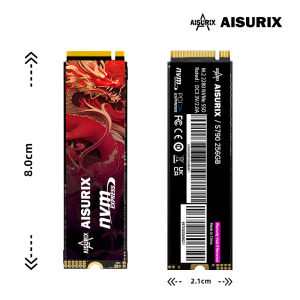
AISURIX 256GB/512GB NVMe PCle 3.0 SSD M.2 2280 Internal Solid State Drive For PC Desktop Laptop X800
AISURIX 256GB/512GB NVMe PCle 3.0 SSD M.2 2280 Internal Solid State Drive For PC Desktop Laptop X800
What is the AISURIX NVMe SSD?
The AISURIX NVMe SSD is a high-performance, PCIe 3.0 SSD designed specifically for PC desktops and laptops. With a sleek M.2 2280 form factor, this internal solid state drive delivers exceptional read speeds and reliable performance, making it an ideal upgrade for gamers, professionals, and tech enthusiasts alike.
Key Features & Specifications
- Model: S790
- Interface parameters: M.2 2280
- Storage Temp: -40°℃~85℃
- Product Capacity: 256GB/512GB
- Read speed: 7450MB/s
- Operating Temp: 0°℃~70℃
- Applicable systems: Windows 7/8/10/11; Mac OS 10.9 and later
- Product weight: 8g
- Product Size: 82.10.2cm
- TBW: 2000TBW
Ideal for PC Desktop & Laptop
AISURIX NVMe SSD is compatible with a wide range of systems, including Windows and Mac OS, making it an excellent choice for upgrading your PC desktop or laptop. Its compact design and high read speeds ensure that your system will boot faster, launch applications quicker, and handle large files effortlessly.
How to Install AISURIX NVMe SSD
Upgrading your system with an AISURIX NVMe SSD is straightforward. Follow these steps to get started:
Preparing Your System
Before installing your new AISURIX NVMe SSD, make sure to back up any important data and disconnect your power source. Gather the necessary tools, such as a screwdriver, and familiarize yourself with your computer's layout.
Installation Process
- Open your PC case or laptop compartment.
- Locate the M.2 slot on your motherboard and remove any existing SSD if necessary.
- Insert the AISURIX NVMe SSD into the M.2 slot, ensuring proper alignment.
- Secure the SSD with the provided screws.
- Reconnect any cables and close your system.
Post-Installation Steps
After installation, connect your power source and turn on your computer. Enter the BIOS settings to configure the new drive as the primary boot device. Finally, install your operating system and any desired software to take full advantage of your upgraded storage.
Performance & Compatibility
The AISURIX NVMe SSD offers impressive performance and compatibility, making it a top choice for various applications.
Read Speed & TBW
With a read speed of 7450MB/s and a total bytes written (TBW) capacity of 2000TBW, the AISURIX NVMe SSD can handle even the most demanding tasks. This high-performance storage solution ensures that your system runs smoothly and efficiently.
Supported Systems & Operating Temperatures
AISURIX NVMe SSD is compatible with Windows 7/8/10/11 and Mac OS 10.9 and later, making it suitable for a wide range of systems. Additionally, its operating temperature range of 0°℃~70℃ ensures reliable performance in various environments.
Frequently Asked Questions
Is AISURIX NVMe SSD suitable for gaming?
Absolutely! The AISURIX NVMe SSD offers exceptional read speeds and reliability, making it an ideal choice for gamers who want faster load times and smoother gameplay.
Can I upgrade my current storage with AISURIX NVMe SSD?
Yes, upgrading your existing storage with an AISURIX NVMe SSD is simple and straightforward. Follow the installation process outlined above to get started.

AISURIX Electronics Accessories
You May Also Like

EXPOSE 19 22 24 27 Inch Flat Monitor for Computer PC Gaming Monitor 1080P 75Hz CCTV Laptop Monitor
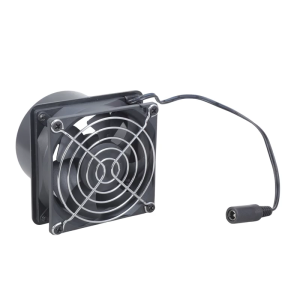
8cm Inline Duct Fan 12V 0.33A Blower Kit Suitable For Kitchen Bathroom Hydroponics Electronic Workshop Cooling
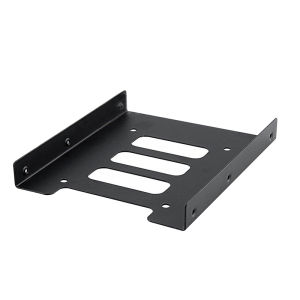
2.5\" To 3.5\" Ssd Hard Disk Drive Bays Holder Metal Hard Drive Bracket Ssd Solid State Disk Tray With Screws For Pc (Black)
Cuttable Computer Mesh Dustproof Cover Chassis Dust Cover40x40mm DIY PVC PC for Case Fan Cooler Black Dust DIY
3D Printer Bed Magnetic PEI Double Sided Printing Textured Spring Steel Platform Sheet for Ender 3/Pro/3/v2/CR20/Pro
MCU-103 Potentiometer Module With 10KΩ Resistance And 333.3℃ Continuous Rotating For Electronic Prototyping
Heat Dissipation Probe TSSOP8/MSOP8/Mini MSOP8 Chip For Stable Chip Programming Temperature Control
Protective Soft PC Cover Carrying Case Guard for Paradise Virtual Interactive Pet Game Machine Shell Storage Skin Sleeve
![AFFORDABLE BAREBONE DESKTOP BRANDED l CASE+MOTHER BOARD+POWER SUPPLY+SATA l INTEL 6TH/8TH/9TH GENERATION [REFURBISHED]](https://img.lazcdn.com/g/ff/kf/S3921e890893a477694775c8e61d0cac3q.png_300x300q80.png)
AFFORDABLE BAREBONE DESKTOP BRANDED l CASE+MOTHER BOARD+POWER SUPPLY+SATA l INTEL 6TH/8TH/9TH GENERATION [REFURBISHED]
❗Plastic Extremely small mini PC❗Intel Celeron N5095 N95 N100 8300H 12450H 13620H /Study/Work/Office/Home mini pc

16" 165Hz Laptop LCD Screen NE160QDM-NY1 MNG007JA1-4 For Lenovo Legion 5 Pro 16ARH7 16ARH7H 16IAH7 16IAH7H Display Matrix Panel