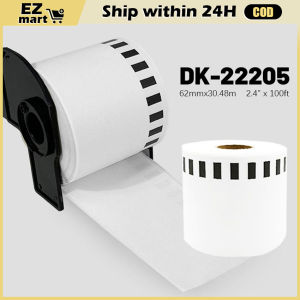
DK22205 Thermal Paper Roll: A Guide for Compatible Brother Label Printers
DK22205 Thermal Paper Roll: A Guide for Compatible Brother Label Printers
What is DK22205 Thermal Paper Roll
The DK22205 Thermal Paper Roll is a high-quality label tape designed specifically for Brother Label Printers. This roll is 62mmx30.48m Continuous Label, making it perfect for printing labels for various applications such as inventory management, shipping, and product labeling. The DK22205 Thermal Paper Roll is compatible with Brother Label Printers, providing users with a cost-effective and reliable solution for their labeling needs.
Overview of DK22205 Thermal Paper Roll
The DK22205 Thermal Paper Roll is a white paper label tape that is compatible with Brother Label Printers. This thermal paper roll is designed to provide users with high-quality labels that are easy to read and long-lasting. The DK22205 Thermal Paper Roll is a cost-effective solution for businesses and individuals looking to streamline their labeling processes.
Key Features of DK22205 Thermal Paper Roll
The DK22205 Thermal Paper Roll has several key features that make it a popular choice among users. These include:
-
62mmx30.48m Continuous Label: The DK22205 Thermal Paper Roll is a continuous label tape that measures 62mmx30.48m, making it perfect for printing labels for various applications.
-
High-Quality Labels: The DK22205 Thermal Paper Roll produces high-quality labels that are easy to read and long-lasting.
-
Compatible with Brother Label Printers: The DK22205 Thermal Paper Roll is compatible with Brother Label Printers, providing users with a reliable solution for their labeling needs.
How to Use DK22205 Thermal Paper Roll
Using the DK22205 Thermal Paper Roll is simple and straightforward. Here is a step-by-step guide to installing the DK22205 Thermal Paper Roll:
-
Open the label printer cover.
-
Insert the DK22205 Thermal Paper Roll into the label printer.
-
Close the label printer cover.
-
Load the label printer software and print your labels.
Troubleshooting Common Issues with DK22205 Thermal Paper Roll
If you encounter any issues while using the DK22205 Thermal Paper Roll, here are some troubleshooting tips:
-
Check that the thermal paper roll is properly installed in the label printer.
-
Check that the label printer software is up-to-date.
-
If the labels are not printing correctly, check the printer settings and adjust as needed.
Benefits of Using DK22205 Thermal Paper Roll
There are several benefits to using the DK22205 Thermal Paper Roll. These include:
Cost-effectiveness of DK22205 Thermal Paper Roll
The DK22205 Thermal Paper Roll is a cost-effective solution for businesses and individuals looking to streamline their labeling processes. This thermal paper roll provides users with a reliable and affordable solution for printing high-quality labels.
Quality of Labels Produced by DK22205 Thermal Paper Roll
The DK22205 Thermal Paper Roll produces high-quality labels that are easy to read and long-lasting. This makes it an ideal choice for businesses and individuals looking to print labels for various applications.
Compatible Brother Label Printers
The DK22205 Thermal Paper Roll is compatible with a wide range of Brother Label Printers. Here is a list of compatible Brother Label Printers:
-
Brother P-Touch PT-D210W
-
Brother P-Touch PT-D320W
-
Brother P-Touch PT-D350W
-
Brother P-Touch PT-D410W
-
Brother P-Touch PT-D450W
-
Brother P-Touch PT-D650W
Ensuring Proper Compatibility with DK22205 Thermal Paper Roll
To ensure proper compatibility with the DK22205 Thermal Paper Roll, make sure that your Brother Label Printer is compatible with this thermal paper roll. Check the printer manual or contact Brother customer support for more information.
Where to Buy DK22205 Thermal Paper Roll
The DK22205 Thermal Paper Roll is available at various online retailers and offline stores. Here are some places where you can buy the DK22205 Thermal Paper Roll:
Online Retailers Selling DK22205 Thermal Paper Roll
-
Amazon
-
eBay
-
Walmart
-
Best Buy
Offline Stores Selling DK22205 Thermal Paper Roll
-
Office Depot
-
Staples
-
Best Buy
-
Walmart

Easy Mart Store
Review
You May Also Like
CE278A 78A Compatible Toner Cartridge (Brand New)
Bluetooth Barcode Scanner: A Comprehensive Guide

SUNMI V2 Pro Smart Handheld Terminal POS PDA

NPG-90 TONER BLACK FOR IR ADV DX 2925/ 2930 /2935/2945
AOS Compatible Kyocera TK-4140 TK4140 TK 4140 Toner Cartridge for Taskalfa 2020 2021

Fuji Xerox Docucentre S2110 S1810 S2011 S2320 S2420 S2520Toner Cartridge Compatible Xerox Docucentre S2520 Toner Brother Dcp 1510 Toner Office Toner Toner Laser Printer - Lazada
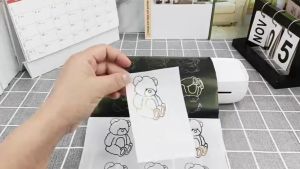
Portable A4 Thermal Printer: Mini Bluetooth Label Printer & PDF Contract Text Printer

EPSON 664 INK GENUINE 100% ORIGINAL (L360 L3110 L200 L565 L220 L130)\\n\\n Understanding EPSON 664 INK GENUINE\\n\\n What is EPSON 664 INK GENUINE?\\n\\nEPSON 664 INK GENUINE is a high-quality ink cartridge specifically designed for EPSON printers such as L360, L3110, L200, L565, L220, and L130. This ink cartridge guarantees optimal performance and print quality, ensuring your documents and photos look their best.\\n\\n Benefits of using 100% ORIGINAL EPSON INK\\n\\nUsing 100% original EPSON ink provides numerous benefits, including:\\n\\n- **Superior Print Quality**: Original EPSON ink cartridges produce vibrant colors and sharp text, making your prints stand out.\\n- **Reliability**: Genuine EPSON ink cartridges are tested and optimized for EPSON printers, reducing the risk of print errors and ensuring consistent performance.\\n- **Durability**: Original EPSON ink cartridges have a longer lifespan compared to compatible alternatives, providing cost savings over time.\\n\\n Compatible Ink for EPSON Printers\\n\\n Advantages of using compatible ink cartridges\\n\\nWhile original EPSON ink cartridges offer superior print quality and reliability, compatible ink cartridges can be a cost-effective alternative. Some advantages of using compatible ink cartridges include:\\n\\n- **Cost Savings**: Compatible ink cartridges often come at a lower price point, allowing you to save money on printing costs.\\n- **Wide Availability**: Compatible ink cartridges are readily available from various manufacturers, providing more options for consumers.\\n\\n How to choose the right compatible ink for your printer\\n\\nWhen selecting a compatible ink cartridge for your EPSON printer, consider the following factors:\\n\\n- **Compatibility**: Ensure the compatible ink cartridge is specifically designed for your printer model.\\n- **Quality**: Look for reputable manufacturers that prioritize quality and reliability.\\n- **Price**: Compare prices from different manufacturers to find the best value for your budget.\\n\\n Installing EPSON 664 INK GENUINE\\n\\n Step-by-step guide to installing genuine EPSON ink cartridges\\n\\nFollow these steps to install EPSON 664 INK GENUINE in your printer:\\n\\n1. Turn off your printer and open the ink cartridge access door.\\n2. Remove the old ink cartridge by gently pulling it out of its slot.\\n3. Carefully remove the new EPSON 664 INK GENUINE from its packaging.\\n4. Insert the new ink cartridge into its designated slot and close the ink cartridge access door.\\n5. Turn on your printer and allow it to initialize.\\n\\n Troubleshooting common ink installation issues\\n\\nIf you encounter any issues during the ink cartridge installation process, refer to the following troubleshooting tips:\\n\\n- **Print Quality Issues**: If your prints appear faded or blurry, try cleaning the print head or replacing the ink cartridge.\\n- **Ink Cartridge Not Detected**: Ensure the ink cartridge is properly inserted and the ink cartridge access door is closed.\\n\\n Maximizing Printer Performance\\n\\n Best practices for maintaining optimal printer performance\\n\\nTo keep your EPSON printer running smoothly, follow these best practices:\\n\\n- **Regular Maintenance**: Clean the print head and replace the ink cartridges regularly to maintain optimal print quality.\\n- **Proper Storage**: Store ink cartridges in a cool, dry place away from direct sunlight to prevent drying out.\\n- **Software Updates**: Keep your printer software up-to-date to ensure compatibility with the latest ink cartridges and features.\\n\\n Tips for extending the lifespan of your ink cartridges\\n\\nTo extend the lifespan of your EPSON 664 INK GENUINE, consider the following tips:\\n\\n- **Use the Right Paper**: Using high-quality paper can help prevent ink smudging and bleeding, reducing the amount of ink used.\\n- **Print in Draft Mode**: Printing in draft mode can reduce ink usage, extending the lifespan of your ink cartridges.\\n- **Store Ink Cartridges Properly**: Storing ink cartridges in a cool, dry place can help prevent drying out and extend their lifespan.\"
Bambu Lab ABS & PLA 3D Printer Filament: A Comprehensive Guide
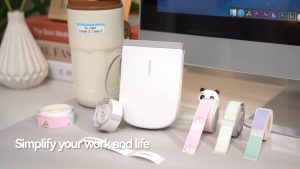
NIIMBOT D11H Bluetooth Label Maker Printer - Upgraded Portable Thermal Sticker Printer for Food Packaging Home Office

Eyoyo 2D Wireless Ring Scanner: A Portable Barcode Solution