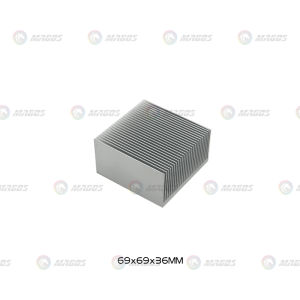
Electronic Radiator & Aluminum Dense Teeth Heatsink: A Guide
Electronic Radiator & Aluminum Dense Teeth Heatsink: A Guide
What is an Electronic Radiator & Aluminum Dense Teeth Heatsink?
An electronic radiator and aluminum dense teeth heatsink are essential components used in cooling systems for electronic devices. The primary function of these components is to dissipate heat from electronic devices and maintain optimal operating temperatures.
Key Features of Electronic Radiator & Aluminum Dense Teeth Heatsink
-
High Thermal Conductivity: Aluminum dense teeth heatsinks are made from high-quality aluminum, which has excellent thermal conductivity properties. This allows the heatsink to efficiently transfer heat away from electronic components.
-
Compact Design: Electronic radiators and aluminum dense teeth heatsinks come in various sizes, including 100/120/150/200/300x69x36MM. This compact design makes them suitable for use in a wide range of electronic devices, from laptops to servers.
-
Durable Construction: These heatsinks are built to last, with robust materials and manufacturing processes that ensure they can withstand the rigors of daily use.
Applications of Electronic Radiator & Aluminum Dense Teeth Heatsink
Electronic radiators and aluminum dense teeth heatsinks are used in a variety of applications, including:
-
Computer Water Cooling Systems: These components are often integrated into computer water cooling systems to provide efficient cooling for CPUs, GPUs, and other electronic components.
-
Laptops and Notebooks: Aluminum dense teeth heatsinks are commonly used in laptops and notebooks to dissipate heat from the CPU and other components.
-
Servers and Data Centers: Electronic radiators and aluminum dense teeth heatsinks are used in servers and data centers to maintain optimal operating temperatures and prevent overheating.
How to Choose the Right Extruded Heat Sink
When selecting an extruded heat sink, there are several factors to consider:
Factors to Consider When Selecting an Extruded Heat Sink
-
Heat Dissipation Requirements: Determine the heat dissipation requirements of your electronic device or system. This will help you choose a heat sink with the appropriate thermal performance.
-
Size and Compatibility: Consider the size and compatibility of the heat sink with your electronic device or system. Ensure that the heat sink fits within the available space and is compatible with the mounting hardware.
-
Cost: Extruded heat sinks come in a range of prices. Determine your budget and choose a heat sink that provides the best value for your money.
Comparing Different Sizes: 100/120/150/200/300x69x36MM
When comparing different sizes of extruded heat sinks, consider the following factors:
-
Heat Dissipation Capacity: Larger heat sinks generally have a higher heat dissipation capacity than smaller ones. However, the actual heat dissipation capacity depends on the specific design and construction of the heat sink.
-
Compatibility: Ensure that the heat sink is compatible with your electronic device or system. This includes considering the size, shape, and mounting hardware.
-
Cost: Larger heat sinks tend to be more expensive than smaller ones. Determine your budget and choose a heat sink that provides the best value for your money.
Integrating Electronic Radiator & Aluminum Dense Teeth Heatsink with Computer Water Cooling System
Integrating an electronic radiator and aluminum dense teeth heatsink with a computer water cooling system can provide several benefits:
Benefits of Combining Electronic Radiator & Aluminum Dense Teeth Heatsink with Water Cooling
-
Improved Heat Dissipation: By combining an electronic radiator and aluminum dense teeth heatsink with a water cooling system, you can achieve improved heat dissipation and maintain optimal operating temperatures for your electronic components.
-
Increased Efficiency: Water cooling systems are generally more efficient than air cooling systems, which means that integrating an electronic radiator and aluminum dense teeth heatsink can help improve the overall efficiency of your cooling system.
-
Enhanced Performance: By maintaining optimal operating temperatures, you can enhance the performance of your electronic components and improve the overall performance of your system.
How to Install Electronic Radiator & Aluminum Dense Teeth Heatsink in a Water Cooling System
To install an electronic radiator and aluminum dense teeth heatsink in a water cooling system, follow these steps:
-
Prepare the Components: Ensure that all the necessary components, including the electronic radiator, aluminum dense teeth heatsink, and water cooling system, are clean and free from dust and debris.
-
Install the Heat Sink: Install the aluminum dense teeth heatsink onto the CPU or other electronic component using the appropriate mounting hardware.
-
Connect the Water Block: Connect the water block to the CPU or other electronic component using the appropriate mounting hardware.
-
Connect the Water Lines: Connect the water lines from the water block to the electronic radiator using the appropriate fittings and tubing.
-
Fill the System with Coolant: Fill the system with coolant and ensure that all connections are secure and leak-free.
-
Start the Pump: Start the pump and ensure that the system is functioning properly.
Maintaining & Optimizing Performance of Electronic Radiator & Aluminum Dense Teeth Heatsink
To maintain and optimize the performance of your electronic radiator and aluminum dense teeth heatsink, follow these best practices:
Best Practices for Keeping Your Heatsink Running Smoothly
-
Regular Cleaning: Regularly clean the heatsink and electronic radiator to remove dust and debris that can interfere with heat dissipation.
-
Check Connections: Regularly check the connections between the heatsink, water block, and electronic radiator to ensure that they are secure and leak-free.
-
Monitor Temperatures: Monitor the temperatures of your electronic components to ensure that they are operating within safe limits.
-
Replace Coolant: Replace the coolant in your water cooling system periodically to ensure that it is functioning properly.
Troubleshooting Common Issues with Electronic Radiator & Aluminum Dense Teeth Heatsink
If you encounter issues with your electronic radiator and aluminum dense teeth heatsink, try these troubleshooting steps:
-
Check Connections: Check the connections between the heatsink, water block, and electronic radiator to ensure that they are secure and leak-free.
-
Clean the Heatsink: Clean the heatsink and electronic radiator to remove dust and debris that can interfere with heat dissipation.
-
Replace Coolant: Replace the coolant in your water cooling system if it is no longer functioning properly.
-
Contact Support: If you continue to experience issues, contact the manufacturer or a qualified technician for assistance.

GlobalSuperBazaar
Review
You May Also Like
TouchWo 15.6-32 Inch Android 11 OS Touchscreen Monitor: A Smart Whiteboard Calendar
Concealed Power Strips With 2 Outlets USB C PD20W QC18W Fast Charging Suitable For Seamlessly Desk Cabinet Installation
PLC MCU 8DI-8DO-1VO-1IO Multifunction Debugging Board NPN ADC Digital Analog Output Module Development Tool
Fan Controller Adapter Cable 5V 3-pin To 6pin/ 4pin Converter 5V ARGB 3Pin to 4Pin 6Pin for Coolmoon Cool Moon Fans
![[COD] SHPYHT SPORTS 1Pc LED Driver 260mA 1-3W LED Power Supply Adapt AC 85V-265V to DC 5-12V LED Lights Transformers Driver for LED Drive Power](https://img.lazcdn.com/g/p/60a0e23841eaed91e3044d4e90ece446.jpg_300x300q80.jpg)
[COD] SHPYHT SPORTS 1Pc LED Driver 260mA 1-3W LED Power Supply Adapt AC 85V-265V to DC 5-12V LED Lights Transformers Driver for LED Drive Power
JONSBO CR1400 EVO CPU Cooler: High Performance & Silent Air Radiator

Fantech Strike CG72 RGB Gaming PC Case Mid Tower ATX Micro ATX Mini ITX Tempered Glass Desktop Case

Windows 10 Home 32bit/64bit OEM USB 3.0 FPP: A Comprehensive Guide
Dell 3040 Quadcore

ZhiTai TiPro9000 PCIe 5.0 NVMe M.2 2280 SSD Up to 14000MB/s Read 12500MB/s Write 1TB/2TB/4TB Options
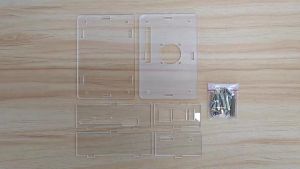
Orange Pi 5 Acrylic Case for Orange Pi 5 4 / 8 / 16GB RAM RK3588S Single Board Optional Cooling Fan Heat Sink