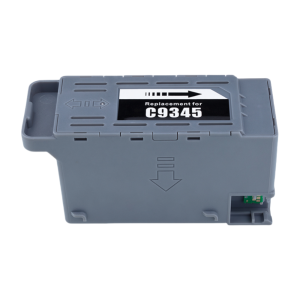
Epson C9345 Maintenance Tank Box Set: A Comprehensive Guide
Epson C9345 Maintenance Tank Box Set: A Comprehensive Guide
The Epson C9345 Maintenance Tank Box Set is a vital accessory for maintaining the optimal performance of several Epson printers, including the L15150, L15160, L15158, L15168, L6578, L6558, L8050, L11050, WF-7820, 7830, 7840, ET-5800, ET-5850, ET-5880, ET-16600, and ET-16650 models. This article provides a comprehensive guide to help you understand the product, installation process, maintenance tips, and troubleshooting common issues.
What is the Epson C9345 Maintenance Tank Box Set?
The Epson C9345 Maintenance Tank Box Set is a collection of essential components that help keep your printer running smoothly. It includes a maintenance tank, ink cartridges, and other necessary parts that work together to ensure the highest print quality.
Key Components
- Maintenance Tank: This component holds the cleaning solution used to maintain the printhead and ensure optimal print quality.
- Ink Cartridges: These cartridges contain the ink needed for printing, which is crucial for producing high-quality prints.
- Other Necessary Parts: These parts include various hardware components required for the proper functioning of the printer.
Compatibility with Epson Printers
The Epson C9345 Maintenance Tank Box Set is compatible with several Epson printers, including the L15150, L15160, L15158, L15168, L6578, L6558, L8050, L11050, WF-7820, 7830, 7840, ET-5800, ET-5850, ET-5880, ET-16600, and ET-16650 models. This compatibility ensures that users can easily find the right maintenance kit for their specific printer model.
How to Install the Epson C9345 Maintenance Tank Box Set
Installing the Epson C9345 Maintenance Tank Box Set is a straightforward process that involves a few simple steps.
Preparation Steps
- Power Off the Printer: Before starting the installation process, make sure to power off the printer to avoid any potential issues.
- Prepare the Maintenance Tank Box Set: Remove all components from the packaging and lay them out on a clean surface.
- Follow the User Manual: Refer to the user manual that came with your printer for specific instructions on installing the maintenance tank box set.
Installation Process
- Install the Maintenance Tank: Insert the maintenance tank into the designated slot on the printer, following the instructions in the user manual.
- Install the Ink Cartridges: Install the ink cartridges into their respective slots, making sure they are securely in place.
- Connect the Other Necessary Parts: Connect any other necessary parts according to the user manual, ensuring proper connections.
- Power On the Printer: Power on the printer and run a test print to ensure everything is functioning correctly.
Maintaining Your Epson Printer with the Maintenance Tank Box Set
Regular maintenance is essential for keeping your printer running smoothly and producing high-quality prints. Here are some tips for maintaining your Epson printer using the maintenance tank box set.
Cleaning Tips
- Clean the Printhead Regularly: Use the cleaning solution from the maintenance tank to clean the printhead regularly, as recommended by the manufacturer.
- Replace Ink Cartridges When Necessary: Replace ink cartridges when they run low or become clogged to maintain optimal print quality.
- Keep the Printer Clean: Regularly clean the exterior of the printer to prevent dust and debris from entering the internal components.
Troubleshooting Common Issues
If you encounter any issues with your Epson printer, here are some common problems and their solutions:
- Low Print Quality: Replace the ink cartridges and clean the printhead using the maintenance tank box set.
- Printhead Clogging: Run a cleaning cycle using the cleaning solution from the maintenance tank box set.
- Printer Not Printing: Check the ink levels and ensure that the printer is properly connected to your computer or network.
Conclusion & Contact Information
The Epson C9345 Maintenance Tank Box Set is an essential accessory for maintaining the optimal performance of your Epson printer. By following the installation process, cleaning tips, and troubleshooting advice provided in this guide, you can ensure that your printer continues to produce high-quality prints.
Summary of Key Points
- The Epson C9345 Maintenance Tank Box Set includes a maintenance tank, ink cartridges, and other necessary parts.
- It is compatible with several Epson printer models, including the L15150, L15160, L15158, L15168, L6578, L6558, L8050, L11050, WF-7820, 7830, 7840, ET-5800, ET-5850, ET-5880, ET-16600, and ET-16650 models.
- Regular maintenance, such as cleaning the printhead and replacing ink cartridges, is crucial for optimal print quality.
Quality Guaranteed Products
We offer quality guaranteed products, ensuring that you receive a reliable maintenance tank box set for your Epson printer.
Contact Us for Support
If you have any problems or questions about the Epson C9345 Maintenance Tank Box Set, please contact us. We are here to help you fix any issues and ensure that your printer continues to function properly.

C0F0E.PERSONAL CARE STORE
You May Also Like
PSD - Transparent Hard Photocard Protector/Flat Card Film (50 sheets)
💥🎁Free Gift🎁💥H9730 Encoder Sensor & 180LPI Raster Strip for Myjet K-Jet Thunderjet
Portable EVA Hard Carrying Case Storage Bag Handheld Shockproof Bag Replacement for B31 Label Maker Accessories

Bare Light DT01431 Compatible With Hitachi CP-X4041WNJ/CP-X4042/CP-X4042WN/DT01433/DT01481/DT01491/DT01511/HCP-K28E/TW-2505

【Best Quality】Phomemo T02 Thermal Label Printer Wireless Bluetooth Portable Pocket Label Maker Home Use Office Fast Printing Printer Free Label
EZ-LABEL Printer Tape Cartridge XR-9WE1 9mmX8m Black on White
3.5cm Heavy Duty Hard Rubber Roller Printing Screen Plastic Frame Craft Tool
AOS MLTD111S Toner Cartridge Compatible MLT-D111S for Samsung Printer
Phomemo Bluetooth Thermal Printer - D520-BT Shipping Label Printer 4x6 Printer for Small Business & Packages/Barcode/Address/Postage Labels

NIIMBOT B21 B21S B21PRO Bluetooth Thermal Label Printer Ink Free Mini Portable Thermal Printer Labels Maker with free Tape Label Sticker Inkless for Clothing Jewelry Tag Supermarket Retail Store Home Labeling Barcodes Price Name Printing - VMI Direct
Original Kyocera MK-4145 Drum Kit Assembly for TA2020