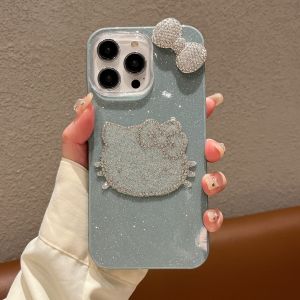
New 3D Bow Diamond Pink Kitty Princess Pattern Glitter IMD Phone Case For iPhone 11 12 13 14 15 16 Series
New 3D Bow Diamond Pink Kitty Princess Pattern Glitter IMD Phone Case For iPhone 11 12 13 14 15 16 Series
Introduction & Key Features
Overview of the Phone Case
Introducing the new 3D Bow Diamond Pink Kitty Princess Pattern Glitter IMD Phone Case, the perfect accessory for your iPhone 11, 12, 13, 14, 15, and 16 series devices. This phone case features a glitter IMD kitty pattern and princess design, making it an eye-catching addition to any smartphone.
Key Features & Benefits
The 3D Bow Diamond Pink Kitty Princess Pattern Glitter IMD Phone Case offers several benefits:
- Protection: The case provides excellent protection against scratches, bumps, and drops.
- Style: With its glitter IMD kitty pattern and princess design, this phone case is sure to turn heads.
- Compatibility: Compatible with iPhone 11, 12, 13, 14, 15, and 16 series devices.
- Easy Installation: The case is easy to install, with clear instructions provided.
Design & Customization Options
Glitter IMD Kitty Pattern
The glitter IMD kitty pattern is a standout feature of this phone case. It adds a touch of whimsy and charm to your device, making it a fun and stylish accessory.
Princess Design Phone Cover
The princess design phone cover adds a touch of elegance and sophistication to your device. It is perfect for those who want a phone case that is both functional and fashionable.
Color Variations & Personalization
The 3D Bow Diamond Pink Kitty Princess Pattern Glitter IMD Phone Case comes in various color variations, allowing you to choose the perfect shade to match your personal style. Additionally, you can personalize your phone case with custom designs or messages.
Compatibility & Installation Guide
Compatibility with iPhone 11, 12, 13, 14, 15, & 16 Series
The 3D Bow Diamond Pink Kitty Princess Pattern Glitter IMD Phone Case is compatible with iPhone 11, 12, 13, 14, 15, and 16 series devices. It fits snugly around your device, providing excellent protection.
Installation Process & Tips
Installing the phone case is simple and straightforward. Follow these steps:
- Remove any existing phone case or screen protector from your device.
- Align the case with your device, making sure it fits snugly around the edges.
- Press down firmly on the case to ensure it is secure.
Tips for installation:
- Make sure your device is clean and free of dust or debris before installing the case.
- Be gentle when pressing down on the case to avoid damaging your device.
Maintenance & Care
Cleaning & Storage Tips
To keep your phone case looking its best, follow these cleaning and storage tips:
- Clean the case regularly with a soft, damp cloth.
- Avoid using harsh chemicals or abrasive materials when cleaning the case.
- Store the case in a cool, dry place when not in use.
Troubleshooting Common Issues
If you experience any issues with your phone case, try the following troubleshooting steps:
- Make sure the case is properly aligned with your device.
- Check for any debris or dust that may be causing the issue.
- If the case is loose, try pressing down firmly on the edges to secure it.

Phone & Tablet Accessories
Review
You May Also Like
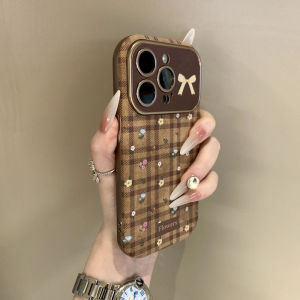
Sup&LV | Full Cover Lens High-end Unique Soft iPhone Cases
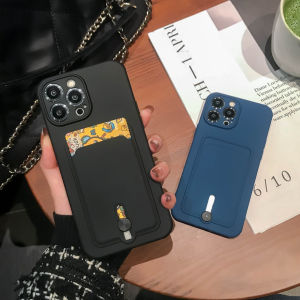
CrashStar Silicone Soft Shockproof Phone Case With Card Slot Holder For iPhone: Ultimate Protection & Convenience
AUFU 2in1 240W USB C to Type C Lanyard Data Cable 5A PD Fast Charging For iPhone 16 15 Xiaomi Huawei Phone Lanyard Charge Cable
【 Free Gift 】Mini Foldable USB LED Light Lamp Edisonmall【 Each package will only be given one as a gift ! The quantity is limited first come first served】
Professional Lens Inner Apertures Flexible Cable Camera Flexible Cable Replacement for Minilux E02 Camera Accessorie
Adapter for Makita 18V Lithium Battery BL1850 BL1815 BL1830 Convert To for Dyson V6 V7 V8 Battery for Dyson Cordless Vacuum Use
IPad Painting Stand Bracket Tablet Computer Dedicated for Painting Stand Foldable Desktop PlayerUnknowns Battlegrounds Learning Handwriting Reading Writing Support Writing Hand-Painted Screen Pro Portable Surface
OEM Samsung Galaxy Tab S6 S Pen: SM-T860N T865 Touch Screen Pen
Case for VIVO Y19S 4G v40 lite v50 lite y29s y29 y04 4g y39 5g phone casing hard case TPU shockproof Cover new design aesthetic with holder and Lanyard for girl CYSTCBZJ01

Wave Bear Design: The Ultimate Huawei WatchGT5 Strap
High Strength 14500 Storage Box Case 4 Slot Way Batteries Clip Holder Container for Electrical Experiment