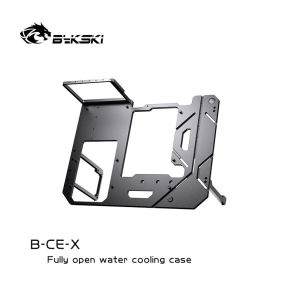
Bykski B-CE-X Open Frame Chassis Distro Plate Water Cooling Computer Case Vertical Horizontal DIY Display
Bykski B-CE-X Open Frame Chassis Distro Plate Water Cooling Computer Case Vertical Horizontal DIY Display
Introduction to Bykski B-CE-X Open Frame Chassis
The Bykski B-CE-X Open Frame Chassis is a unique, versatile case designed specifically for water cooling enthusiasts who wish to showcase their builds. This chassis offers a robust platform for those looking to create a custom, eye-catching display case while maintaining optimal performance.
What is the Bykski B-CE-X Open Frame Chassis?
The Bykski B-CE-X Open Frame Chassis is an open frame computer case that provides ample space for various components, including powerful GPUs, CPUs, and water cooling systems. With its modular design, users can easily customize their build and take advantage of the case's vertical or horizontal orientation options.
Key Features of the Bykski B-CE-X Open Frame Chassis
- Chassis Distro Plate: The chassis distro plate allows for easy cable management and optimal airflow.
- DIY Display Case: Create a stunning display case for your custom water cooling setup.
- Water Cooling Computer Case: Designed specifically for water cooling enthusiasts, this case provides ample space for radiators and reservoirs.
- Vertical Horizontal Case: Choose between vertical or horizontal orientation to optimize performance and aesthetics.
- Open Frame Chassis: An open design allows for maximum airflow and easy access to components.
Water Cooling Computer Case Setup
Setting up a water cooling system in the Bykski B-CE-X Open Frame Chassis is straightforward and rewarding. Follow these steps to install your water cooling system and configure the optimal orientation for your build.
How to Install a Water Cooling System in the Bykski B-CE-X Open Frame Chassis
- Assemble the case and install the motherboard, CPU, and GPU.
- Mount the radiator(s) on the top, bottom, or side of the chassis, depending on your desired orientation.
- Install the reservoir and fill it with coolant.
- Connect the pump, tubing, and fittings to create a closed-loop water cooling system.
- Connect the power supply and ensure proper cable management using the chassis distro plate.
Configuring Vertical & Horizontal Orientation for Optimal Performance
The Bykski B-CE-X Open Frame Chassis allows users to choose between vertical or horizontal orientation, depending on their preferences and build requirements. To configure the optimal orientation for your build:
- Vertical Orientation: Ideal for showcasing a tall, narrow build with multiple radiators or a large CPU cooler.
- Horizontal Orientation: Best for a wide, low-profile build with ample space for GPUs and other components.
DIY Display Case Customization
Customizing your DIY display case using the Bykski B-CE-X Open Frame Chassis is a fun and rewarding process. Here are some tips to help you enhance your build:
How to Customize Your DIY Display Case Using the Bykski B-CE-X Open Frame Chassis
- Choose the right components: Select high-performance components that align with your build goals.
- Optimize cable management: Utilize the chassis distro plate for easy cable routing and organization.
- Select the appropriate orientation: Decide whether vertical or horizontal orientation best suits your build and preferences.
- Add lighting: Incorporate RGB lighting to create a stunning visual display.
Enhancing Your Build with Open Frame Chassis Distro Plate
The open frame chassis distro plate plays a crucial role in enhancing your build by providing easy access to components and facilitating optimal airflow. To make the most of this feature:
- Organize cables: Route cables through the distro plate to keep them tidy and out of sight.
- Maximize airflow: Ensure proper airflow by positioning fans strategically and minimizing obstructions.
- Secure components: Use the provided mounting points to secure components safely and securely.
Conclusion
The Bykski B-CE-X Open Frame Chassis is an excellent choice for water cooling enthusiasts looking to create a custom, eye-catching display case. With its modular design, ample space for components, and versatile orientation options, this chassis offers a robust platform for building a stunning, high-performance PC. Whether you're a seasoned builder or just starting out, the Bykski B-CE-X Open Frame Chassis is sure to impress.

Water Cooling
Review

You May Also Like
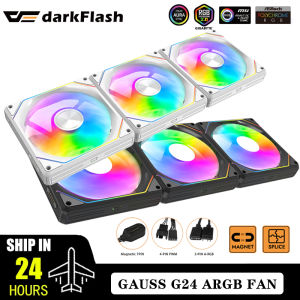
Darkflash G24 Case Fan PC 120mm Rgb Fans Cooler Kit Magnetic interface No Wire Connection PWM CPU Cooling Fan Argb Ventilador

Lenovo ThinkPad 4G 8G 16G 32G DDR4 2400 2666 3200 Laptop Internal Memory T480 T490 P52 Re480 E47090 580 Computer Memory Upgrade
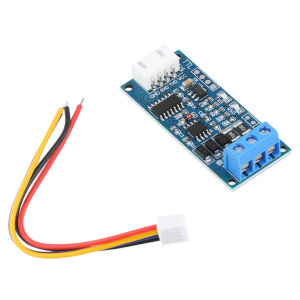
TTL Serial Port To RS485 Converter Module: An Overview

COOLMOON GPU Stand Support Aluminum GPU Bracket Adjustable Graphics Card Holder
Silent Cooling Fan 9CM 2-Wire Design Low Noise CPU Computer Heat Sink Fan DC12V 0.19A Suitable for Multiple Platforms
Easy to Install LX401 Ideal Diode Rectifiers Module Offer Reliable Power Delivery for Home Electronics Industrial System
RV Power Adapter 12 Inch 30Amp Female to 15 Amp Male Pigtail RV Adapter 125V 1875W Heavy Duty 10 AWG Wire Size UL ETL Listed RV Generator Adapter for Connecting Rvs Evs
8 Channel Solid Relays Module PLC Driver DC5V 12V 24V With Reverse Proof Power Function For DIY Enthusiasts
2Channel Digital Magnetic Isolator Board Module with Crosstalk Reduction Technology for Bidirectional Communication

Wireless 4G LTE WiFi6 Hotspot Auto Signal Optimization Memory Slot Americas Frequency Bands
AMD Ryzen 5 5500 Gaming PC Set With RX580 8GB GPU DDR4 16GB RAM M.2 Nvme 512GB SSD Full PC Set Desktop Computer