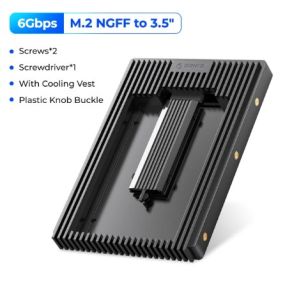
ORICO Hard Drive Caddy Adapter 2.5 SATA mSATA NGFF to 3.5 Internal Drive Bay SSD Converter Mounting Bracket Caddy Tray SATA 3.0
ORICO Hard Drive Caddy Adapter 2.5 SATA mSATA NGFF to 3.5 Internal Drive Bay SSD Converter Mounting Bracket Caddy Tray SATA 3.0
What is an ORICO Hard Drive Caddy Adapter?
The ORICO Hard Drive Caddy Adapter is a versatile mounting bracket that enables users to convert their 2.5-inch SATA, mSATA, or NGFF drives into 3.5-inch internal drive bay-compatible devices. This innovative adapter allows users to maximize their storage capacity by fitting smaller drives into standard-sized bays, providing a convenient solution for upgrading or expanding their computer systems.
Key Features & Benefits
- Compatibility: Supports SATA, mSATA, and NGFF drives, making it a versatile option for various storage needs.
- SATA 3.0 Support: Ensures optimal performance and data transfer speeds, with up to 6 Gbps bandwidth.
- Easy Installation: Simple mounting process, allowing users to quickly integrate their drives into their computer systems.
- Enhanced Security: Robust design provides added protection for drives, minimizing the risk of damage during installation or operation.
Compatibility with Different Drives
The ORICO Hard Drive Caddy Adapter is compatible with a wide range of 2.5-inch SATA, mSATA, and NGFF drives. Users can easily upgrade their storage capacity by fitting smaller drives into standard-sized bays, allowing for greater flexibility and adaptability in their computer systems.
How to Install the ORICO Hard Drive Caddy Adapter
Installing the ORICO Hard Drive Caddy Adapter is a straightforward process that can be completed in just a few steps.
Preparing Your System
Before installing the adapter, ensure that your computer system is powered off and unplugged from any power sources. This will help prevent any potential damage during installation.
Mounting the Adapter
To mount the adapter, simply slide it into the 3.5-inch internal drive bay, aligning the mounting holes with those on the adapter. Secure the adapter using the provided screws, ensuring that it is firmly attached to the computer chassis.
Connecting the Drive
Once the adapter is securely mounted, connect your 2.5-inch SATA, mSATA, or NGFF drive to the adapter using the appropriate cables. Ensure that all connections are secure before powering on your system.
Troubleshooting Common Issues
Despite its ease of use, users may encounter some common issues during installation or operation of the ORICO Hard Drive Caddy Adapter. Here are some solutions to help resolve these problems:
Adapter Not Detected
If the adapter is not detected by your system, check that all connections are secure and that the adapter is properly seated in the drive bay. Additionally, ensure that the appropriate drivers are installed for your operating system.
Drive Not Recognized
If your drive is not recognized by your system, check that the drive is properly connected to the adapter and that all connections are secure. Additionally, verify that the drive is compatible with your computer system and operating system.
Power Supply Issues
If you experience power supply issues, ensure that the adapter is properly connected to the power supply and that all connections are secure. Additionally, verify that the power supply is capable of providing sufficient power to the adapter and drive.
Enhancing Performance & Security
To optimize the performance and security of your ORICO Hard Drive Caddy Adapter, consider implementing the following tips:
Optimizing Drive Performance
To ensure optimal performance, use high-quality cables and connectors, and keep your operating system and drivers up-to-date. Additionally, consider using solid-state drives (SSDs) for faster data transfer speeds and improved system performance.
Ensuring Data Security
To protect your data, use reliable backup solutions and ensure that your operating system and drivers are up-to-date. Additionally, consider using encryption software to secure sensitive data stored on your drives.

ORICO HOME
Review
You May Also Like
Do It Home SanDisk 3.0-8GB Flash Drive 3.0 8GB

90s Non-Stop Music Videos Remix V1 in 32GB USB Flash Drive. 300+ Music Video Remix Compilation with a complimentary gift

Single Cell LR14 C Enclosure Constructed With Wear Resistant Plastic Material For Extended Device Compatibility

Canon Camera ccd Memory Card 5D46D290dR6 SLR 200d High-Speed Storage M50 Second Generation SD Card
USB TF Reader for PC Memory to USB Adapter MS Reader for Camera Memory Reader Simultaneously Read

Sandisk Ultra Curve USB 3.2: A Comprehensive Guide
2.5 Hard Drive Enclosure No Disassembly Required USB3.0 Hard Drive Enclosure Mechanical SSD Solid State sata Serial Port External Hard Drive Enclosure
Aluminum M.2 Case M.2 Nvme Enclosure USB 3.1 Type C Gen 2 10Gbps Transfer M.2 Nvme Hard Drive Box Replacement
TISHRIC HDD Case SATA to USB3.0 HDD Enclosure 2.5 inch Hard Drive Case Support 6Gbps Mobile External HDD Case for PC Laptop
Do It Home SanDisk SDDDCZ-128GB Dual Drive Type-C 3.1 128GB
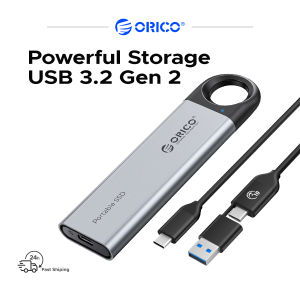
ORICO Portable SSD USB 3.2 Gen 2 Speed Up To 1000MB/s Max 256G/512G/1TB/2TB Capacity Choice Type-C to C/A Cable