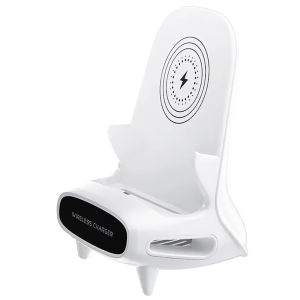
15W Desktop Vertical Wireless Fast Charging Universal Mobile Phone Holder
15W Desktop Vertical Wireless Fast Charging Universal Mobile Phone Holder
What is a Universal Mobile Phone Holder?
A universal mobile phone holder is a versatile accessory designed to securely hold smartphones of various sizes and brands. These holders provide a convenient way to keep your phone within reach while charging, watching videos, or navigating maps. They come in different styles, such as horizontal, vertical, and wall-mounted, catering to different preferences and needs.
Key Features & Benefits
- Universal compatibility: Suitable for most smartphones, regardless of brand or model.
- Secure grip: Holds your phone firmly in place, preventing accidental drops or slides.
- Easy setup: Simply place your phone in the holder, and it's ready to use.
- Space-saving design: Compact and lightweight, making it perfect for small workspaces or desks.
How to Choose the Right Phone Holder
When selecting a universal mobile phone holder, consider the following factors:
- Size and weight of your smartphone: Ensure the holder can accommodate your device comfortably.
- Charging requirements: If you want to charge your phone while using the holder, look for a model with built-in wireless charging capabilities.
- Placement preferences: Choose a holder that suits your desired location, such as a desk, wall, or car dashboard.
- Additional features: Some holders come with built-in fans, phone grips, or adjustable angles for added convenience.
Understanding the 15W Desktop Wireless Charging Holder
The 15W desktop wireless charging holder is a high-performance accessory designed to charge your smartphone quickly and efficiently. It supports Qi wireless charging technology, allowing you to charge your compatible device without the need for cables.
How to Set Up Your Wireless Charger
Setting up your wireless charger is simple and straightforward:
- Place the charger on a flat surface, such as a desk or table.
- Remove any protective cases or covers from your smartphone.
- Align your phone with the charging pad, ensuring it's centered and properly connected.
- Turn on your phone and start charging.
Tips for Optimal Wireless Charging Performance
To get the most out of your wireless charger, follow these tips:
- Keep the charging area clean and free from debris.
- Ensure your phone is aligned correctly with the charging pad.
- Use a compatible device that supports Qi wireless charging technology.
- Charge your phone in a well-ventilated area to prevent overheating.
Exploring the Fast Charging Mobile Holder
The fast charging mobile holder is designed to maximize battery life by providing quick and efficient charging. It supports high-power charging speeds, allowing you to recharge your smartphone in less time compared to standard chargers.
How to Maximize Battery Life with Fast Charging
To make the most of your fast charging mobile holder, consider the following tips:
- Charge your phone when the battery level drops below 20% to avoid deep discharges.
- Unplug your phone once it reaches 100% to prevent overcharging.
- Keep your phone cool during charging to maintain optimal performance.
- Use a compatible device that supports fast charging technology.
Comparing Fast Charging Mobile Holders
When comparing fast charging mobile holders, consider the following factors:
- Power output: Look for a holder that supports at least 15W of power output for faster charging.
- Compatibility: Ensure the holder is compatible with your smartphone and supports fast charging technology.
- Additional features: Some holders come with built-in fans, phone grips, or adjustable angles for added convenience.
Vertical Charging Stand: An Overview
The vertical charging stand is a specialized accessory designed to keep your smartphone upright while charging. It provides a convenient way to watch videos, read articles, or navigate maps hands-free.
How to Position Your Phone for Best Results
To position your phone correctly in the vertical charging stand, follow these steps:
- Remove any protective cases or covers from your smartphone.
- Align your phone with the charging pad, ensuring it's centered and properly connected.
- Adjust the angle of the stand to your desired viewing position.
- Turn on your phone and start using it.
Benefits of Vertical Charging
Vertical charging offers several advantages over horizontal charging, including:
- Improved ergonomics: Reduces strain on your neck and eyes when watching videos or reading articles.
- Better visibility: Provides a wider viewing angle for a more immersive experience.
- Space-saving design: Keeps your desk or workspace clutter-free.
- Quick access: Allows you to easily reach your phone when needed.
In conclusion, the 15W desktop vertical wireless fast charging universal mobile phone holder is a versatile accessory that combines the convenience of a phone holder with the efficiency of a wireless charger. By understanding the features and benefits of this product, you can make an informed decision and choose the right accessory for your needs.

Sinboia
Review

You May Also Like
CCLCC Luminous Transparent Cover: A Durable Protector for Your Apple Watch
FATBEAR Tactical Military Grade Rugged Shockproof Armor Protective Shell Skin Case Cover for iPhone 17 Pro Max iPhone Air
Lenovo Thinkplus Wireless Mouse Wl80: A Comprehensive Guide

Adorable Kurokos Y77e Silicone Phone Case Crossbody Backpack Stand Vivo Y97gt Y100t Y95 Y93s Cute Cartoon Style Mobile Phone Shell

Zoyu | Transparent Magnetic Split Drawing Case For iPad Mini 7 Air 6 iPad 11 Pro 11 Inch 10 Generation Tablet Protective Cover Pull Out
XIAOMI MI 13 PRO / MI 13 Case XUNDD BeatleMAGNET Shockproof Case
LDNIO Gan 140W Fast Charger: A Comprehensive Guide
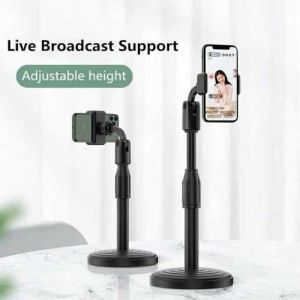
TikTok Online Class Universal Adjustable Height Tablet Desktop Mobile Live Broadcast Holder Stand
Ringke Fusion Card Case: A Comprehensive Guide for iPhone 16 Pro Max

Black Silicone Protective Case for Apple Bluetooth Earphones Airpods4 Love Heart Design Compatible with 2nd And 3rd Gen pro Models

1PCS KETTLE GAS BUTANE for Portable Gas Stove 220g (Luckystar.shop.ph) - Don't Choose Flash/J&T