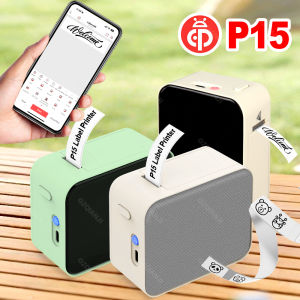
ATO C9 Thermal Printer Wireless Bluetooth Thermal Receipt Printer 1000mAh Printer Paper Photo Pocket Thermal Printer

ATO TOOL. Bluetooth Connectivity. The PeriPage Mini Thermal Printer offers hassle-free connectivity via Bluetooth, allowing you to print from any Bluetooth-enabled device. High-Speed Printing. With a print speed of 20ppm, this printer ensures quick and efficient printing, saving you valuable time. Wireless Network Printing. The wireless network printing capability allows for seamless connectivity and printing anywhere, anytime. Max Resolution of 203dpi. The high-resolution printhead delivers crisp and clear prints, making it perfect for photos and labels. Thermal Paper Consumption. Designed to use thermal paper, this printer is environmentally friendly and offers a reliable printing solution. Compact and Portable. Its compact size and lightweight design make this printer highly portable, ideal for on-the-go use

ATO TOOL

ATO TOOL

Seller ratings 98%

You May Also Like

PGI72 PGI-72 Color Compatible Printer Ink Cartridge for Canon PIXMA Pro-10 Pro 10 PRO-10S PRO 10S Printer\\n\\n Introduction to Tatrix PGI 72 Ink Cartridge\\n\\nThe Tatrix PGI 72 Ink Cartridge is a high-quality, compatible ink cartridge designed specifically for use with Canon PIXMA Pro-10S printers. This ink cartridge offers a cost-effective alternative to Canon's original ink cartridges while maintaining the same level of quality and performance.\\n\\n What is the Tatrix PGI 72 Ink Cartridge?\\n\\nThe Tatrix PGI 72 Ink Cartridge is a compatible ink cartridge designed to work seamlessly with Canon PIXMA Pro-10S printers. It is compatible with Canon's original ink cartridge model number PGI-72 and offers the same vibrant colors and print quality.\\n\\n How Does It Compare to Canon PIXMA Pro-10S Original Ink?\\n\\nWhile the Tatrix PGI 72 Ink Cartridge offers similar print quality and performance to Canon's original ink cartridges, it provides a more cost-effective solution for users who require frequent printing. The Tatrix PGI 72 Ink Cartridge is designed to work perfectly with Canon PIXMA Pro-10S printers, providing high-quality prints at a lower cost.\\n\\n Key Features of Tatrix PGI 72 Compatible Ink Cartridge\\n\\nThe Tatrix PGI 72 Ink Cartridge offers several key features that make it a great choice for users looking for a cost-effective, high-quality ink cartridge solution.\\n\\n Full Ink Cartridge with Chip for Perfect Compatibility\\n\\nThe Tatrix PGI 72 Ink Cartridge comes pre-filled with ink and includes a chip that ensures perfect compatibility with Canon PIXMA Pro-10S printers. This chip allows the printer to recognize the ink cartridge and print at its highest quality.\\n\\n Bulk Packaging for Cost-Effective Printing\\n\\nThe Tatrix PGI 72 Ink Cartridge is available in bulk packaging, making it an ideal solution for users who require frequent printing. By purchasing in bulk, users can save money on their printing costs while still maintaining high-quality prints.\\n\\n Dye-Based Ink for Vivid Colors\\n\\nThe Tatrix PGI 72 Ink Cartridge uses dye-based ink, which provides vivid colors and excellent print quality. This makes it a great choice for users who require high-quality prints for professional or personal use.\\n\\n How to Install Tatrix PGI 72 Compatible Ink Cartridge\\n\\nInstalling the Tatrix PGI 72 Ink Cartridge is easy and straightforward. Follow these steps to install the ink cartridge in your Canon PIXMA Pro-10S printer:\\n\\n Step-by-Step Guide to Installing Tatrix PGI 72\\n\\n1. Turn on your Canon PIXMA Pro-10S printer and open the front cover.\\n2. Remove the original ink cartridge from the printer.\\n3. Insert the Tatrix PGI 72 Ink Cartridge into the printer, making sure it is seated properly.\\n4. Close the front cover of the printer and press the \"Start\" button to begin the installation process.\\n\\n Troubleshooting Common Installation Issues\\n\\nIf you encounter any issues during the installation process, try the following troubleshooting tips:\\n\\n* Make sure the ink cartridge is seated properly in the printer.\\n* Check that the ink cartridge is compatible with your printer model.\\n* If the printer does not recognize the ink cartridge, try restarting the printer.\\n\\n Maximizing Printer Performance with Tatrix PGI 72\\n\\nTo ensure optimal performance from your Canon PIXMA Pro-10S printer, follow these tips:\\n\\n* Always use high-quality paper for printing.\\n* Clean the print head regularly to maintain optimal print quality.\\n* Follow the manufacturer's instructions for ink cartridge installation and maintenance.\\n\\nIn conclusion, the Tatrix PGI 72 Ink Cartridge is a great choice for users looking for a cost-effective, high-quality ink cartridge solution for their Canon PIXMA Pro-10S printer. With its full ink cartridge, bulk packaging, and dye-based ink, the Tatrix PGI 72 Ink Cartridge offers excellent value and performance.\"\n}
00:52

PGI72 PGI-72 Color Compatible Printer Ink Cartridge for Canon PIXMA Pro-10 Pro 10 PRO-10S PRO 10S Printer\\n\\n Introduction to Tatrix PGI 72 Ink Cartridge\\n\\nThe Tatrix PGI 72 Ink Cartridge is a high-quality, compatible ink cartridge designed specifically for use with Canon PIXMA Pro-10S printers. This ink cartridge offers a cost-effective alternative to Canon's original ink cartridges while maintaining the same level of quality and performance.\\n\\n What is the Tatrix PGI 72 Ink Cartridge?\\n\\nThe Tatrix PGI 72 Ink Cartridge is a compatible ink cartridge designed to work seamlessly with Canon PIXMA Pro-10S printers. It is compatible with Canon's original ink cartridge model number PGI-72 and offers the same vibrant colors and print quality.\\n\\n How Does It Compare to Canon PIXMA Pro-10S Original Ink?\\n\\nWhile the Tatrix PGI 72 Ink Cartridge offers similar print quality and performance to Canon's original ink cartridges, it provides a more cost-effective solution for users who require frequent printing. The Tatrix PGI 72 Ink Cartridge is designed to work perfectly with Canon PIXMA Pro-10S printers, providing high-quality prints at a lower cost.\\n\\n Key Features of Tatrix PGI 72 Compatible Ink Cartridge\\n\\nThe Tatrix PGI 72 Ink Cartridge offers several key features that make it a great choice for users looking for a cost-effective, high-quality ink cartridge solution.\\n\\n Full Ink Cartridge with Chip for Perfect Compatibility\\n\\nThe Tatrix PGI 72 Ink Cartridge comes pre-filled with ink and includes a chip that ensures perfect compatibility with Canon PIXMA Pro-10S printers. This chip allows the printer to recognize the ink cartridge and print at its highest quality.\\n\\n Bulk Packaging for Cost-Effective Printing\\n\\nThe Tatrix PGI 72 Ink Cartridge is available in bulk packaging, making it an ideal solution for users who require frequent printing. By purchasing in bulk, users can save money on their printing costs while still maintaining high-quality prints.\\n\\n Dye-Based Ink for Vivid Colors\\n\\nThe Tatrix PGI 72 Ink Cartridge uses dye-based ink, which provides vivid colors and excellent print quality. This makes it a great choice for users who require high-quality prints for professional or personal use.\\n\\n How to Install Tatrix PGI 72 Compatible Ink Cartridge\\n\\nInstalling the Tatrix PGI 72 Ink Cartridge is easy and straightforward. Follow these steps to install the ink cartridge in your Canon PIXMA Pro-10S printer:\\n\\n Step-by-Step Guide to Installing Tatrix PGI 72\\n\\n1. Turn on your Canon PIXMA Pro-10S printer and open the front cover.\\n2. Remove the original ink cartridge from the printer.\\n3. Insert the Tatrix PGI 72 Ink Cartridge into the printer, making sure it is seated properly.\\n4. Close the front cover of the printer and press the \"Start\" button to begin the installation process.\\n\\n Troubleshooting Common Installation Issues\\n\\nIf you encounter any issues during the installation process, try the following troubleshooting tips:\\n\\n* Make sure the ink cartridge is seated properly in the printer.\\n* Check that the ink cartridge is compatible with your printer model.\\n* If the printer does not recognize the ink cartridge, try restarting the printer.\\n\\n Maximizing Printer Performance with Tatrix PGI 72\\n\\nTo ensure optimal performance from your Canon PIXMA Pro-10S printer, follow these tips:\\n\\n* Always use high-quality paper for printing.\\n* Clean the print head regularly to maintain optimal print quality.\\n* Follow the manufacturer's instructions for ink cartridge installation and maintenance.\\n\\nIn conclusion, the Tatrix PGI 72 Ink Cartridge is a great choice for users looking for a cost-effective, high-quality ink cartridge solution for their Canon PIXMA Pro-10S printer. With its full ink cartridge, bulk packaging, and dye-based ink, the Tatrix PGI 72 Ink Cartridge offers excellent value and performance.\"\n}

PG 445/446 ink PG445S/CL446S refillable ink cartridge for Canon PIXMA MX494 MG2440 MG2540 MG2940 MG2942 MG2944 IP2840 printer
00:34

PG 445/446 ink PG445S/CL446S refillable ink cartridge for Canon PIXMA MX494 MG2440 MG2540 MG2940 MG2942 MG2944 IP2840 printer

AOS MLT-D203L MLTD203L Toner Cartridge Compatible
00:12

AOS MLT-D203L MLTD203L Toner Cartridge Compatible

SXXINGI 1Pcs MX-H813 Price Tag Labeller 8 Digits A-line Label Maker Durable Label Paper Pricing Tag Display Tool for Retail Store
00:15

SXXINGI 1Pcs MX-H813 Price Tag Labeller 8 Digits A-line Label Maker Durable Label Paper Pricing Tag Display Tool for Retail Store

Brother PT-D410 & PT-D610BT Label Printer: Your Ultimate Guide
00:30

Brother PT-D410 & PT-D610BT Label Printer: Your Ultimate Guide

XeroxPrintRush IDLaminate (TARPAULIN PRINTING) Available COD
00:16

XeroxPrintRush IDLaminate (TARPAULIN PRINTING) Available COD

Cuyi UV Dye Ink 1 Liter Bottle (Magenta Color)
00:55

Cuyi UV Dye Ink 1 Liter Bottle (Magenta Color)

Original Epson T11F Standard Capacity Inks
00:21

Original Epson T11F Standard Capacity Inks

Gprinter GP-1424D Thermal Printer
00:20

Gprinter GP-1424D Thermal Printer

Kyocera 100% Original CCMT CCMT09T308HQ CCMT09T304HQ CCMT09T302HQ CCMT 060204 HQ CCMT. 060202 HQ CCMT. 060202 HP TN60 Turning Inserts
00:13

Kyocera 100% Original CCMT CCMT09T308HQ CCMT09T304HQ CCMT09T302HQ CCMT 060204 HQ CCMT. 060202 HQ CCMT. 060202 HP TN60 Turning Inserts

【COD+Fast Delivery】Canon PG 445 446 ink PG445S CL446S refillable ink cartridge for Canon PIXMA MX494 MG2440 MG2540 MG2940 MG2942 MG2944 IP2840 Printers
00:36

【COD+Fast Delivery】Canon PG 445 446 ink PG445S CL446S refillable ink cartridge for Canon PIXMA MX494 MG2440 MG2540 MG2940 MG2942 MG2944 IP2840 Printers

GZQIANJI Android 11 Terminal POS System With 58mm Receipt Printer Scan 1D/2D Code By Camera Android All-in-one Handheld POS Machine
00:52

GZQIANJI Android 11 Terminal POS System With 58mm Receipt Printer Scan 1D/2D Code By Camera Android All-in-one Handheld POS Machine