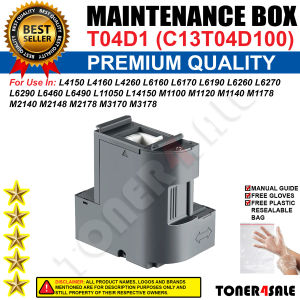
Maintenance Box T04D1 C13T04D100: A Comprehensive Guide for Epson EcoTank Printers
Maintenance Box T04D1 C13T04D100: A Comprehensive Guide for Epson EcoTank Printers
Introduction
What is a Maintenance Box T04D1 C13T04D100?
The Maintenance Box T04D1 C13T04D100 is a crucial component for keeping your Epson EcoTank printer running smoothly. It includes essential parts such as cleaning wipers, rollers, and other components necessary for regular maintenance.
Which Printers Can Use T04D1 C13T04D100?
The T04D1 C13T04D100 maintenance box is compatible with a wide range of Epson EcoTank printers, including L4150, L4160, L4260, L6160, L6170, L6190, L6260, L6270, L6290, L6460, L6490, L11050, L14150, M1100, M1120, M1140, M1178, M2140, M2148, M2178, M3170, and M3178 models.
Installation Guide
How to Install T04D1 C13T04D100
To install the maintenance box, follow these steps:
- Turn off your printer and unplug it from the power source.
- Open the printer's maintenance access panel.
- Remove the old maintenance box if present.
- Insert the new T04D1 C13T04D100 maintenance box into the designated slot.
- Close the maintenance access panel and reconnect the power supply.
- Turn on the printer and allow it to perform a self-test.
Troubleshooting Common Issues
If you encounter any issues during installation, consult the Epson user manual or contact their customer support for assistance.
Replacement Parts for Epson EcoTank Printers
L6160 L6170 Printer Accessories
The L6160 and L6170 printers require specific accessories, such as ink cartridges and cleaning kits, to function optimally. Make sure to purchase genuine Epson parts to ensure compatibility and performance.
L4150 L4160 Printer Maintenance Kit
For the L4150 and L4160 printers, the T04D1 C13T04D100 maintenance box serves as the essential maintenance kit. It includes all necessary components for regular printer upkeep.
M1100 M1120 Compatible Parts
The M1100 and M1120 printers share compatible parts with other Epson EcoTank models. The T04D1 C13T04D100 maintenance box is one such part that ensures proper printer operation.
Epson EcoTank Maintenance Box: Best Practices
Regular Maintenance Tips
To keep your Epson EcoTank printer running smoothly, perform regular maintenance tasks such as:
- Cleaning the print head and ink cartridges
- Replacing the maintenance box as needed
- Checking for clogs or blockages
Extending Printer Lifespan
To maximize the lifespan of your Epson EcoTank printer, follow these tips:
- Use genuine Epson parts and accessories
- Store the printer properly when not in use
- Follow the manufacturer's recommended maintenance schedule
Conclusion
Summary of Key Takeaways
In summary, the T04D1 C13T04D100 maintenance box is essential for keeping your Epson EcoTank printer running smoothly. It is compatible with a wide range of models and includes all necessary components for regular printer upkeep.
Final Thoughts
By following the installation guide, troubleshooting common issues, and adhering to best practices, you can ensure your Epson EcoTank printer remains reliable and efficient. Remember to use genuine Epson parts and accessories for optimal performance.

Toner4sale
You May Also Like
HP GT53/GT52 (B/C/Y/M) - High-Quality Printer Supplies
ETQ Replacement Drum Unit for ECOSYS M2540dn & M2540dw
Applicable to Ricoh C2503 C3003 C3503 C4503 C5503 C6003 Drum Unit Gear Pink Lens
12V 24V 40W Heating Rod Heater Cartridge For Reliable Fast 3D Printer Heating Energy Saving
12.7mm 25 language Touch Screen QR Bar Batch Code Date Logo Expiry Label Portable Handheld Injk Jet Thermal Mini Printer
KGS Premium X1 DTF TRANSFER PET FILM for DTF Printing | size 30/60/ 33cm x100m | Roll
Compatible Kyocera TK1113 Chip for MFP FS1060 1520H 1120MFP 1025 FS-1040 1110 FS1016 Office Equipment Consumables Accessories
HBAPOS Handsfree 2D 1D Barcode Scanner Omnidirectional Desktop Automatic QR Bar Code Reader for POS PC Supermarket
ETQ TN221 Compatible Toner Cartridge for C227, C287, C367, and C7528 Models
Brother BT5000 Continuous Ink for Brother DCP-T420W / DCP-T520W / DCP- T720W Sold per (BOX)
GZQIANJI Android 13 14 POS PDA Handheld Terminal 58mm Printer NFC Reader 4G SIM PDA Loyverse App Receipt Printing 1D Scanner