Honeywell 5703 Scanner: A Comprehensive Guide
Honeywell 5703 Scanner: A Comprehensive Guide
Introduction to Honeywell 5703 Scanner & Portable Data Terminal
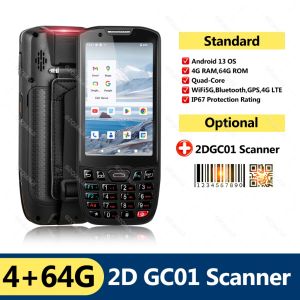
The Honeywell 5703 Scanner is a powerful and versatile device designed to meet the needs of businesses requiring efficient data collection and management. With its PDA terminal running Android 13 and equipped with a Qualcomm processor, this scanner is a top choice for businesses looking to streamline their operations.
Key Features
The Honeywell 5703 Scanner boasts several key features that make it stand out in the market:
- Android 13: The device runs on the latest version of Android, providing users with a smooth and intuitive experience.
- Qualcomm Processor: With a quad-core 2.0G 64-bit processor, the Honeywell 5703 Scanner offers excellent performance and speed.
- 4+64GB Memory: This device comes with 4GB RAM and 64GB internal storage, providing ample space for data storage and application usage.
- 4G Network: The scanner supports 2G, 3G, and 4G networks, ensuring reliable connectivity.
- 2D Scanning Head: The device features a 2DQC01 scanning head, enabling accurate and efficient data collection.
Technical Specifications
Here are some technical specifications of the Honeywell 5703 Scanner:
- Size: 158.2mm * 67.2mm * 21.5mm
- Weight: Less than 282g (including battery)
- Screen: 4-inch, 480*800 HD, G+F+F, capacitive screen, multi-touch
- Expandable Storage: Up to 128G (TF card not included)
- Network: 2G, 3G, 4G network full network pass
- WIFI: IEEE 802.11 a/b/g/n 2.4G&5G Dual Band
- Bluetooth: BT5.0
- Camera: Rear 8MP, flash, autofocus; Front 8MP (optional)
- Positioning: GPS/Beidou/Glonass/Galileo
- Alerts: Three-color breathing light, vibration
- Battery: 4500mAh, removable High-performance lithium polymer battery
- Charging power: 5V 2A
- Interface: TYPE-C USB 2.0; Memory card interface: one TF card; SIM card interface: two Nano-SIM cards
- On/Off button: Power button
- Scanning key: left and right side barcode scanning shortcut keys
- Main keys: 21 main body keys (0-9, Return, Confirm, Delete, Scan, *, #, Fn Crystal lossless keys)
How to Set Up Your Honeywell 5703 Scanner
Setting up your Honeywell 5703 Scanner is a straightforward process. Follow these steps to get started:
Connecting to Wi-Fi & Bluetooth
- Power on your Honeywell 5703 Scanner by pressing the power button.
- Go to Settings > Wireless & Networks > Wi-Fi.
- Select your desired Wi-Fi network and enter the password if required.
- To connect to Bluetooth devices, go to Settings > Wireless & Networks > Bluetooth and enable Bluetooth.
Installing SIM Cards
- Insert the SIM card(s) into the designated slot(s) on the device.
- Power on your Honeywell 5703 Scanner and follow the prompts to set up your network connection.
Enhancing Productivity with Honeywell 5703 Scanner
The Honeywell 5703 Scanner is designed to enhance productivity in various industries, including retail, logistics, and manufacturing. Here are some ways to maximize its potential:
Scanning & Data Collection
With its 2D scanning head, the Honeywell 5703 Scanner enables accurate and efficient data collection. Simply press the scanning key and point the device at the barcode to capture the information.
Integrating with Other Devices
The Honeywell 5703 Scanner supports integration with other devices, such as printers, scanners, and computers, through Wi-Fi, Bluetooth, and USB connections. This allows for seamless data transfer and streamlines workflows.
Tips for Maintaining Your Honeywell 5703 Scanner
To ensure optimal performance and longevity of your Honeywell 5703 Scanner, follow these maintenance tips:
Battery Care
- Charge the battery regularly to maintain its capacity.
- Avoid exposing the device to extreme temperatures.
Cleaning & Storage
- Clean the device with a soft, dry cloth.
- Store the device in a cool, dry place when not in use.
By following these guidelines, you can make the most of your Honeywell 5703 Scanner and enjoy its many benefits.

GZQIANJI Store
Review

You May Also Like

NIIMBOT B21 B21S B21PRO Bluetooth Thermal Label Printer Ink Free Mini Portable Thermal Printer Labels Maker with free Tape Label Sticker Inkless for Clothing Jewelry Tag Supermarket Retail Store Home Labeling Barcodes Price Name Printing - VMI Direct
MX-H813 8 Digits Price Tag Labeler: A Comprehensive Guide
HPee 151A (W1510A) Black LaserJet Toner Cartridge
IR-40T IR-40 Compatible Calculator Printer Ribbons Ink Roller - Black & Red/Black
Compatible CF283A 83A toner cartridge for HP Laserjet pro M201 M225 M202 M226 M125A M127FN printer
NPG59 Toner Cartridge for Use and Compatible with IR2202 IR2204 IR2004 IR2002
AOS TN263 TN267 Toner Powder for Brother HL-L3230CDW HL-L3270CDW DCP-L3510CDW MFC-L3750CDW MFC-L3745CDW
eTONER ERC 30 ERC 34 ERC 38 ERC 30/34/38 Black Compatible Ink Ribbon for Epson 6PCS
price tag labeller (Free Ink Roll And Tag) 8 Digits price tag ner Price Labeller Crown Mx-5500 With Labels Introductory Package gcash vendo machine negosyo
Genuine Epson 003 Ink – High Quality Print For L-Series Printers

Epson Surecolor T3270 & T7270 Matte Black 700ml C13T694500