


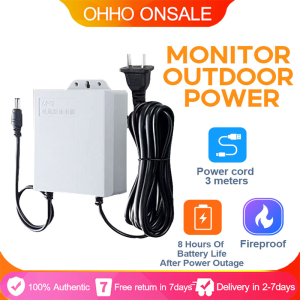
12V 1.5A Mini UPS Battery Backup for WiFi Router & Outdoor CCTV

12V 1.5A Mini UPS Battery Backup for WiFi Router & Outdoor CCTV
12V 1.5A Mini UPS Battery Backup for WiFi Router & Outdoor CCTV
What is a Mini UPS for WiFi Router & Outdoor CCTV?
A Mini UPS, or Uninterruptible Power Supply, is a compact device designed to provide backup power to essential devices such as WiFi routers, modems, and outdoor CCTV security cameras during power outages. This ensures continuous operation and uninterrupted connectivity, even during unexpected power disruptions.
Key Features
- Compact Design: Mini UPS units are small and lightweight, making them easy to install and fit into tight spaces.
- Built-in Battery Working System: This system allows the Mini UPS to seamlessly switch from mains power to battery power during outages, ensuring minimal downtime.
- Power Outage Endurance System: The built-in battery provides extended runtime during power outages, depending on the device's power consumption.
Benefits of Using a Mini UPS
- Reliable Connectivity: With a Mini UPS, you can maintain uninterrupted WiFi connectivity even during power outages, ensuring that you stay connected and informed.
- Continuous Security Monitoring: Outdoor CCTV security cameras equipped with a Mini UPS continue to operate during power outages, providing continuous monitoring and surveillance.
- Cost-effective Solution: Investing in a Mini UPS offers a cost-effective solution to protect your essential devices from power-related damages.
How to Choose the Right Mini UPS for Your Needs
When selecting a Mini UPS, consider the following factors:
- Power Capacity: Choose a Mini UPS with sufficient power capacity to support your devices during power outages.
- Compatibility: Ensure the Mini UPS is compatible with your WiFi router, modem, and outdoor CCTV security cameras.
- Runtime: Select a Mini UPS with a runtime that meets your needs during power outages.
Popular Models
Some popular models of Mini UPS include:
- 12V 1.5A Mini UPS Battery Backup: This model provides reliable backup power for WiFi routers, modems, and outdoor CCTV security cameras.
Setting Up Your Mini UPS
Follow these steps to install and configure your Mini UPS:
- Connect the Mini UPS to your WiFi router, modem, and outdoor CCTV security cameras using the provided power cords.
- Plug the Mini UPS into a mains power outlet.
- Power on your devices to ensure they are functioning correctly.
Troubleshooting Tips
If you encounter any issues with your Mini UPS, try the following troubleshooting tips:
- Check the connections between the Mini UPS and your devices.
- Verify that the Mini UPS is receiving power from the mains outlet.
- Ensure that the built-in battery is properly charged.
Maximizing the Performance of Your Mini UPS
To get the most out of your Mini UPS, follow these maintenance tips and best practices:
- Regularly check the battery level and recharge as needed.
- Keep the Mini UPS clean and free from dust and debris.
- Follow the manufacturer's instructions for proper usage and maintenance.

Ohho Philippines
Seller ratings 96%
Review
4.9
/5
172 Ratings
A
A****n
Aug 26, 2025
Great for outdoor CCTV security cameras., Turret-style security camera for versatile installation., 16 channels for comprehensive recording capabilities., 16 channels for comprehensive recording capabilities.,
Helpful (0)
J
J****s
Jul 21, 2025
This 12V 1.5A Mini UPS is exactly what I needed for my WiFi router. Setup was quick and simple. It provides instant, seamless power when electricity goes out, keeping my internet connection uninterrupted which is essential. The compact size is perfect. In my initial test, the battery lasted about 6 hours. While the product indicated up to 10 hours, 6 hours is still very good for most power interruptions. I will continue to observe its performance over time and plan to provide a follow-up review in the future. Overall, I am very pleased with this purchase. It's a great device for maintaining continuous internet access.
Helpful (0)
You May Also Like
00:38
V380 PRO: A Comprehensive Guide to Endurance Power Supply for IP Camera & WiFi Router
00:23
SUPERSS Binocular HD Professional Zoom Telescope: The Ultimate Long Range Observation Tool
00:43
1080p Night Vision Wireless CCTV Camera: Connect Cellphone & Two-way Audio

00:10
Rover Systems 305 meters /1 Roll RG59SATCBET Endura RG59 Professional CCTV Camera Coaxial Cable 22AWG (Black)
01:00
【BUY 1 TAKE 1】Three Lens V380 PRO CCTV Camera Wireless WiFi Camera Outdoor 4G Waterproof Surveillance No WIFI Needed Two-Way Audio Night Vision IP Security Cameras
01:02
8K 16MP WiFi Camera: Smart CCTV Surveillance & Outdoor Security Protection
01:14
Panasonic Lumix S Series 24-105mm F4 MACRO L-Mount Lens
00:15
8MP Wireless Security Surveillance Camera - Outdoor Wifi IP with 4X Zoom Smart Home CCTV AI Human Tracking Two-way Audio HD Cam
00:36
Mini H-unting Camera 16MP 1080P Motion Activated 0.2s Trigger Time Infrared Night Vision Wildlife Obervation Trail Game Scouting
00:16
ANRAN 3MP Outdoor Solar Security Camera Humanoid Detection HD Color Night Vision Wireless Surveillance Camera Free Cloud Storage
00:56
Hikvision 2MP(1080P)ECO Series Tubro HD Outdoor Waterproof IP67 Camera Hikvision Eco Hikvision System - Lazada

00:36
Outdoor IP Security Cameras: A Comprehensive Guide to CCTV Camera Connect Cellphone v380 Pro
Hot Search
boys national dresspuzzel toys for kidsportable tvwall mounted floating deskhumorous gift ideakeyboard protector for gigabyte laptophulu subscriptionoriginal ballsetting spray koreanmedal wirh blue lace depedrocking chairs for adults plastictent ceiling fanspeedtuner bell mio i 125koceblo handle bar carbonpcb:nr :f 01u 314 072

















