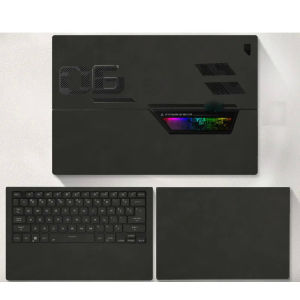
PU Leather Skin Laptop Stickers for ROG Flow Z13
PU Leather Skin Laptop Stickers for ROG Flow Z13
Introduction to PU Leather Skin Laptop Stickers
When it comes to protecting your ROG Flow Z13 gaming laptop, finding the right accessories can make all the difference. One popular choice among gamers is PU leather skin laptop stickers. These stylish and practical stickers provide a layer of protection against scratches, dust, and minor impacts. In this article, we will explore the benefits, compatibility, and installation process of PU leather skin laptop stickers for the ROG Flow Z13.
Key Features & Benefits
PU leather skin laptop stickers offer several advantages for gaming laptops:
- Gaming Laptop Skin Protection: These stickers provide an extra layer of protection against scratches, dust, and minor impacts, keeping your ROG Flow Z13 looking like new.
- PU Leather Laptop Stickers: Made from high-quality PU leather, these stickers offer a premium feel and appearance, enhancing the overall look of your gaming laptop.
- Customizable Laptop Decals: With various designs available, you can personalize your ROG Flow Z13 to match your unique style and preferences.
Compatibility & Specifications
Our PU leather skin laptop stickers are specifically designed for the Asus ROG Flow Z13 gaming laptop, including models gz301, gz301vf, and gz301vv from 2022 and 2023. The package includes top skin, keyboard perimeter skin, and bottom skin, providing comprehensive protection for your device.
How to Choose the Right Sticker for Your ROG Flow Z13
Before purchasing PU leather skin laptop stickers for your ROG Flow Z13, consider the following factors:
- Model Compatibility: Ensure that the sticker is compatible with your specific ROG Flow Z13 model. We recommend double-checking the model number before making a purchase.
- Size Considerations: While our stickers are designed to fit perfectly, there might be a slight size error of 0.1-0.3cm. If you're concerned about this, measure your laptop's dimensions and compare them with the sticker's specifications before buying.
Installation & Removal Process
Installing and removing PU leather skin laptop stickers is easy and hassle-free:
- Clean the surface of your ROG Flow Z13 to remove any dust or debris.
- Carefully peel off the sticker from its backing paper.
- Align the sticker with your laptop's surface and press firmly to secure it in place.
- To remove the sticker, gently lift one corner and peel it off. Our stickers leave no sticky residue behind.
Tips for Maintaining Your Laptop Stickers
To ensure the longevity of your PU leather skin laptop stickers, follow these maintenance tips:
- Keep your laptop clean and free from dust and debris.
- Avoid exposing your laptop to extreme temperatures or moisture.
- Handle the stickers gently when installing or removing them to prevent damage.
By following these guidelines, you can enjoy the benefits of PU leather skin laptop stickers for your ROG Flow Z13 gaming laptop, keeping it protected and looking great for years to come." }

nigdrm
Review

You May Also Like
Y-fold Case For iPad 10th Generation 10.9 11th A16 11Air 4 5 6 7 Air 11 13 M2 M3 7/8/9th 10.2 Pro 11 M5 M4 Pro 13 iPad Pro 11 2nd 3rd 4th Pro 12.9 3/4/5/6th 5/6th Air 2 Pro 9.7 Mini 6 Mini 7 A17 Pro 8.3 Tablet Cover with Pen Solt
1/2 Sturdy Mobile Phone lanyard Clip Pad Stainless Steel Metal Ultra-thin Cellphone Connector Universal Patch for iPhone Xiaomi
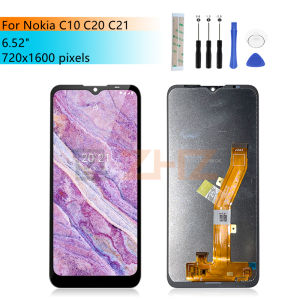
6.52" For Nokia C10 LCD Display Touch Screen Digitizer Assembly For Nokia C10/C20 Screen Replacement Repair parts
Huawei Nova 14 14i 14Pro Xundd Beatle Series Shockproof Case Cover

Honor 200 Cream Pattern Plush Mobile Phone Case with Lanyard Ultra-Thin Cute Dog Creative Stand Silicone Protective Cover
Buzz Lightyear Anime Cartoon Phone Case Full Lens Protection Personality Simple Design Compatible with iPhone And Huawei
FT STAR (12V & 24V & 220V) Digital Bluetooth Stereo Amplifier Board: A Comprehensive Guide

Detachable Sewing Shoe Repair Tool Awl Leather Craft Kit Tools with 3 Needles / Thread Spool
Winnereco 3 Way Treble Midrange Bass Speaker Crossover Home Loudspeaker Frequency Divider

Case for Realme 5 realme c3 realme 5i realme 6i realme 5 pro phone casing Softcase Liquid Silicone Protector shockproof Cover new design aesthetic with Lanyard for girl YTSTXX01

Honor 300 Ultra Camera Lens Film High Definition Protective Sticker for Rear Camera Drop Resistant Shockproof Tempered Glass