T04D1 Maintenance Box: A Comprehensive Guide for Compatible Epson Printers
T04D1 Maintenance Box: A Comprehensive Guide for Compatible Epson Printers
Introduction to T04D1 Maintenance Box
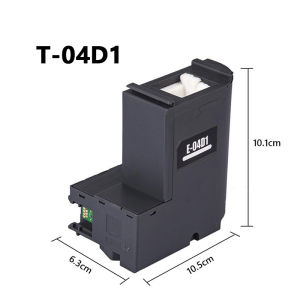
The T04D1 Maintenance Box is a vital accessory designed specifically for various compatible Epson printers, including the L4167, L6166, L6176, L4165, L4168, L4156, L4158, M2148, M2178, and M1178 models. This article aims to provide a comprehensive guide to understanding, installing, and maintaining the T04D1 Maintenance Box for optimal printer performance.
Understanding the T04D1 Maintenance Box
The T04D1 Maintenance Box is a high-quality replacement part that ensures smooth operation and longevity of your Epson printer. It plays a crucial role in cleaning the printhead, removing any clogs, and ensuring consistent print quality. With its easy-to-install design, the T04D1 Maintenance Box is a must-have accessory for Epson printer owners.
Why Choose the T04D1 Maintenance Box for Your Printer
There are several reasons why the T04D1 Maintenance Box is an excellent choice for your Epson printer:
- High-Quality Materials: The T04D1 Maintenance Box is made from premium materials that ensure durability and reliability.
- Compatibility: The T04D1 Maintenance Box is compatible with a wide range of Epson printers, making it a versatile solution for different models.
- Easy Installation: The T04D1 Maintenance Box comes with a straightforward installation process, allowing even novice users to install it quickly and efficiently.
Key Features of T04D1 Maintenance Box
High-Quality Materials & Construction
The T04D1 Maintenance Box is crafted using high-quality materials that ensure durability and long-lasting performance. Its robust construction makes it resistant to wear and tear, providing reliable service for years to come.
Compatibility with Various Epson Printers
The T04D1 Maintenance Box is compatible with a wide range of Epson printers, including the L4167, L6166, L6176, L4165, L4168, L4156, L4158, M2148, M2178, and M1178 models. This compatibility makes it a versatile solution for different printer models, ensuring that you can find the right replacement part for your specific printer.
Easy Installation Process
Installing the T04D1 Maintenance Box is a breeze thanks to its user-friendly design. Follow these simple steps to get started:
- Turn off your printer and unplug it from the power source.
- Open the printer's front cover and locate the existing maintenance box.
- Remove the old maintenance box by gently pulling it out.
- Insert the new T04D1 Maintenance Box into the designated slot.
- Close the printer's front cover and plug it back into the power source.
How to Use T04D1 Maintenance Box
Step-by-Step Installation Guide
Follow this step-by-step guide to install the T04D1 Maintenance Box in your Epson printer:
- Turn off your printer and unplug it from the power source.
- Open the printer's front cover and locate the existing maintenance box.
- Remove the old maintenance box by gently pulling it out.
- Insert the new T04D1 Maintenance Box into the designated slot.
- Close the printer's front cover and plug it back into the power source.
Troubleshooting Common Issues
If you encounter any issues during the installation process, refer to the troubleshooting tips below:
- Printer Not Recognizing New Maintenance Box: Make sure the new T04D1 Maintenance Box is properly inserted and seated in the designated slot. If the issue persists, try restarting your printer and reinstalling the maintenance box.
- Print Quality Declining: Regularly clean the printhead and perform maintenance tasks to ensure optimal print quality. Refer to your printer's user manual for detailed instructions.
Tips for Maintaining Optimal Printer Performance
To maintain optimal printer performance, follow these tips:
- Regular Cleaning: Clean the printhead regularly to prevent clogs and ensure consistent print quality.
- Maintenance Tasks: Perform regular maintenance tasks, such as replacing the ink cartridges and cleaning the paper feed rollers, to keep your printer running smoothly.
- Proper Storage: Store your printer in a cool, dry place away from direct sunlight and moisture to prevent damage.
Conclusion & Final Thoughts
In conclusion, the T04D1 Maintenance Box is a valuable accessory for Epson printer owners looking to maintain optimal printer performance. With its high-quality materials, compatibility with various Epson printers, and easy installation process, the T04D1 Maintenance Box is a must-have accessory for anyone who values consistent print quality and reliable service.

Captain Jack.LA
Review

You May Also Like
Tape Frame For Pin Type Printer
ETQ Compatible Fuji Xerox Toner Powder DC S1810 S2010 S2011 S2110
10Pcs/lot Glossy Inkjet RFID 13.56MHZ Chip Cards Printable PVC ID Card For Epson Canton Printer Access Control Security Cards
Canon IP100B & IP100 TR150 Ink Cartridges: A Comprehensive Guide

44\"x18m Inkjet Matte Surface Cotton and Polyester Blend Stretchable Inkjet Canvas Roll for Inkjet Printer

CoLiDo Kids 1.0 3D Printer: A Portable Educational Tool

Aircraft Design Aluminum Alloy Luggage Label for Frequent Travelers Set of 2 Bag Identification Markers for Business Trip
Comprehensive Guide: HP 283A Toner Cartridge & Compatible Options
ORIGINAL Sony Ultrasound Thermal Paper UPP 110S Type 1 - 1 roll

3D Printing Pen with USB Cable DIY Printer Pen with Filament Crafting Doodle Toy for kids
Maintenance Cartridge for G1020 G2020 G3020 G2260 G3260 G3360 G2160 Canon Maintenance Box