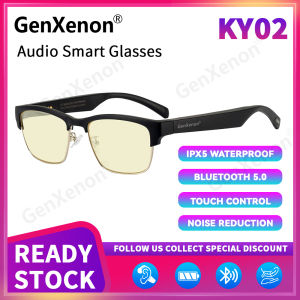
GenXenon KY02 Bluetooth Audio Smart Glasses Blue Light Open Ear Touch and Voice Assistant Control Polarized Lenses Glasses with Mic and Speakers for Women and Men
GenXenon KY02 Bluetooth Audio Smart Glasses Blue Light Open Ear Touch and Voice Assistant Control Polarized Lenses Glasses with Mic and Speakers for Women and Men
Introduction
Overview of GenXenon KY02 Bluetooth Audio Smart Glasses
Introducing the GenXenon KY02 Bluetooth Audio Smart Glasses, a cutting-edge wearable device designed to enhance your audio experience while providing polarized lenses for optimal vision protection. With a sleek and stylish design, these smart glasses offer a range of advanced features, including open ear design, touch and voice assistant control, and built-in mic and speakers.
Key Features & Benefits
- Open Ear Design: Enjoy clear sound quality without blocking your ears.
- Touch and Voice Assistant Control: Easily adjust settings using touch gestures or voice commands.
- Built-in Mic and Speakers: Connect to your devices and enjoy hands-free calling and audio playback.
- Polarized Lenses: Protect your eyes from harmful blue light and glare.
- Universal Compatibility: Connect to various devices via Bluetooth.
Product Specifications
Design & Comfort
The GenXenon KY02 Bluetooth Audio Smart Glasses feature a lightweight, ergonomic design that ensures maximum comfort during extended wear. The frames are made of high-quality materials that are durable and resistant to scratches, making them a reliable accessory for everyday use.
Open Ear Design & Sound Quality
The open ear design allows you to enjoy crystal-clear sound quality while still being aware of your surroundings. The built-in speakers deliver immersive audio experiences, whether you're listening to music, watching videos, or engaging in hands-free calls.
Touch & Voice Assistant Control
Easily control your smart glasses using touch gestures or voice commands. The intuitive interface allows you to adjust volume, skip tracks, and access other features with ease.
How to Use GenXenon KY02 Bluetooth Audio Smart Glasses
Pairing & Connecting to Devices
Pairing your GenXenon KY02 Bluetooth Audio Smart Glasses with your devices is simple and straightforward. Follow the instructions provided in the manual to connect to your phone, tablet, or computer via Bluetooth.
Using Touch & Voice Assistant Control
Take advantage of the touch and voice assistant control features to customize your audio experience. Use touch gestures to adjust volume, skip tracks, and access other settings. Alternatively, activate voice commands to control your smart glasses hands-free.
Tips & Tricks for Optimal Performance
- Keep your smart glasses clean and free of debris to maintain optimal performance.
- Store your smart glasses in a protective case when not in use.
- Charge your smart glasses using the magnetic charging cable provided.
Conclusion
Summary of Key Points
- GenXenon KY02 Bluetooth Audio Smart Glasses offer a range of advanced features, including open ear design, touch and voice assistant control, and built-in mic and speakers.
- The polarized lenses provide protection against harmful blue light and glare.
- Pairing and connecting to devices is simple and straightforward.
Final Thoughts & Recommendations
If you're looking for a stylish and functional wearable device that enhances your audio experience while protecting your eyes, the GenXenon KY02 Bluetooth Audio Smart Glasses are an excellent choice. With their open ear design, touch and voice assistant control, and polarized lenses, these smart glasses offer a unique blend of style and functionality that sets them apart from other audio devices on the market.

GenXenon
You May Also Like
Jam Tangan Pintar Sukan untuk Kanak-kanak Jam Digital LED Kalis Air dengan Pemantau Kadar Jantung Jam Tangan Penjejak Kecergasan Sesuai untuk Kanak-kanak Lelaki dan Perempuan
4 Gang Smart Scene Switch 12 Mode Scenes Operated Wire-Free Switch Works with Smart App Smart Life Tuya App Phone Control
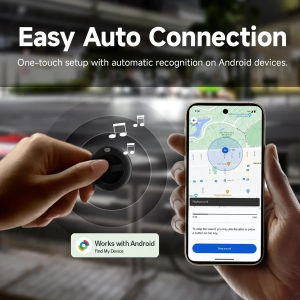
Smart Item Locator – Ultra-Portable GPS/Bluetooth Tracker for Keys Pets & Valuables (Android/iOS Compatible)
Portable Storage Pouches: Waterproof & Soft Lining for GT4/5 Smartwatch & Wristwatch Box
XIAOMI M8 Smart Bracelet: Heart Rate & Blood Pressure Monitoring for Men & Women
Rainbuvvy D09 Smart Watch: A Comprehensive Guide

LIGE New 1000mAh Capacity Battery Smart Watch LED Flashlight Outdoor Mountain Climbing Cycling Sports Health Monitor Smartwatch
Fitbit Versa 2: A Comprehensive Guide to IOS & Android Compatible Smartwatch
MOES Matter Tuya WiFi Smart Concave Glass Panel Light Switch Neutral Wire Required Compatible with Alexa Google Home SmartThings
Global Version Original CDS9 Ultra Smartwatch: Android 9.0 & 4G Network Card\\n\\n Introduction to the CDS9 Ultra Smartwatch\\n\\nThe CDS9 Ultra smartwatch is a cutting-edge device designed for tech enthusiasts and professionals alike. This smartwatch offers a seamless blend of style and functionality, making it the perfect companion for your daily activities. In this article, we will delve into the key features of the CDS9 Ultra smartwatch, focusing on its compatibility with Android 9.0, 4G network connectivity, rotating camera functionality, and integration with the Google Play Store.\\n\\n Key Features Overview\\n\\n- **Android 9.0**: The CDS9 Ultra smartwatch runs on Android 9.0, providing a smooth and intuitive user experience.\\n- **4G Network Connectivity**: With a built-in 4G network card, you can stay connected on-the-go, making calls and sending messages directly from your wrist.\\n- **Rotating Camera**: A unique feature of the CDS9 Ultra smartwatch is its rotating camera, which allows you to capture stunning photos and videos from any angle.\\n- **Google Play Store**: The watch comes with access to the Google Play Store, allowing you to download and install apps and games tailored to your needs.\\n\\n Compatibility with Android 9.0\\n\\nThe CDS9 Ultra smartwatch is compatible with Android 9.0, ensuring a familiar and user-friendly interface. This compatibility allows you to easily navigate through the watch's features and applications, making it a breeze to use.\\n\\n Benefits of 4G Network Connectivity\\n\\nOne of the standout features of the CDS9 Ultra smartwatch is its 4G network connectivity. This feature enables you to make calls, send messages, and browse the internet directly from your wrist, keeping you connected wherever you go. Additionally, the 4G network ensures fast and reliable data transfer, enhancing your overall smartwatch experience.\\n\\n Rotating Camera Functionality\\n\\nThe CDS9 Ultra smartwatch boasts a unique rotating camera, allowing you to capture photos and videos from various angles effortlessly.\\n\\n How to Use the Rotating Camera\\n\\nTo use the rotating camera, simply swipe up on the screen to open the camera app. Once opened, rotate the camera to your desired angle, and press the shutter button to take a photo or start recording a video.\\n\\n Photo & Video Quality\\n\\nThe rotating camera on the CDS9 Ultra smartwatch delivers impressive photo and video quality, thanks to its high-resolution sensor and advanced image processing capabilities. Whether you're capturing a scenic landscape or recording a video call, the rotating camera ensures that every moment is captured in stunning detail.\\n\\n Additional Camera Features\\n\\nIn addition to the rotating camera, the CDS9 Ultra smartwatch also includes other useful camera features, such as:\\n\\n- **Night mode**: Capture clear and vibrant photos even in low-light conditions.\\n- **Time-lapse**: Create time-lapse videos by setting the desired interval between frames.\\n- **Panorama mode**: Take wide-angle photos by panning the camera horizontally or vertically.\\n\\n Google Play Store Integration\\n\\nThe CDS9 Ultra smartwatch comes with access to the Google Play Store, offering a vast selection of apps and games tailored to your needs.\\n\\n Accessing the Google Play Store\\n\\nTo access the Google Play Store, simply swipe down on the home screen and tap on the Google Play Store icon. From there, you can browse through the available apps and games, read reviews, and download your favorites.\\n\\n Installing Apps & Games\\n\\nInstalling apps and games on the CDS9 Ultra smartwatch is a straightforward process. Simply search for the desired app or game in the Google Play Store, tap on the \"Install\" button, and wait for the installation to complete. Once installed, you can find the app or game in your app library.\\n\\n Managing Your App Library\\n\\nManaging your app library on the CDS9 Ultra smartwatch is easy. To view your installed apps, swipe down on the home screen and tap on the \"Apps\" tab. From there, you can uninstall apps, organize them into folders, or rearrange their order on the home screen.\\n\\n Tips & Tricks for Optimal Usage\\n\\nTo get the most out of your CDS9 Ultra smartwatch, here are some tips and tricks to help you optimize its performance:\\n\\n Battery Life Optimization\\n\\n- **Adjust screen brightness**: Lowering the screen brightness can significantly extend battery life.\\n- **Disable unnecessary notifications**: Turning off unnecessary notifications can help conserve battery power.\\n- **Use airplane mode**: When not using the smartwatch, enable airplane mode to save battery life.\\n\\n Customizing Watch Faces\\n\\nPersonalize your CDS9 Ultra smartwatch by customizing the watch face to suit your preferences. Simply swipe down on the home screen and tap on the \"Watch Face\" tab to access the available options.\\n\\n Connecting to Other Devices\\n\\nTo connect your CDS9 Ultra smartwatch to other devices, such as your smartphone or tablet, make sure they are paired via Bluetooth. This will allow you to sync data, receive notifications, and control media playback from your wrist.\\n\\nIn conclusion, the CDS9 Ultra smartwatch is a versatile device that offers a wide range of features and functionalities. With its Android 9.0 compatibility, 4G network connectivity, rotating camera, and Google Play Store integration, it is the perfect choice for tech enthusiasts and professionals alike.\"\n}

JBL Clip3 Mini Bluetooth Speaker: A Comprehensive Guide