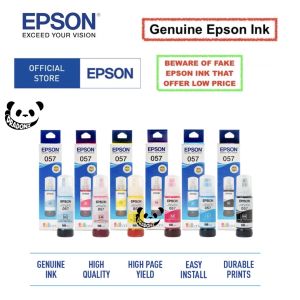
Original Epson Set of 6 057 Ink Bottles for Epson L8050 & L18050 Printers
Original Epson Set of 6 057 Ink Bottles for Epson L8050 & L18050 Printers
What Are Original Epson Set of 6 057 Ink Bottles?
The Original Epson Set of 6 057 ink bottles is a premium printing solution designed specifically for the new model Epson L8050 and Epson L18050 printers. This set includes six ink bottles (Black, Cyan, Magenta, Yellow, Light Cyan, and Light Magenta), each containing 70ml of high-quality ink. These ink bottles are compatible with the mentioned printers and are recommended by Epson for optimal print quality and durability.
Key Features of the Original Epson Set of 6 057 Ink Bottles
- High-quality ink designed for the Epson L8050 and L18050 printers
- 70ml ink capacity per bottle
- Includes six colors: Black, Cyan, Magenta, Yellow, Light Cyan, and Light Magenta
- Compatible with 70ml ink cartridges for L18050 and Epson ink set for L8050
How to Choose Between Original & Compatible Ink for Epson Printers
When choosing between original and compatible ink for your Epson printer, consider the following factors:
- Print Quality: Original ink is specifically designed for your printer model, ensuring optimal print quality. Compatible ink may vary in quality and consistency.
- Durability: Original ink is formulated to last longer and resist fading, while compatible ink may not provide the same level of durability.
- Cost: While compatible ink may be cheaper upfront, it could result in higher costs due to frequent replacements and potential damage to your printer.
How to Install Original Epson Set of 6 057 Ink Bottles
Installing the Original Epson Set of 6 057 ink bottles is a straightforward process. Follow these steps to ensure a smooth installation:
Step-by-Step Guide to Installing Original Epson Set of 6 057 Ink Bottles
- Turn off your Epson L8050 or L18050 printer and unplug it from the power source.
- Open the printer's ink cartridge access door and remove the empty ink bottles.
- Carefully insert the new ink bottles into their respective slots, making sure they are securely in place.
- Close the ink cartridge access door and plug the printer back into the power source.
- Turn on the printer and follow any prompts to initialize the new ink bottles.
Tips for Smooth Installation Process
- Make sure your hands are clean and dry before handling the ink bottles.
- Do not touch the ink nozzles or the contacts on the ink bottles.
- Store unused ink bottles in a cool, dry place away from direct sunlight.
Benefits of Using Original Epson Set of 6 057 Ink Bottles
Using the Original Epson Set of 6 057 ink bottles offers numerous advantages for your printing needs:
Enhanced Print Quality & Durability
Original ink bottles provide superior print quality and durability compared to compatible ink. They are specifically designed for your printer model, ensuring optimal performance and long-lasting prints.
Cost-Effective Printing Solution
While original ink bottles may have a higher upfront cost, they offer better value in the long run. They last longer and produce consistent results, reducing the need for frequent replacements and potential printer damage.
Troubleshooting Common Issues with Original Epson Set of 6 057 Ink Bottles
If you encounter any issues with your Original Epson Set of 6 057 ink bottles, refer to the following solutions:
Common Problems & Solutions
- Print Quality Issues: Clean the ink nozzles and printhead according to the printer's manual.
- Ink Bottles Not Recognized: Ensure the ink bottles are properly installed and the printer is connected to a power source.
- Low Ink Warning: Check the ink levels and replace any empty ink bottles.
Contacting Epson Support for Further Assistance
If you continue to experience issues with your Original Epson Set of 6 057 ink bottles, contact Epson support for further assistance. They can help diagnose and resolve any problems you may encounter.

Pradoni
Review
You May Also Like
XPRINTER Xp-5022G 1D/2DPORTABLE BARCODE SCANNER
PG 445/446 ink PG445S/CL446S refillable ink cartridge for Canon PIXMA MX494 MG2440 MG2540 MG2940 MG2942 MG2944 IP2840 printer

24in glossy photo paper roll for dye printer without self adhesive
![[COD] Bsuimki Universal Ink Bottle For Printer L3110 L4160 L6190 L3150 ET-8550 L8160 L8180 L8050 101 103 105 502 522 544 T552](https://img.lazcdn.com/g/p/2d599bb170b50352b84ff8167919a153.jpg_300x300q80.jpg)
[COD] Bsuimki Universal Ink Bottle For Printer L3110 L4160 L6190 L3150 ET-8550 L8160 L8180 L8050 101 103 105 502 522 544 T552
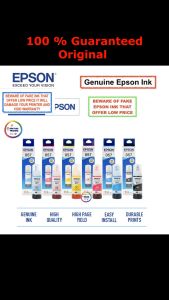
100% Original Epson 057 ink bottle 70ml ( Set of 6 ) for Epson L8050 / Epson L18050 Printer ( Black / Cyan / Magenta / Yellow / Light Cyan / Light Magenta )
Double Sided Spring Steel Sheet No Warping Easy to Remove 3D Printer Hotbed Build Plate Removal PEO PEI Double Sides
Eyoyo USB Wired 2D Barcode Scanner with Adjustable Stand and Auto Sensing 1D QR Screen Image Scanner PDF417 Data Matrix Code Scanning Handheld Barcode Reader work with Windows Mac OS Linux Computer
HPee 85a (CE285A) Black Original LaserJet Toner Cartridge
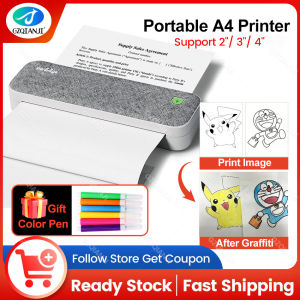
Painting Graffiti Use Color Pen Peripage A40 Therma A4 Printer Wireless Bundle Fold Paper for Office Electronics Computer Printing Maker Painting Graffiti Use Color Pen
Portable EVA Hard Carrying Case Storage Bag Handheld Shockproof Bag Replacement for B31 Label Maker Accessories
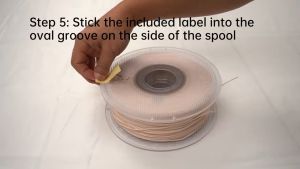
Bambu Lab ABS-GF 3D Printer Filament Enhanced Strength Stiffness Durability & Water Resistance