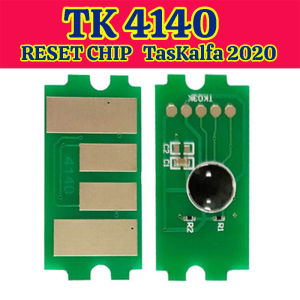
TK4140 Kyocera Taskalfa TK 4140 2020 2021 TK 4140 Cartridge Toner Reset Chip
TK4140 Kyocera Taskalfa TK 4140 2020 2021 TK 4140 Cartridge Toner Reset Chip
What is Kyocera TK 4140 Toner Compatibility?
Kyocera TK 4140 toner compatibility refers to the ability of compatible toner cartridges to work effectively with Kyocera Taskalfa TK 4140 printers. Compatible toners are third-party alternatives to original equipment manufacturer (OEM) toner cartridges. They are designed to meet the same quality standards as OEM cartridges, but at a lower cost.
Understanding Toner Cartridge Replacement
Replacing toner cartridges is essential for maintaining optimal print quality and printer performance. When the toner level gets low, the printer may produce faint or smudged prints. To avoid this issue, it is important to replace the toner cartridge before it runs out of ink completely.
Benefits of Compatible Toners
Compatible toners offer several advantages over OEM cartridges, including:
- Lower cost: Compatible toners are typically less expensive than OEM cartridges, making them an attractive option for businesses and individuals looking to save money on printing costs.
- Quality: Many compatible toner manufacturers invest heavily in research and development to ensure their products meet or exceed OEM quality standards.
- Availability: Compatible toners are often more widely available than OEM cartridges, which can be difficult to find in some regions.
How to Reset Kyocera Taskalfa TK 4140 Toner Chip
Resetting the toner chip on a Kyocera Taskalfa TK 4140 printer is a simple process that can help extend the life of your compatible toner cartridges. By resetting the chip, you can reset the printer's toner level counter, allowing you to use the cartridge until it is completely empty.
Step-by-Step Process
To reset the Kyocera Taskalfa TK 4140 toner chip, follow these steps:
- Turn off the printer and unplug it from the power source.
- Open the front cover of the printer and remove the toner cartridge.
- Locate the toner chip on the cartridge and carefully remove it using a small screwdriver or similar tool.
- Insert the new toner chip into the cartridge, making sure it is securely attached.
- Reinsert the toner cartridge into the printer and close the front cover.
- Plug the printer back in and turn it on.
Troubleshooting Common Issues
If you encounter any issues during the reset process, here are some common solutions:
- Make sure the new toner chip is compatible with your printer model.
- Double-check that the toner chip is securely attached to the cartridge.
- Ensure that the printer is properly connected to a power source.
Key Features of 2020 & 2021 Kyocera Toner Reset Chips
Kyocera toner reset chips have undergone significant improvements in recent years, with enhanced security measures and improved print quality being among the most notable advancements.
Enhanced Security Measures
To prevent unauthorized use of toner cartridges, Kyocera has implemented advanced security measures in their toner reset chips. These measures include encryption and authentication protocols that make it more difficult for counterfeit or unauthorized toner cartridges to work with Kyocera printers.
Improved Print Quality
In addition to enhanced security measures, Kyocera toner reset chips now offer improved print quality. This is due to advancements in toner formulation and cartridge design, which allow for more consistent ink distribution and sharper print output.
Choosing the Right Kyocera Printer Toner Chip
Selecting the right Kyocera printer toner chip is crucial for ensuring optimal print quality and printer performance. Here are some factors to consider when choosing a toner chip:
Factors to Consider
- Compatibility: Ensure that the toner chip is compatible with your printer model.
- Quality: Look for toner chips from reputable manufacturers that meet or exceed OEM quality standards.
- Security: Choose toner chips with advanced security measures to protect against unauthorized use.
Tips for Long-Term Cost Savings
To maximize cost savings when using compatible toner cartridges, consider the following tips:
- Purchase toner chips in bulk to take advantage of volume discounts.
- Choose toner chips from reputable manufacturers that offer warranties or guarantees.
- Follow proper maintenance procedures to extend the life of your toner cartridges.
Conclusion & Next Steps
In conclusion, Kyocera TK 4140 toner compatibility and reset chips offer several benefits for businesses and individuals looking to save money on printing costs. By choosing the right toner chip and following proper maintenance procedures, you can enjoy high-quality prints at a lower cost.
Recap of Important Points
- Kyocera TK 4140 toner compatibility refers to the ability of compatible toner cartridges to work effectively with Kyocera Taskalfa TK 4140 printers.
- Resetting the toner chip can help extend the life of compatible toner cartridges.
- Enhanced security measures and improved print quality are among the most notable advancements in Kyocera toner reset chips.
Resources for Further Learning
For more information on Kyocera TK 4140 toner compatibility and reset chips, visit the Kyocera website or consult with a qualified printer technician.

MRB COPIER CENTER
You May Also Like
190g Inkjet Photo RC Glossy Luster Photo Paper A4*30m Roll Factory Supplier
Original Canon MC-G01 Maintenance Box: A Comprehensive Guide
IPrint - QUAFF Universal Dye Ink for Inkjet Printers 100ml Compatible For All Inkjet Printer (CMYKLCLM)
PP Supplies - QUAFF Dye Ink 100ML (CMYK ) for All Inkjet Printers
NOXIER Mini Bluetooth Thermal Printer Photo Printer Label Sticker Paper Portable WAYBILL PRINTER with Free Printer Paper
4PCS/1SET Toner Cartridge For Xerox IV C2270 C2275 C3300 C3370 C3373 C3375 C4470 Toner Cartridge
Brother Original INK SET BTD60BK BT5000 Black Cyan Magenta Yellow Ink Bottle T220 T310 T420W T520W T710W T720DW T910DW T4500DW
Wearable Mini 1D 12D Ring Barcode Scanner 2.4G Wireless & Bluetooth & USB Wired 3-in-1 Reader Laser Bar Code Finger Scanners for POS Inventory LibraryImage
【COD】LC539XL LC535XL LC539 LC535 ink Cartridge For Brother DCP-J100 DCP-J105 MFC-J200 Printers
AOS Ricoh Toner Powder Compatible Aficio MP2014 MP1600 MP1900 MP2000 MP2550 MP4000 MP3350 MP1500 MP2500 MP2851 MP5000 Toner Powder 1Kg for Ricoh Copier and all other Monochrome Machine
Thermal Receipt Printer OFFICOM 58IIH Bluetooth USB - POS Thermal Printer with 5 Receipt Paper 58mm