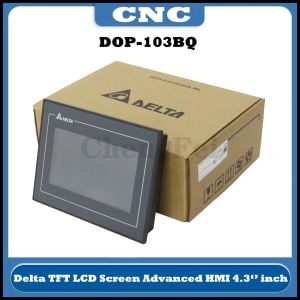
Original Touch Screen DOP-103BQ DOP-107BV DOP-107CV DOP-107EV DOP-107EG DOP-110CS DOP-110IS

Original Touch Screen DOP-103BQ DOP-107BV DOP-107CV DOP-107EV DOP-107EG DOP-110CS DOP-110IS


Yisunder.sun
Seller ratings 96%
Review

Oops
This video has no reviews.
You May Also Like
00:48
Secure UPS: 650VA to 3000VA Uninterruptible Power Supply for PC & Laptop\\n\\n Understanding Secure UPS\\n\\n What is an Uninterruptible Power Supply?\\n\\nAn Uninterruptible Power Supply (UPS) is a backup power source designed to provide continuous electricity during unexpected power outages. Secure UPS models offer reliable protection for your computer systems, including PCs and laptops, by maintaining a consistent power supply. This ensures your work remains uninterrupted and helps prevent data loss.\\n\\n How Does Secure UPS Work?\\n\\nSecure UPS works by continuously monitoring the incoming electrical supply. If it detects a drop or surge in voltage, it switches to battery power almost instantaneously. This transition is seamless, allowing your devices to continue operating without interruption. Once the primary power source is restored, the UPS automatically reverts back to normal operation.\\n\\n Choosing the Right Secure UPS\\n\\n Selecting the Right Capacity: 650VA to 3000VA\\n\\nWhen choosing a Secure UPS, consider the total power requirements of your devices. Secure UPS offers various models with capacities ranging from 650VA to 3000VA. This range caters to different needs, whether you're protecting a single laptop or a larger desktop setup.\\n\\n* 650VA: Ideal for laptops and small devices\n* 1000VA: Suitable for desktop computers and moderate-sized systems\n* 1500VA: Offers extended runtime for power-hungry applications\n* 2000VA: Provides robust protection for gaming PCs and larger setups\n* 3000VA: Perfect for server rooms and high-power configurations\\n\\n Comparing Secure UPS Models for Desktop & Laptop\\n\\nWhen selecting a Secure UPS model, consider the specific needs of your desktop or laptop setup. For laptops, a smaller capacity UPS may suffice, while desktop users might require more substantial power reserves. Additionally, some Secure UPS models offer advanced features like WiFi connectivity and remote management capabilities, which can be beneficial for home office environments.\\n\\n Setting Up Your Secure UPS\\n\\n Installing a Secure UPS for Home Office\\n\\nInstalling a Secure UPS in your home office is a straightforward process. First, ensure you've chosen the appropriate capacity for your devices. Next, connect your UPS to a power outlet and plug your devices into the UPS's output ports. Finally, configure any necessary settings, such as battery runtime or surge protection levels.\\n\\n Configuring WiFi Connectivity for Secure UPS\\n\\nMany Secure UPS models come equipped with built-in WiFi capabilities, allowing you to monitor and manage your UPS remotely. To set up WiFi connectivity, simply connect your Secure UPS to your home network using the provided instructions. Once connected, you can access real-time data, receive notifications, and perform maintenance tasks from anywhere.\\n\\n Maximizing Your Secure UPS Performance\\n\\n Maintaining Your Secure UPS\\n\\nRegular maintenance is essential to ensure your Secure UPS operates at peak performance. Follow these tips:\\n\\n* Check battery levels regularly\\n* Keep the unit clean and free from dust\\n* Replace batteries every 3-5 years\\n* Update firmware if necessary\\n\\n Troubleshooting Common Issues\\n\\nIf you encounter problems with your Secure UPS, refer to the troubleshooting guide provided by Secure UPS. Common issues may include:\\n\\n* Incorrect power settings\\n* Battery issues\\n* Connectivity problems\\n\\nBy addressing these concerns promptly, you can maintain a reliable power supply for your PC and laptop.\"\n}

00:57
19, 22, 24, 27 Inch IPS Gaming Monitor 75Hz 1080P Framless Curved/Flat FHD Gaming Monitor for Computer PC Monitor

00:24
16 Inch 165Hz Laptop LCD Screen B160QAN02.K Display Panel Matrix Replacement 2560x1600 96% DCI-P3 Mini LED eDP 40 Pins Non-Touch

00:20
USB Sound USB External Stereo Sound Adapter Splitter Converters with Volumes Control Plug & Play No Driver Need

00:05
Western Digital 26TB WD Red Pro 7200 rpm SATA III 3.5\" Internal NAS HDD

00:38
Sandisk Extreme M.2 NVMe PCIe Gen 4.0 Internal SSD ~ 500GB (SDSSDX3N)

00:16
Circuitrocks FTDI Basic Breakout 3.3 / 5V Arduino Compatible FT232 USB to TTL

00:59
YAMY Gaming Monitor curved 24 Inch Monitor 144HZ PC Monitor 27 Inch 100HZ 180HZ 240HZ 165HZ

00:24
15.6" IPS Laptop LCD Screen NV156FHM N43 NV156FHM-N43 LP156WF6-SPB1 LP156WF6-SPB5 LP156WF6-SPB6 Display Matrix Panel eDP 30 Pins

00:58
Beelink EQ14 MINI PC Intel Twin Lake N150 16G DDR4 3200MHz 500G/1TB PCIe 3.0 M.2 SSD Dual 2.5G LAN

00:55
Electop Ethernet Adapter for Chromecast 4K Google TV USBC Type-C to 1000Mbps Network Card for Smartphones Tablets Android Device

00:16
10000W SCR Digital Display Power Regulation Voltage Controller AC220V 80A for Motor Speed and Temperature Regulation
Hot Search
ido furniture store philippinesalkaline tablet for watermi kab o earplugscoin purse for kidsCabinet Storage Solutions Guidesatellite dish tv setmangosteen plantsandal 2 inches heels elegantfire truck air horn 12vmegalith watchtv rack with speaker standtrc mono shock sniper 150milk 1literpcb board for inverter airconkorak swing arm extension