Dahua HDCVI Kit DH-KIT-CVI2MPP2B2T-I: A Comprehensive Guide
Dahua HDCVI Kit DH-KIT-CVI2MPP2B2T-I: A Comprehensive Guide
What is the Dahua HDCVI Kit?
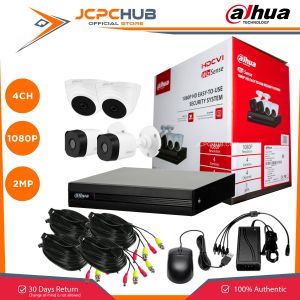
The Dahua HDCVI Kit DH-KIT-CVI2MPP2B2T-I is a 4CH 1080P CCTV package that includes 2 bullet cameras, 2 dome cameras, 4x coaxial cables, and a 4-channel DVR. This comprehensive kit provides a robust security solution for residential and commercial properties, ensuring enhanced surveillance capabilities and easy installation.
Key Features
- 4CH 1080P Resolution: The Dahua HDCVI Kit offers a high-resolution video output, allowing users to capture every detail in their surveillance footage.
- 2 Bullet Cameras & 2 Dome Cameras: With a combination of bullet and dome cameras, this kit provides a versatile surveillance solution for various environments.
- Easy Installation: The Dahua HDCVI Kit comes with all necessary components, including 4x coaxial cables and a centralized power adaptor, making installation simple and hassle-free.
Components Included
- 1x 4CH DVR
- 4x Cameras (2 bullet cameras and 2 dome cameras)
- 4x 20-meter siamese cables
- 1x Centralized power adaptor
- 1x Complete accessories package
Optional components include an HDD and monitor, which can be added based on user preference.
How to Install the Dahua HDCVI Kit
Installing the Dahua HDCVI Kit is a straightforward process. Follow these steps to set up your new security system:
Step-by-Step Installation Process
- Unpack the kit: Remove all components from the packaging and lay them out for easy access.
- Connect the cameras: Attach the bullet and dome cameras to their respective mounting points using the included hardware.
- Run the coaxial cables: Connect the siamese cables from each camera to the DVR, ensuring proper connections and secure cable management.
- Power the system: Plug in the centralized power adaptor to the DVR and connect any optional components, such as an HDD or monitor.
- Configure the DVR: Power on the DVR and follow the on-screen prompts to set up your system, including adjusting camera settings and configuring recording schedules.
Troubleshooting Common Issues
If you encounter any issues during installation or operation, refer to the following troubleshooting tips:
- No video output: Ensure all camera connections are secure and check that the DVR is properly powered.
- Low video quality: Adjust camera settings within the DVR menu to optimize image clarity.
- Recording issues: Verify that the HDD is properly connected and formatted for use with the DVR.
Benefits of Using the Dahua HDCVI Kit
The Dahua HDCVI Kit offers numerous advantages for both residential and commercial users:
Enhanced Security & Surveillance
With its high-resolution cameras and reliable DVR, the Dahua HDCVI Kit provides exceptional security capabilities. Users can monitor their property in real-time, review recorded footage, and detect potential threats.
Easy-to-Use Interface
The Dahua HDCVI Kit's intuitive interface allows users to quickly configure and manage their system. From adjusting camera settings to setting recording schedules, the user-friendly design ensures a seamless experience.
Conclusion
The Dahua HDCVI Kit DH-KIT-CVI2MPP2B2T-I is an excellent choice for those seeking a comprehensive security solution. With its 4CH 1080P resolution, versatile camera selection, and easy installation process, this kit provides unparalleled surveillance capabilities. By following the step-by-step installation guide and troubleshooting tips, users can enjoy enhanced security and peace of mind.

JCPCHUB Mall Store
Review

You May Also Like
Remote surveillance camera Graffiti Smart Surveillance Camera Wireless Remote HD Night Vision Camera (Shortened Title)
PHL 2024NEW Telescope: A Comprehensive Guide to HD Zoom & Night Vision Monoculars
4K Underwater Waterproof Helmet Video Recording Sports Action Camera

High-definition childrens camera mini toy for taking photos and videos dual-camera digital video
A9 Mini IP Camera HD 1080P Remote Wireless Voice Recorder Video Camcorder Day Night Home Security Surveillance WiFi Camera
8K 16MP WiFi Camera: Smart CCTV Surveillance & Outdoor Security Protection
FUERS 5K 10MP Dual Lens IP Camera: A Comprehensive Guide
V380 AOV 24-hour wideo intelligent monitoring system 3-lens 15MP surveillance camera outdoor high-definition night vision full-color solar-powered camera wireless network CCTV mobile phone remote control low-power consumption high-Camera
Digital Night Vision Scope Monocular: A Comprehensive Guide
M9 3-10X42 Red Dot Laser Sight Scope Red Green Illuminated Reticles Scope with Red Laser for 11mm/20mm Mount with Free Battery
V380 PRO Light Bulb CCTV Camera: 1080P HD Night Vision & 360° Panoramic View