How to Replace the Motherboard for Your TCL LED29F5450
How to Replace the Motherboard for Your TCL LED29F5450
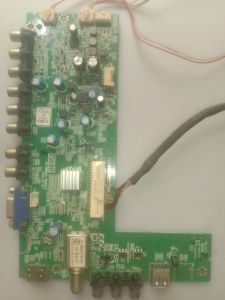
Understanding the 40-0MS82L-MAB2LG Motherboard
What is the 40-0MS82L-MAB2LG Motherboard?
The 40-0MS82L-MAB2LG motherboard is the main circuit board in your TCL LED29F5450 TV. It contains essential components such as the processor, memory, and various connectors, allowing your TV to function properly.
How to Identify if Your TCL LED29F5450 Needs a New Motherboard
If your TV displays unusual behavior such as flickering, distorted images, or no display at all, it may be time to consider replacing the motherboard. Before proceeding, ensure that other potential issues, such as loose connections or power supply problems, have been ruled out.
Steps to Replace the Motherboard
Tools Needed for Replacing the Motherboard
Before starting the replacement process, gather the necessary tools:
- Screwdrivers (Philips and flathead)
- Anti-static wrist strap
- Replacement motherboard (40-0MS82L-MAB2LG)
How to Remove the Old Motherboard
To remove the old motherboard, follow these steps:
- Unplug the TV from the power source.
- Place the TV on a flat surface, facing down.
- Remove the screws securing the back panel of the TV.
- Gently lift the back panel to expose the internal components.
- Disconnect any cables connected to the motherboard.
- Unscrew the screws holding the motherboard in place.
- Carefully lift the old motherboard out of the TV.
How to Install the New Motherboard
To install the new motherboard, follow these steps:
- Place the new motherboard in the TV, ensuring it aligns with the mounting holes.
- Screw the motherboard securely in place.
- Reconnect any disconnected cables.
- Replace the back panel and secure it with screws.
- Plug the TV back into the power source and test its functionality.
Finding the Right Replacement Parts
Where to Buy TCL TV Parts
To purchase replacement parts for your TCL TV, consider reputable online retailers such as Amazon, eBay, or authorized TCL dealers. Always ensure that the part number matches your TV model (LED29F5450) and motherboard type (40-0MS82L-MAB2LG).
Tips for Buying the Correct Motherboard for Your TCL TV
When purchasing a new motherboard, make sure it is compatible with your TV model and has the correct part number (40-0MS82L-MAB2LG). Additionally, check the seller's return policy in case the motherboard does not work or is faulty.
Troubleshooting Common Issues
What to Do if the New Motherboard Doesn't Work
If the new motherboard does not function correctly, first check that all connections are secure and that the part number matches your TV model. If the issue persists, consider contacting TCL customer support for further assistance.
Contacting TCL Customer Support for Further Help
If you encounter issues during the replacement process or need additional guidance, contact TCL customer support by visiting their website or calling their toll-free number. They can provide valuable advice and troubleshooting tips to help resolve any problems.

2nd hand LED TV parts
Review

You May Also Like
TVCON IPS Gaming Monitor for PC 27 inch Monitor 144HZ Monitors Monitor for laptop extension 24 inch Monitor 165HZ 100HZ

【Local delivery】Kingston Hyperx impact RAM DDR3L 4GB 8GB PC3L-12800 Laptop Memory 1600mhz SODIMM DDR3 Notebook
Compact 12cm Desktop Air Compressor 4 Pin High Speed Large Air Volume for PC Case Cooling
AVR Automatic Voltage Regulator Rectifier for Generator 5KW 6KW 6.5KW

Beelink Mini S Intel N5095 New Compact Gaming PC 8GB RAM 128GB SSD Windows 11 with Dual Channel DDR4 - 12 Month Warranty

Beelink ME mini 6-Slot Home Storage NAS Mini PC Intel® Twin Lake N200 12GB LPDDR5 64GB eMMC Dual 2.5G LAN Wi-Fi 6/BT5.2 Compact Home/Office Network Storage Solution MINI Host
Beelink SEi13 Pro Mini PC Core I9 13900HK 32GB DDR5 M.2 Pcie 4.0 X4 1TB SSD Triple Display Wifi6 BT5.2 4K DP Type C
Synchronous Rectifier Step Down Module Voltages Conversion Efficiency 500KHz Switching Mountable Electronic Component
Motherboard for LG TV: 47LM420T & 42LM620S
![[COD] Yaokeqi 1Set 10 100 1000Mbps Gigabit Ethernet PCI Express PCI-E Network Card RJ-45 LAN Adapter Converter Network Controller](https://img.lazcdn.com/g/p/42fd21a2e827e2a88d0e4251e0acb863.jpg_300x300q80.jpg)
[COD] Yaokeqi 1Set 10 100 1000Mbps Gigabit Ethernet PCI Express PCI-E Network Card RJ-45 LAN Adapter Converter Network Controller
EXPOSE 24 27 Inch IPS OLED Office Monitor 165Hz 4K UHD Frameless Gaming Monitor Computer For PC Laptop Office Design Monitor