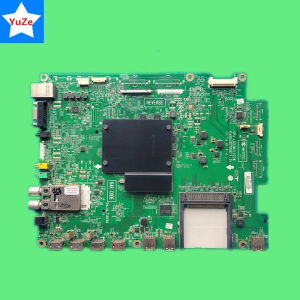
Motherboard for LG TV: 47LM420T & 42LM620S
Motherboard for LG TV: 47LM420T & 42LM620S
Introduction to Motherboards for LG TV Models
Motherboards play a crucial role in the functioning of any electronic device, including LG TVs. In this article, we will delve into the details of motherboards for LG TV models, specifically focusing on the 47LM420T and 42LM620S. We will discuss compatibility, technical specifications, installation, and maintenance tips for these motherboards.
Overview of 47LM420T Main Board
The 47LM420T main board is a vital component in the operation of LG's 47-inch LCD TV model. It provides essential functions such as power distribution, signal processing, and connectivity options. The main board is designed to work seamlessly with the 47LM420T TV, ensuring optimal performance and reliability.
Overview of Motherboard for 42LM620S
The motherboard for the 42LM620S LG TV model serves a similar purpose as the 47LM420T main board. It is responsible for managing power distribution, signal processing, and connectivity options within the 42-inch LCD TV. This motherboard is specifically designed to work with the 42LM620S TV model, providing the necessary functionality for optimal performance.
Compatibility with LG TV Models
Understanding the compatibility of motherboards with specific LG TV models is crucial for ensuring proper functionality and performance. In this section, we will discuss the compatibility of the 47LM420T and 42LM620S motherboards with their respective TV models.
Compatibility with 47LM420T
The 47LM420T main board is specifically designed to work with LG's 47-inch LCD TV model. It is important to note that this motherboard may not be compatible with other LG TV models, as the design and functionality may differ. Always verify compatibility before installing a new motherboard in your LG TV.
Compatibility with 42LM620S
Similarly, the motherboard for the 42LM620S LG TV model is designed to work exclusively with this specific TV model. As with the 47LM420T main board, it is important to verify compatibility before installing a new motherboard in your LG TV.
Technical Specifications & Features
Understanding the technical specifications and features of motherboards for LG TV models is essential for choosing the right replacement or upgrade option. In this section, we will discuss the network support, single-drive type, origin, and brand name of these motherboards.
Network Support & Single-drive Type
Both the 47LM420T main board and the motherboard for the 42LM620S LG TV model support a single-drive type. They do not include network support, meaning they cannot connect to external networks or devices via Wi-Fi or Ethernet.
Origin & Brand Name: TjYuze
Both motherboards originate from Mainland China and are manufactured by the brand TjYuze. TjYuze is known for producing high-quality motherboards for various electronic devices, including LG TVs.
Installation & Maintenance Tips
Installing and maintaining motherboards for LG TV models requires careful attention to detail and adherence to specific guidelines. In this section, we will discuss the steps to install these motherboards and troubleshoot common issues.
Steps to Install Motherboard for LG TV Models
- Turn off and unplug your LG TV from the power source.
- Remove the back panel of the TV to access the motherboard.
- Carefully disconnect any cables or connectors attached to the old motherboard.
- Remove the old motherboard from the TV.
- Install the new motherboard in the same position as the old one.
- Reconnect all cables and connectors to the new motherboard.
- Replace the back panel of the TV.
- Plug in and turn on your LG TV to test the new motherboard.
Troubleshooting Common Issues
If you encounter any issues after installing a new motherboard in your LG TV, consider the following troubleshooting steps:
- Verify that all cables and connectors are properly connected to the new motherboard.
- Check if the new motherboard is compatible with your LG TV model.
- If the issue persists, consult the user manual or contact LG support for further assistance.
In conclusion, understanding the details of motherboards for LG TV models, such as the 47LM420T and 42LM620S, is crucial for ensuring optimal performance and reliability. By following the guidelines and tips provided in this article, you can successfully install and maintain these motherboards in your LG TV.

ajezsi
Review

You May Also Like
V380 PRO 12V 1.5A Mini UPS Battery Backup for WiFi Router Modem and Outdoor CCTV Security Camera
Portable 10-Inch Touchscreen Display with Built-In Battery for Laptop Computer External Mini Monitor IPS Panel 1280x800 Resolution
Keyestudio Basic ESP-32 IOT Electronic Engineering Learning Kit+40 Projects For Arduino ESP32 Tutorial Starter Education Kit
M.2 Adapter NVMe PCIe M2 NGFF To SSD For Laptop Apple Macbook Air Pro 2013 2014 2015 A1465 A1466 A1502 A1398 PCI-E X4

220V Blower Fan Automatic Incubator Cooling Fan Air Circulation Exhaust Fan with Power Cord Switch for Egg Incubator Parts and Accessories
25mm Fan DC5V 12V 24V Hydraulic Bearing Cooling Solution for 3D Printing and Miniature Electronics
6 Heatpipes CPU Air Cooler Lightless PC Processor Ventilador For Intel LGA 1366 1151 1155 1200 1700 2011 X79 X99 AMD AM5 AM3 AM4
14" Laptop LCD Screen NV140WUM T01 NV140WUM-T01 Display Matrix Panel Replacement 1920x1200 IPS 45% NTSC eDP 40 Pins Touch Screen
Original SVR Himark 1000 AVR Automatic Voltage Regulator 1000watts SVR-1000VA Servo Type AVR Time Delay
JGINYUE B650M Snow Dream AM5 DDR5 ARGB M-ATX Motherboard For Gaming PCIe 4.0×4 M.2 For CPU 9700X/9900X/7800X3D gaming pc DIY
Dell Latitude 5400 E5400 B Shell C Shell Screen Frame Keyboard Surface Palm Rest Notebook Computer Parts And Accessories