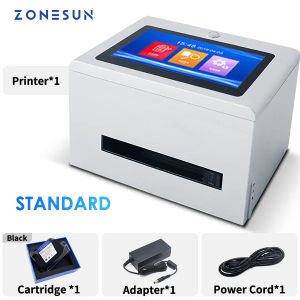
ZONESUN Tabletop Inkjet Printer ZS-TIP127: A Portable Touch Screen Barcode Printer
ZONESUN Tabletop Inkjet Printer ZS-TIP127: A Portable Touch Screen Barcode Printer
Introduction to ZONESUN Tabletop Inkjet Printer ZS-TIP127
The ZONESUN Tabletop Inkjet Printer ZS-TIP127 is a versatile and efficient touch screen digital printer designed for businesses looking to streamline their printing processes. With its compact size and easy-to-use interface, this portable inkjet printer offers a range of features that cater to various industries, including retail, manufacturing, and logistics. In this article, we will explore the key features, target market, and applications of the ZONESUN Tabletop Inkjet Printer ZS-TIP127.
Key Features & Benefits
-
Compact Size: The ZONESUN Tabletop Inkjet Printer ZS-TIP127 is lightweight and portable, making it easy to move between workstations or store when not in use.
-
Touch Screen Interface: The printer features a user-friendly touch screen interface that simplifies setup, configuration, and printing processes.
-
Printing Capabilities: The ZONESUN Tabletop Inkjet Printer ZS-TIP127 supports printing QR codes, serial numbers, logos, and batch expiry dates, providing businesses with a comprehensive solution for their labeling needs.
-
Customizable Settings: Users can easily adjust print settings, such as font size, color, and layout, to meet specific requirements.
Target Market & Applications
The ZONESUN Tabletop Inkjet Printer ZS-TIP127 is ideal for small to medium-sized businesses in various industries, including:
-
Retail: For printing product labels, price tags, and promotional materials.
-
Manufacturing: For creating serial number labels, batch expiry date labels, and custom branding.
-
Logistics: For generating shipping labels, tracking numbers, and barcodes.
How to Use the ZONESUN Tabletop Inkjet Printer ZS-TIP127
In this section, we will provide step-by-step instructions on how to set up, configure, and use the ZONESUN Tabletop Inkjet Printer ZS-TIP127.
Setup & Configuration
-
Unpack the printer and place it on a flat surface.
-
Connect the power cord and turn on the printer.
-
Follow the on-screen prompts to complete the initial setup process.
-
Install the ink cartridges and load the label paper.
-
Connect the printer to a computer or mobile device via USB or Wi-Fi.
Printing QR Codes, Serial Numbers, and Logos
To print QR codes, serial numbers, or logos using the ZONESUN Tabletop Inkjet Printer ZS-TIP127:
-
Open the desired file or design on your computer or mobile device.
-
Select the print option and choose the ZONESUN Tabletop Inkjet Printer ZS-TIP127 as the printer.
-
Adjust the print settings as needed, such as font size, color, and layout.
-
Click the print button to begin printing.
Managing Batch Expiry Dates
To manage batch expiry dates using the ZONESUN Tabletop Inkjet Printer ZS-TIP127:
-
Open the batch expiry date template on your computer or mobile device.
-
Enter the required information, such as product name, batch number, and expiry date.
-
Select the print option and choose the ZONESUN Tabletop Inkjet Printer ZS-TIP127 as the printer.
-
Adjust the print settings as needed, such as font size, color, and layout.
-
Click the print button to begin printing.
Comparing ZONESUN Tabletop Inkjet Printer ZS-TIP127 with Competitors
In this section, we will compare the ZONESUN Tabletop Inkjet Printer ZS-TIP127 with similar touch screen digital printers, 12.7mm barcode printers, and serial number label printers.
Touch Screen Digital Printer Comparison
Compared to other touch screen digital printers, the ZONESUN Tabletop Inkjet Printer ZS-TIP127 offers a more user-friendly interface, customizable settings, and a wider range of printing capabilities.
12.7mm Barcode Printer Comparison
When compared to other 12.7mm barcode printers, the ZONESUN Tabletop Inkjet Printer ZS-TIP127 stands out due to its compact size, touch screen interface, and ability to print QR codes, serial numbers, logos, and batch expiry dates.
Serial Number Label Printer Comparison
In comparison to other serial number label printers, the ZONESUN Tabletop Inkjet Printer ZS-TIP127 offers a more comprehensive solution, with the ability to print QR codes, logos, and batch expiry dates in addition to serial numbers.
Conclusion & Next Steps
In conclusion, the ZONESUN Tabletop Inkjet Printer ZS-TIP127 is a versatile and efficient touch screen digital printer that caters to various industries, including retail, manufacturing, and logistics. With its compact size, user-friendly interface, and wide range of printing capabilities, it is an ideal solution for small to medium-sized businesses looking to streamline their printing processes.
Summary of Key Takeaways
-
The ZONESUN Tabletop Inkjet Printer ZS-TIP127 is a portable touch screen digital printer designed for businesses in various industries.
-
It offers a range of features, including printing QR codes, serial numbers, logos, and batch expiry dates.
-
The printer is easy to set up, configure, and use, with a user-friendly touch screen interface.
Potential Future Improvements
While the ZONESUN Tabletop Inkjet Printer ZS-TIP127 is already a comprehensive solution, there are always areas for improvement. Potential future enhancements could include:
-
Expanding the range of supported file formats and design templates.
-
Adding support for additional languages and character sets.
-
Improving the speed and efficiency of the printing process.
Where to Purchase the ZONESUN Tabletop Inkjet Printer ZS-TIP127
The ZONESUN Tabletop Inkjet Printer ZS-TIP127 is available for purchase through authorized resellers and online marketplaces, including Amazon, eBay, and Alibaba. To learn more about pricing and availability, visit the official ZONESUN website or contact a local reseller.

ZONESUN
Review

You May Also Like
YCALL Queue Number Printer: A Plug-and-play Que Number System for Ticket Dispenser

Bambu Lab A1/P1/X1 Textured PEI Plate for BambuLab 3d parts
【BIG SALE】EPSON ink 774 Pigment Bottle ink Genuine Black 140ml Ink EPSON Workforce M200 M105 M100 L655 L605 L1455 T7741 7741 774 INKS
Compatible Toner Cartridge TN2380 Drum unit Dr2355 for Brother DCP-2540 Series
Flexible Unguis Filing Block 4 Unique Hominy In Single Spongiform four hundred eight hundred twelve hundred four thousand Exemplary For Homestudio Use Dense Permanent EVA Substance
HPRT Portable Photo Printer Pocket 2x3 inch Size Wireless Zink Technology Print 2x3 Sticky-Backed Photos Maker with Papers Case

INKSCRIBED DR269CL DR-269CL Compatible for Bro HL-L3280CDW DCP-L3560CDW MFC-L8340CDW Printer etc. Universal for All Colors
MX-5500 8-Digit Price Tagger: A Retail Inventory Management Solution
Cidy Manual Label Maker with FREE 2 TAPESManual Typewriter Tape Embossing Label Maker (9mm x 3mtrs)
Compatible Konica-Minolta TN-118 Toner Cartridge
Niimbot D11 & D110 Portable Thermal Sticker Label Handheld Maker: Your Ultimate Guide