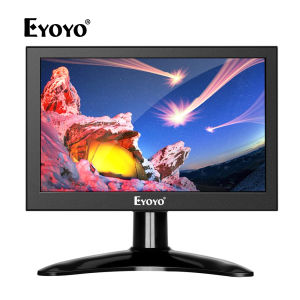
Eyoyo 7 Inch Mini HDMI Monitor: A Versatile & High-Quality Secondary Display
Eyoyo 7 Inch Mini HDMI Monitor: A Versatile & High-Quality Secondary Display
The Eyoyo 7 Inch Mini HDMI Monitor is a compact and powerful secondary display designed to enhance your experience with multiple devices. With its high-quality IPS display and support for various inputs, this monitor is compatible with PC, laptop, Raspberry Pi, security camera, and gaming consoles like PS4. In this article, we will explore its key features, installation process, and optimal usage scenarios.
Key Features & Benefits
Astounding Contrast Ratio & Expansive Views
One of the standout features of the Eyoyo 7 Inch Mini HDMI Monitor is its astoundingly high contrast ratio. This allows for crisp, clear images with vibrant colors and deep blacks. The expansive views ensure that you can easily see every detail, making it perfect for gaming, streaming, and monitoring security cameras.
Multiple Interfaces: HDMI, VGA, AV, & BNC
The Eyoyo monitor supports a variety of input interfaces, including HDMI, VGA, AV, and BNC. This versatility makes it compatible with a wide range of devices, including PCs, laptops, Raspberry Pi, security cameras, and gaming consoles like PS4. The multiple interfaces provide flexibility and convenience, allowing you to connect and switch between devices effortlessly.
Installation & Setup
Connecting Your Eyoyo Monitor to PC/Laptop
To connect your Eyoyo monitor to a PC or laptop, simply plug in the appropriate cable (HDMI, VGA, AV, or BNC) into the corresponding port on both devices. Once connected, your secondary display will be recognized by your computer, and you can adjust settings like resolution and screen orientation through your operating system's display settings.
Setting Up Security Camera/CCTV with Eyoyo Monitor
The Eyoyo monitor is compatible with security cameras and CCTV systems thanks to its BNC connection. To set up your security camera with the monitor, connect the BNC cable from your camera to the BNC port on the monitor. This will allow you to view live footage from your security camera on the Eyoyo display.
Configuring Eyoyo Monitor for PS4 & Other Gaming Consoles
To use the Eyoyo monitor with gaming consoles like PS4, connect the appropriate cable (HDMI or AV) to both the console and the monitor. Once connected, you can enjoy your favorite games on a secondary display, giving you an edge in multiplayer matches or simply enhancing your overall gaming experience.
Optimal Usage Scenarios
Using Eyoyo Monitor as a Secondary Display
The Eyoyo 7 Inch Mini HDMI Monitor is perfect for use as a secondary display. Whether you're working on a project, streaming videos, or playing games, having a second screen can significantly improve your productivity and entertainment experience. Simply connect the monitor to your PC or laptop, and adjust settings to suit your preferences.
Enhancing Security Camera Surveillance with Eyoyo Monitor
With its BNC connection, the Eyoyo monitor is an excellent choice for security camera surveillance. Connect your camera to the monitor, and you'll have a dedicated display for monitoring live footage. This setup is ideal for businesses, homeowners, or anyone looking to enhance their security system.
Utilizing Eyoyo Monitor for Gaming & Entertainment
The Eyoyo monitor's high-quality IPS display and multiple interfaces make it an excellent choice for gaming and entertainment. Connect your gaming console or media player to the monitor, and enjoy your favorite games, movies, and TV shows on a secondary display. The compact size makes it easy to place the monitor wherever you need it, whether it's next to your TV or on a desk.

Eyoyo
Review
You May Also Like
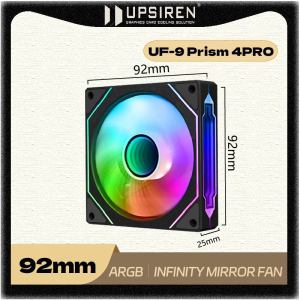
UPSIREN UF-9 PRISM 4PRO 92mm Computer Chassis Fan ARGB 4 Pin PWM Quiet Cooling Fan 12V Large Air Volume 40CFM 800-2500RPM
1/2Pcs 3D Printer Accessories Nozzle Brush Replacement Hotbed Mounted Silicone Wiper Cleaning Tool for Lab X1 P1
2 in 1 LR6 Eliminators USB Power Supply Replace 3V LR6 Batteries for Clock Toy Camera Christmas Strips Light

15.6 Inch Laptop LCD Touch Screen NV156FHM-T07 R156NWF7 R2 For Lenovo ThinkPad T15p P15v Gen 1 Gen 2 Gen 3 Display Matrix Panel
QJ-PS30SWI DC Power Supply 13.8V Fixed Output DC Stabilization Communication Switch Power Supply 13.8V 30A Short-wave Station
PERFECT-EF 120mm CPU Fan Cooler Case Chassis Cooling Dual Ring Double Sided LED Fan (RGB) Silent - High Air Flow CPU Radiator Heatsink For PC Case
DC 12V 5A 10A 20A 30A 40A Centralize Power Supply CCTV Led Adapter PSU For CCTV Led Adapter
3D Printer Nozzles Hardened Steel Nozzle For X1/P1 3D Printing Enthusiasts Suitable For High Wear Filaments
Butterfly 3W 7W 12W 18W 24W Power Supply Driver Adapter Transformer Switch for LED Lights
External USB 7.1 Sound Card to 3.5mm Jack 5HV2 Adapter USB to 3D CH Antimagnetic Audio Microphone for Laptop PC PS4 D85
Reliable Brass Nozzle for Bambu Lab X1C/P1P/P1S 3D Printers Multiple Sizes 0.2/0.3/0.4/0.5/0.6/0.8/1.0/1.2mm