4 Pack HP Printer Ink: Compatible HP Photosmart Ink & HP Deskjet 3070A Ink

4 Pack HP Printer Ink: Compatible HP Photosmart Ink & HP Deskjet 3070A Ink

Introduction to 4 Pack HP Printer Ink

Overview of 4 Pack HP Printer Ink

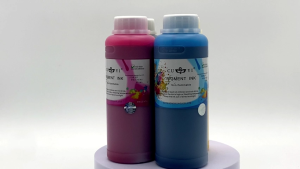
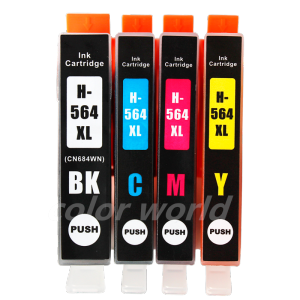
The 4 Pack HP Printer Ink is a set of compatible ink cartridges designed specifically for HP printers, including the HP Photosmart series and HP Deskjet 3070A. This set includes black, cyan, magenta, and yellow ink cartridges, which provide vibrant and high-quality prints for both home and office use.

Benefits of Using 4 Pack HP Printer Ink

Using the 4 Pack HP Printer Ink offers several benefits, such as cost savings, easy installation, and compatibility with multiple HP printer models. These ink cartridges are designed to work seamlessly with popular HP printers like the HP Photosmart 5510, 5511, 5512, 5514, 5515, 5520, 5522, 5525, Officejet 4610, 4620, 4622, and Deskjet 3070A, making them a versatile choice for various printing needs.

Choosing the Right 4 Pack HP Printer Ink

HP Ink Cartridge 564XL Set: Key Features

The HP Ink Cartridge 564XL Set is a popular choice among users due to its high page yield and excellent print quality. This set includes four ink cartridges (black, cyan, magenta, and yellow) that are compatible with HP Photosmart and HP Deskjet printers. Some key features of this set include:

  • High page yield for more prints per cartridge
  • Vibrant colors and sharp text
  • Easy installation and removal

Officejet 4610 Cyan Magenta: Key Features

The Officejet 4610 Cyan Magenta ink cartridge is specifically designed for HP Officejet printers, including the Officejet 4610 and 4620 series. This cartridge offers:

  • High-quality prints with vibrant colors
  • Easy installation and removal
  • Compatibility with multiple HP printer models

How to Install 4 Pack HP Printer Ink

Installing the 4 Pack HP Printer Ink is a straightforward process that can be completed in just a few steps. Follow the instructions below to install ink cartridges for different HP printer models.

Installing HP Deskjet 3070A Ink

To install the ink cartridges for the HP Deskjet 3070A, follow these steps:

  1. Turn on your printer and open the ink cartridge access door.
  2. Remove the old ink cartridges by gently pulling them out.
  3. Remove the new ink cartridges from their packaging and peel off the protective tape.
  4. Insert the new ink cartridges into their respective slots and push them down until they click into place.
  5. Close the ink cartridge access door and allow the printer to initialize the new ink cartridges.

Installing HP Photosmart 5510-5525 Ink

To install the ink cartridges for the HP Photosmart 5510-5525 series, follow these steps:

  1. Turn on your printer and open the ink cartridge access door.
  2. Remove the old ink cartridges by gently pulling them out.
  3. Remove the new ink cartridges from their packaging and peel off the protective tape.
  4. Insert the new ink cartridges into their respective slots and push them down until they click into place.
  5. Close the ink cartridge access door and allow the printer to initialize the new ink cartridges.

Installing Officejet 4610-4622 Ink

To install the ink cartridges for the Officejet 4610-4622 series, follow these steps:

  1. Turn on your printer and open the ink cartridge access door.
  2. Remove the old ink cartridges by gently pulling them out.
  3. Remove the new ink cartridges from their packaging and peel off the protective tape.
  4. Insert the new ink cartridges into their respective slots and push them down until they click into place.
  5. Close the ink cartridge access door and allow the printer to initialize the new ink cartridges.

Troubleshooting Common Issues with 4 Pack HP Printer Ink

Despite the ease of use, users may encounter some issues while using the 4 Pack HP Printer Ink. Here are some common problems and their solutions:

Low Print Quality: Causes & Solutions

Low print quality can be caused by several factors, such as low ink levels, clogged print heads, or incorrect settings. To resolve this issue, try the following solutions:

  • Check the ink levels and replace any low ink cartridges.
  • Run a print head cleaning cycle to clear any clogs.
  • Adjust the print settings to improve print quality.

Ink Cartridge Not Detected: Causes & Solutions

If your printer does not detect the new ink cartridges, there could be several reasons for this issue. Try the following solutions:

  • Make sure the ink cartridges are properly installed and seated in their respective slots.
  • Remove and reinsert the ink cartridges to ensure proper seating.
  • Check for any errors or messages displayed on the printer screen and follow the instructions to resolve the issue.

Ink Cartridge Not Working: Causes & Solutions

If the new ink cartridges are not working, there could be several reasons for this issue. Try the following solutions:

  • Make sure the ink cartridges are properly installed and seated in their respective slots.
  • Remove and reinsert the ink cartridges to ensure proper seating.
  • Check for any errors or messages displayed on the printer screen and follow the instructions to resolve the issue.

By following these troubleshooting tips, you can easily resolve any issues you may encounter while using the 4 Pack HP Printer Ink.

HotelCalifornia
HotelCalifornia

Seller ratings 98%

Review

Oops
This video has no reviews.

You May Also Like

AOS Good Quality Compatible HP Black Laser Toner Cartridge CRG041 CF287 CF287A
00:20

AOS Good Quality Compatible HP Black Laser Toner Cartridge CRG041 CF287 CF287A

ETQ Compatible Toner Cartridge: A Comprehensive Guide for Sharp MX-315 Users
00:12

ETQ Compatible Toner Cartridge: A Comprehensive Guide for Sharp MX-315 Users

C9345 chip Resetter Reset Chip for Epson L18050 L8050 L15150 L15160 L15158 L15168 L6578 L6558 WF-7820 7830 7840 ET-5800 ET-5850 ET-5880 ET-16600 ET-16650 Printer
00:24

C9345 chip Resetter Reset Chip for Epson L18050 L8050 L15150 L15160 L15158 L15168 L6578 L6558 WF-7820 7830 7840 ET-5800 ET-5850 ET-5880 ET-16600 ET-16650 Printer

How to Choose & Use Compatible Brother Printer Cartridges: Focus on Brother LC-462XL
01:40

How to Choose & Use Compatible Brother Printer Cartridges: Focus on Brother LC-462XL

NIIMBOT B21s Label Printer Portable Wir-eless Bluetooth Thermal Label Maker Sticker Printer Label paper
00:45

NIIMBOT B21s Label Printer Portable Wir-eless Bluetooth Thermal Label Maker Sticker Printer Label paper

Canon Pixma Cartridge For Canon Pixma P200 (PG-705 Black / CL-706 Tri-color / PG 705 / CL 706)
00:47

Canon Pixma Cartridge For Canon Pixma P200 (PG-705 Black / CL-706 Tri-color / PG 705 / CL 706)

【🔥🔥🔥Hot sale & Fast delivery】Eyoyo 1D 2D Wireless Barcode Scanner Via Bluetooth Portable Phone  Back Clip Bar Code QR Scan Reader PDF417 Data Matrix Code Image Scanning For Android iOS System
01:12

【🔥🔥🔥Hot sale & Fast delivery】Eyoyo 1D 2D Wireless Barcode Scanner Via Bluetooth Portable Phone Back Clip Bar Code QR Scan Reader PDF417 Data Matrix Code Image Scanning For Android iOS System

AOS Compatible TN267 Toner Cartridge for Brother HL-L3210CW/3230CDN/3270CDW DCP-L3551CDW MFC-L3735CDN/L3750CDW/L3770CDW\\n\\n Introduction to AOS Compatible TN267 Toner Cartridge\\n\\nThe AOS Compatible TN267 Toner Cartridge is a high-quality replacement toner designed specifically for select Brother printer models. This toner cartridge is compatible with Brother HL-L3210CW/3230CDN/3270CDW, DCP-L3551CDW, and MFC-L3735CDN/L3750CDW/L3770CDW printers. With its superior printing performance, cost-effective solution, and easy installation process, the AOS Compatible TN267 Toner Cartridge is an ideal choice for businesses and individuals looking for a reliable alternative to Brother's original toner cartridges.\\n\\n Key Features of AOS Compatible TN267 Toner Cartridge\\n\\n High-Quality Printing Performance\\n\\nThe AOS Compatible TN267 Toner Cartridge delivers sharp, clear, and consistent print quality that rivals Brother's original toner cartridges. The toner particles are evenly distributed, ensuring a smooth and uniform finish on every page. This makes it perfect for printing documents, reports, presentations, and other important materials that require high-quality output.\\n\\n Cost-Effective Solution\\n\\nCompared to Brother's original toner cartridges, the AOS Compatible TN267 Toner Cartridge offers significant cost savings without compromising on print quality. By choosing AOS Compatible TN267 Toner Cartridge, users can save up to 50% on their printing costs, making it an excellent choice for businesses and individuals looking to reduce their printing expenses.\\n\\n Easy Installation Process\\n\\nInstalling the AOS Compatible TN267 Toner Cartridge is simple and straightforward. Just follow these steps:\\n\\n1. Turn off the printer and unplug it from the power source.\\n2. Open the printer cover and remove the old toner cartridge.\\n3. Carefully remove the new AOS Compatible TN267 Toner Cartridge from its packaging.\\n4. Insert the new toner cartridge into the printer and close the cover.\\n5. Plug the printer back into the power source and turn it on.\\n\\n Compatible Brother Printer Models\\n\\nThe AOS Compatible TN267 Toner Cartridge is compatible with the following Brother printer models:\\n\\n- DCP-L3551CDW\\n- MFC-L3735CDN/L3750CDW/L3770CDW\\n- Brother HL-L3210CW/3230CDN/3270CDW\\n\\n How to Choose the Right Toner Cartridge\\n\\nWhen selecting a toner cartridge for your Brother printer, consider the following factors:\\n\\n Assessing Printer Compatibility\\n\\nMake sure the toner cartridge you choose is compatible with your specific Brother printer model. The AOS Compatible TN267 Toner Cartridge is designed for select Brother printer models, including DCP-L3551CDW, MFC-L3735CDN/L3750CDW/L3770CDW, and Brother HL-L3210CW/3230CDN/3270CDW.\\n\\n Evaluating Quality and Reliability\\n\\nLook for a toner cartridge that delivers high-quality print results consistently. The AOS Compatible TN267 Toner Cartridge is known for its superior print quality, making it a reliable choice for businesses and individuals.\\n\\n Considering Cost and Value\\n\\nConsider the cost of the toner cartridge and its value relative to other options available. The AOS Compatible TN267 Toner Cartridge offers significant cost savings compared to Brother's original toner cartridges, making it an excellent value for users.\\n\\n Conclusion & Next Steps\\n\\nIn conclusion, the AOS Compatible TN267 Toner Cartridge is a high-quality replacement toner cartridge designed specifically for select Brother printer models. With its superior print quality, cost-effective solution, and easy installation process, it is an excellent choice for businesses and individuals looking for a reliable alternative to Brother's original toner cartridges. We encourage users to try the AOS Compatible TN267 Toner Cartridge and experience the benefits firsthand.\"
00:28

AOS Compatible TN267 Toner Cartridge for Brother HL-L3210CW/3230CDN/3270CDW DCP-L3551CDW MFC-L3735CDN/L3750CDW/L3770CDW\\n\\n Introduction to AOS Compatible TN267 Toner Cartridge\\n\\nThe AOS Compatible TN267 Toner Cartridge is a high-quality replacement toner designed specifically for select Brother printer models. This toner cartridge is compatible with Brother HL-L3210CW/3230CDN/3270CDW, DCP-L3551CDW, and MFC-L3735CDN/L3750CDW/L3770CDW printers. With its superior printing performance, cost-effective solution, and easy installation process, the AOS Compatible TN267 Toner Cartridge is an ideal choice for businesses and individuals looking for a reliable alternative to Brother's original toner cartridges.\\n\\n Key Features of AOS Compatible TN267 Toner Cartridge\\n\\n High-Quality Printing Performance\\n\\nThe AOS Compatible TN267 Toner Cartridge delivers sharp, clear, and consistent print quality that rivals Brother's original toner cartridges. The toner particles are evenly distributed, ensuring a smooth and uniform finish on every page. This makes it perfect for printing documents, reports, presentations, and other important materials that require high-quality output.\\n\\n Cost-Effective Solution\\n\\nCompared to Brother's original toner cartridges, the AOS Compatible TN267 Toner Cartridge offers significant cost savings without compromising on print quality. By choosing AOS Compatible TN267 Toner Cartridge, users can save up to 50% on their printing costs, making it an excellent choice for businesses and individuals looking to reduce their printing expenses.\\n\\n Easy Installation Process\\n\\nInstalling the AOS Compatible TN267 Toner Cartridge is simple and straightforward. Just follow these steps:\\n\\n1. Turn off the printer and unplug it from the power source.\\n2. Open the printer cover and remove the old toner cartridge.\\n3. Carefully remove the new AOS Compatible TN267 Toner Cartridge from its packaging.\\n4. Insert the new toner cartridge into the printer and close the cover.\\n5. Plug the printer back into the power source and turn it on.\\n\\n Compatible Brother Printer Models\\n\\nThe AOS Compatible TN267 Toner Cartridge is compatible with the following Brother printer models:\\n\\n- DCP-L3551CDW\\n- MFC-L3735CDN/L3750CDW/L3770CDW\\n- Brother HL-L3210CW/3230CDN/3270CDW\\n\\n How to Choose the Right Toner Cartridge\\n\\nWhen selecting a toner cartridge for your Brother printer, consider the following factors:\\n\\n Assessing Printer Compatibility\\n\\nMake sure the toner cartridge you choose is compatible with your specific Brother printer model. The AOS Compatible TN267 Toner Cartridge is designed for select Brother printer models, including DCP-L3551CDW, MFC-L3735CDN/L3750CDW/L3770CDW, and Brother HL-L3210CW/3230CDN/3270CDW.\\n\\n Evaluating Quality and Reliability\\n\\nLook for a toner cartridge that delivers high-quality print results consistently. The AOS Compatible TN267 Toner Cartridge is known for its superior print quality, making it a reliable choice for businesses and individuals.\\n\\n Considering Cost and Value\\n\\nConsider the cost of the toner cartridge and its value relative to other options available. The AOS Compatible TN267 Toner Cartridge offers significant cost savings compared to Brother's original toner cartridges, making it an excellent value for users.\\n\\n Conclusion & Next Steps\\n\\nIn conclusion, the AOS Compatible TN267 Toner Cartridge is a high-quality replacement toner cartridge designed specifically for select Brother printer models. With its superior print quality, cost-effective solution, and easy installation process, it is an excellent choice for businesses and individuals looking for a reliable alternative to Brother's original toner cartridges. We encourage users to try the AOS Compatible TN267 Toner Cartridge and experience the benefits firsthand.\"

Applicable to Hp 803 Ink Cartridge Deskjet hp1112 2132 1110 2130 2621 2623 Printer
00:24

Applicable to Hp 803 Ink Cartridge Deskjet hp1112 2132 1110 2130 2621 2623 Printer

Zebra Wax-Based Carbon Ribbon for SUP0000194 Printer Barcode Printer Carbon Ribbon Roll 110*300 Office Equipment Consumables
01:28

Zebra Wax-Based Carbon Ribbon for SUP0000194 Printer Barcode Printer Carbon Ribbon Roll 110*300 Office Equipment Consumables

MP00 Mini Cap Press Machine: A Portable Handheld Heat Press for Cap Printing
01:08

MP00 Mini Cap Press Machine: A Portable Handheld Heat Press for Cap Printing

Refillable Ink Cartridge for Printers
00:32

Refillable Ink Cartridge for Printers