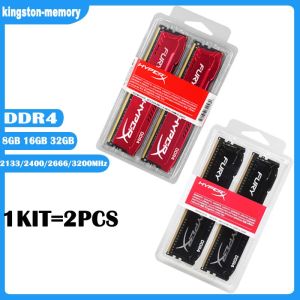
2x8GB 2x16GB KIT DDR4 32GB 8GB 4GB 3200MHz 2666MHz 2400MHz 2133MHz Desktop RAM HyperX FURY Memory 1.2V DIMM 288-pin Desktop Inter&AMD Memory

2x8GB 2x16GB KIT DDR4 32GB 8GB 4GB 3200MHz 2666MHz 2400MHz 2133MHz Desktop RAM HyperX FURY Memory 1.2V DIMM 288-pin Desktop Inter&AMD Memory
HyperX. Kingston. 4GB 8GB 16GB. DDR4 2133MHz 2400MHz 2666MHz 3200MHz. DIMM Desktop Memory. 1.2V. 288 Pins. 16GB 2133MHz KIT 2PCSX8GB 2133 MHz. 16GB 2400MHz KIT 2PCSX8GB 2400 MHz. 16GB 2666MHz KIT 2PCSX8GB 2666 MHz. 16GB 3200MHz KIT 2PCSX8GB 3200 MHz. 32GB 2133MHz KIT 2PCSX16GB 2133 MHz. 32GB 2400MHz KIT 2PCSX16GB 2400 MHz. 32GB 2666MHz KIT 2PCSX16GB 2666 MHz. 32GB 3200MHz KIT 2PCSX16GB 3200 MHz. Product Parameters. Application: Desktop. Memory Type: DDR4. Memory Capacity: 4GB 8GB 16GB. Mail Frequency: 2133MHz 2400MHz 2666MHz 3200MHz. Voltage: 1.2V. Number of Pins: 288 Pins. Function: NON-ECC. Package List: 1x RAM Memory Module

kingston-memory
Seller ratings 98%
You May Also Like
00:48
Secure UPS: 650VA to 3000VA Uninterruptible Power Supply for PC & Laptop\\n\\n Understanding Secure UPS\\n\\n What is an Uninterruptible Power Supply?\\n\\nAn Uninterruptible Power Supply (UPS) is a backup power source designed to provide continuous electricity during unexpected power outages. Secure UPS models offer reliable protection for your computer systems, including PCs and laptops, by maintaining a consistent power supply. This ensures your work remains uninterrupted and helps prevent data loss.\\n\\n How Does Secure UPS Work?\\n\\nSecure UPS works by continuously monitoring the incoming electrical supply. If it detects a drop or surge in voltage, it switches to battery power almost instantaneously. This transition is seamless, allowing your devices to continue operating without interruption. Once the primary power source is restored, the UPS automatically reverts back to normal operation.\\n\\n Choosing the Right Secure UPS\\n\\n Selecting the Right Capacity: 650VA to 3000VA\\n\\nWhen choosing a Secure UPS, consider the total power requirements of your devices. Secure UPS offers various models with capacities ranging from 650VA to 3000VA. This range caters to different needs, whether you're protecting a single laptop or a larger desktop setup.\\n\\n* 650VA: Ideal for laptops and small devices\n* 1000VA: Suitable for desktop computers and moderate-sized systems\n* 1500VA: Offers extended runtime for power-hungry applications\n* 2000VA: Provides robust protection for gaming PCs and larger setups\n* 3000VA: Perfect for server rooms and high-power configurations\\n\\n Comparing Secure UPS Models for Desktop & Laptop\\n\\nWhen selecting a Secure UPS model, consider the specific needs of your desktop or laptop setup. For laptops, a smaller capacity UPS may suffice, while desktop users might require more substantial power reserves. Additionally, some Secure UPS models offer advanced features like WiFi connectivity and remote management capabilities, which can be beneficial for home office environments.\\n\\n Setting Up Your Secure UPS\\n\\n Installing a Secure UPS for Home Office\\n\\nInstalling a Secure UPS in your home office is a straightforward process. First, ensure you've chosen the appropriate capacity for your devices. Next, connect your UPS to a power outlet and plug your devices into the UPS's output ports. Finally, configure any necessary settings, such as battery runtime or surge protection levels.\\n\\n Configuring WiFi Connectivity for Secure UPS\\n\\nMany Secure UPS models come equipped with built-in WiFi capabilities, allowing you to monitor and manage your UPS remotely. To set up WiFi connectivity, simply connect your Secure UPS to your home network using the provided instructions. Once connected, you can access real-time data, receive notifications, and perform maintenance tasks from anywhere.\\n\\n Maximizing Your Secure UPS Performance\\n\\n Maintaining Your Secure UPS\\n\\nRegular maintenance is essential to ensure your Secure UPS operates at peak performance. Follow these tips:\\n\\n* Check battery levels regularly\\n* Keep the unit clean and free from dust\\n* Replace batteries every 3-5 years\\n* Update firmware if necessary\\n\\n Troubleshooting Common Issues\\n\\nIf you encounter problems with your Secure UPS, refer to the troubleshooting guide provided by Secure UPS. Common issues may include:\\n\\n* Incorrect power settings\\n* Battery issues\\n* Connectivity problems\\n\\nBy addressing these concerns promptly, you can maintain a reliable power supply for your PC and laptop.\"\n}

00:08
ON Off Power Switch Board Repairing Accessories 3.7V 3000mA USB Verison Fit for GG Game Console Power Board Replacement

00:32
Asiahorse Aurora Pro ARGB PSU Cover with LED Light for GPU and Motherboard 24Pin 8Pin 12+4Pin

00:12
Miniature Lithiums Charge Display Module Red Yellow Green LED Indicators Low Energy Voltages Detectors

00:35
DIODIY All in one PC Computer set i3 /i5 /i7 8G/16G RAM 128G/256G/512G SSD for online courses /Office /PC full set of 24 inch monitor

00:38
Y.s.techYuanshan Fd126015ll 5015 12v 0.12a Silent Cooling Fan 5cm

00:06
20pcs Computer for Case Shockproof Screws + Shock Absorption Rubber Gaskets for 3.5-inch HDD Hard Disk Damping Screw Set

00:19
RGEEK Opener for CPU Cap dr. Delid to Remove Cover Improve Overclocking Cooling for 3770k I7 6700K 6700 7700 7700K 3570 8700k E3

00:22
Samsung Seagate Momentus ST500LM012 2.5" 500GB 5400 RPM HDD Hard Disk

00:11
ASUS VIVOBOOK 16X K3605VC-RP493W (INDIE BLACK) - INTEL CORE I5-13420H/8GB DDR4 RAM/512GB NVME PCIE M.2 SSD/NVIDIA GEFORCE RTX3050 4GB GDDR6/WIN11 HOME/16 INCHES IPS WUXGA 144HZ DISPLAY
![[COD] Bsuimki 10Set Hand Tool Mounting Stand Off Screw Hex Nut for A-SUS M.2 SSD Motherboard](https://img.lazcdn.com/g/p/18a897d4fc268f592d99607f48a8bbe0.jpg_300x300q80.jpg)
00:26
[COD] Bsuimki 10Set Hand Tool Mounting Stand Off Screw Hex Nut for A-SUS M.2 SSD Motherboard

00:58